266
Appendix D
The PTX_SETUP Commands
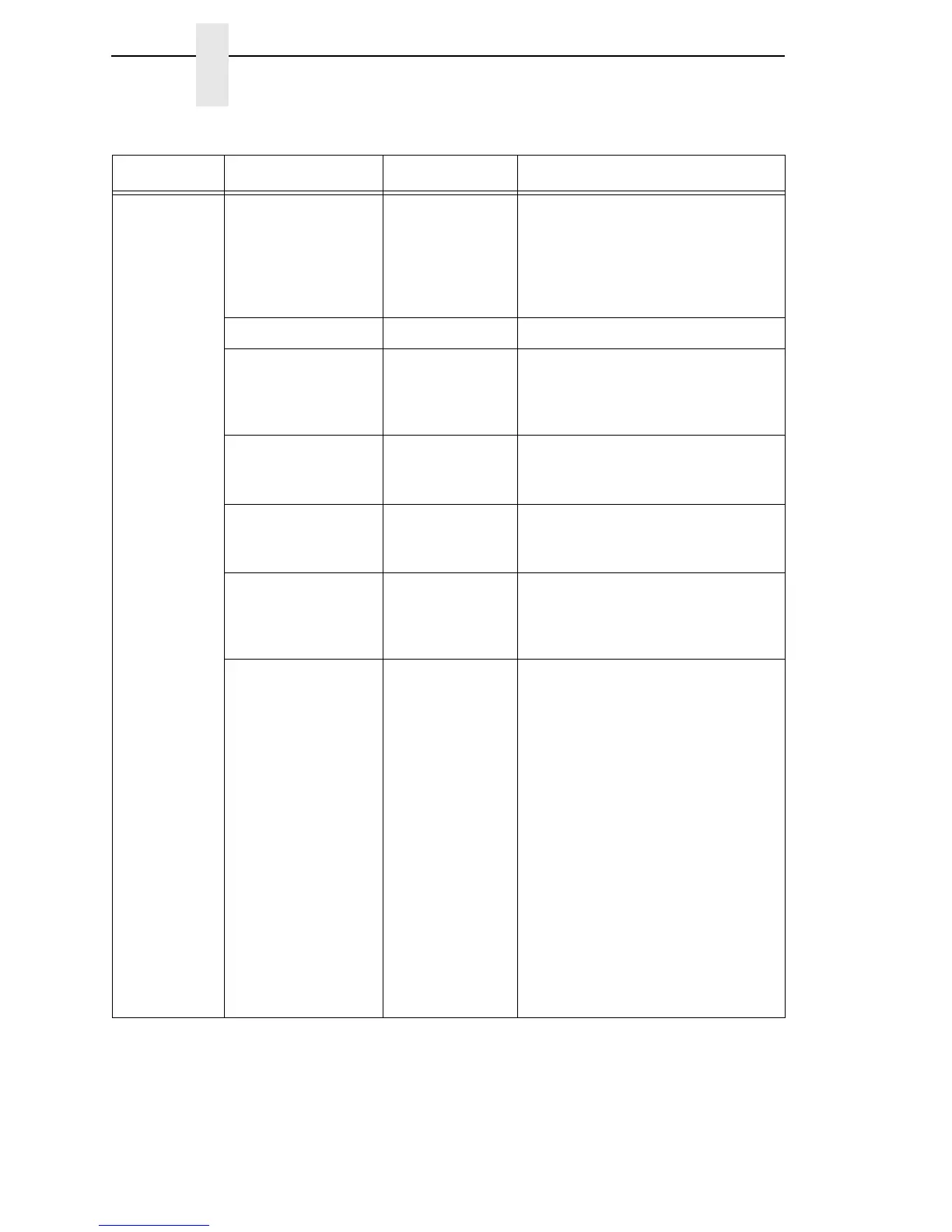
CONFIG OVERLAY
Cfg
This command overlays the
configuration data that follows on
existing configuration Cfg. Cfg must
be 1-8 (or END). If Cfg does not
exist then command is treated the
same as DOWNLOAD.
RESET Reboots the printer.
GET_NAMES
“Port”
This command uploads the names
of the configurations to the port
specified by Port. Port must either
be “1284” or “SERIAL”.
SET_NAME
Cfg
This command downloads a name
for the configuration specified by
Cfg
.
Cfg
must be 1-8.
CLEAR_NAMES This command resets all of the
configuration names to their default
values.
MPI_SELECT
MPI
This command selects the active
Management Protocol Interface
(MPI). Currently there are two
selections “UCP” and “PXML”.
PNE_PORT
Port
This command selects the port that
the PNE will use to communicate to
the printer.
The valid ports are:
•
DISABLE
•
HOST_SERIAL
If Host I/O is set to Auto
Switching or Serial, the port
defaults to Debug Serial.
•
DEBUG_SERIAL
•
ETHERNET
•
USB
NOTE:
If ETHERNET is selected
but not enabled, the
selection will revert to
DISABLE.
Table 22. General PTX_SETUP Commands
Command Sub-Command Parameter Description














 To Next Page