OPERATION
Page 62 of 99 USER MANUAL PSPC UM-PSPC-06-E/10-2012
SERVICE MENU ADJUST TRANSFER MECHANISM
TIP!
The pick-up position and tray set position may
differ a little bit from the adjusted position. The
transfer arm may lower a bit further than the set
position.
Adjust the position a little bit higher than the
required pick-up position and tray set position.
TIP!
Since the encoder knows if the transfer arm is
above the cups or the conveyor, adjusting the
pick-up position when the transfer arm is above
the conveyor results in a not accepted when set
position is pressed.
TIP!
Since the encoder knows if the transfer arm is
above the cups or the conveyor, adjusting the
tray set position when the transfer arm is above
the cups results in a not accepted when set
position is pressed.
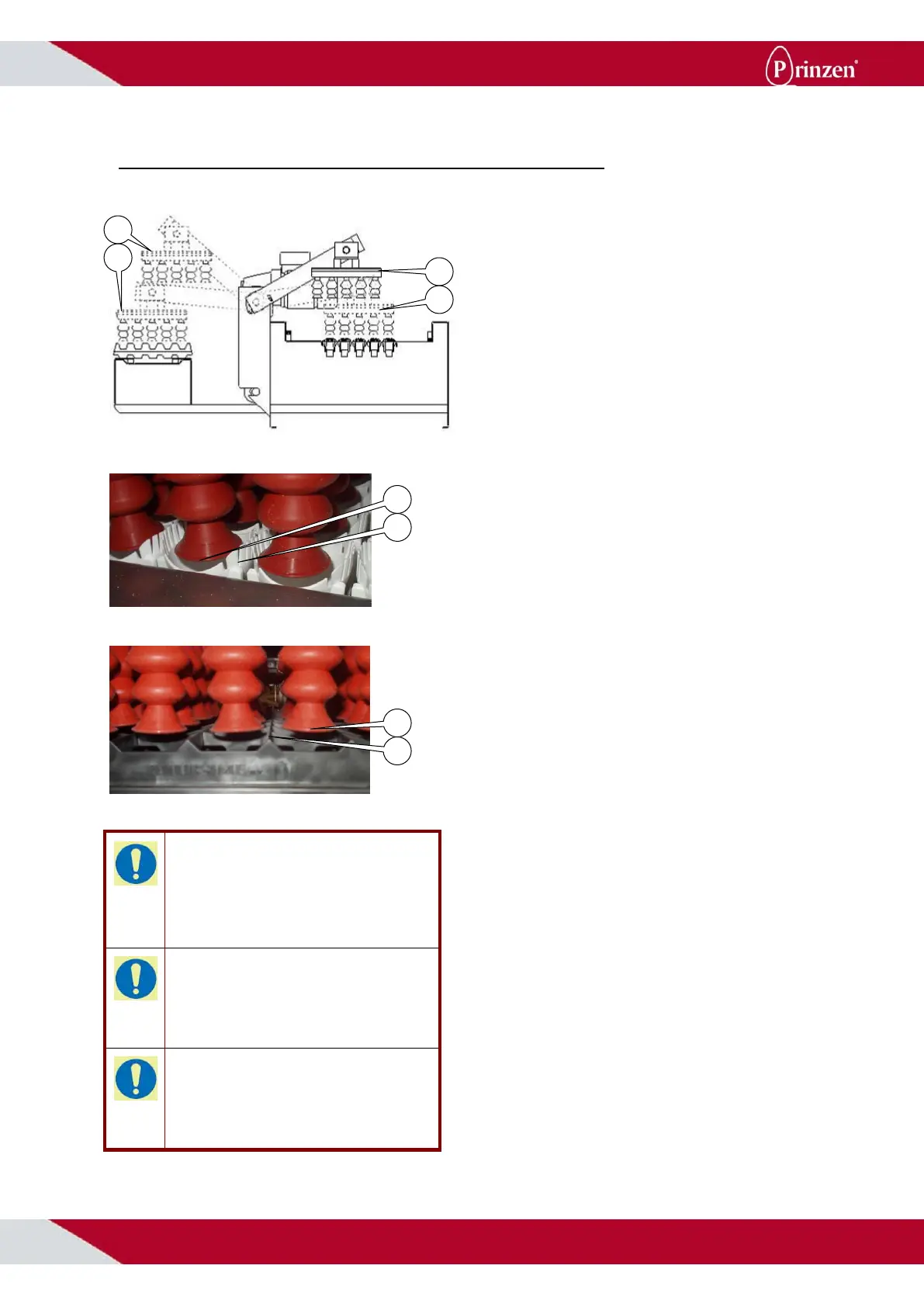
The transfer arm has 4 stop positions; rest
position (1), pick-up position (2), conveyor full
stop position (3) and tray set position (4). The
pick-up position and the tray set position are
adjustable.
Adjust the pick-up position:
When the vacuum head is at the pickup
position, the tip (5) of the suction cup should
be at the same height as the end of the slots
(6) in the cup (factory setting). Follow below
procedure to adjust this position:
- Select “Pick-up position”.
- Choose “Transfer to cups” when the
suction cups are too high or “Transfer to
conveyor” when suction cups are too low.
- Press F3 to move the transfer arm into the
selected direction. Every time F3 is
pressed the transfer arm moves a small
step into this direction.
- Select “Set position by pressing F6”.
- A screen appears showing that the
changed position is accepted or not.
In case you do not want to change the pick-up
position but only wanted to move the transfer
arm, press “Back to previous menu” instead of
“Set position by pressing F6”.
Adjust the tray set position:
When the vacuum head is at the tray set
position, the tip (7) of the suction cup should
be 5 mm above the surface (8) of the hatch
tray (factory setting). Follow below procedure
to adjust this position:
- Select “Tray set position”.
- Choose “Transfer to conveyor” when the
suction cups are too high or “Transfer to
cups” when suction cups are too low.
- Press F3 to move the transfer arm into the
selected direction. Every time F3 is
pressed the transfer arm moves a small
step into this direction.
- Select “Set position by pressing F6”.
- A screen appears showing that the
changed position is accepted or not.
In case you do not want to change the tray set
position but only wanted to move the transfer
arm, press “Back to previous menu” instead of
“Set position by pressing F6”.



 To Next Page