28 © 2015 Proceq SA
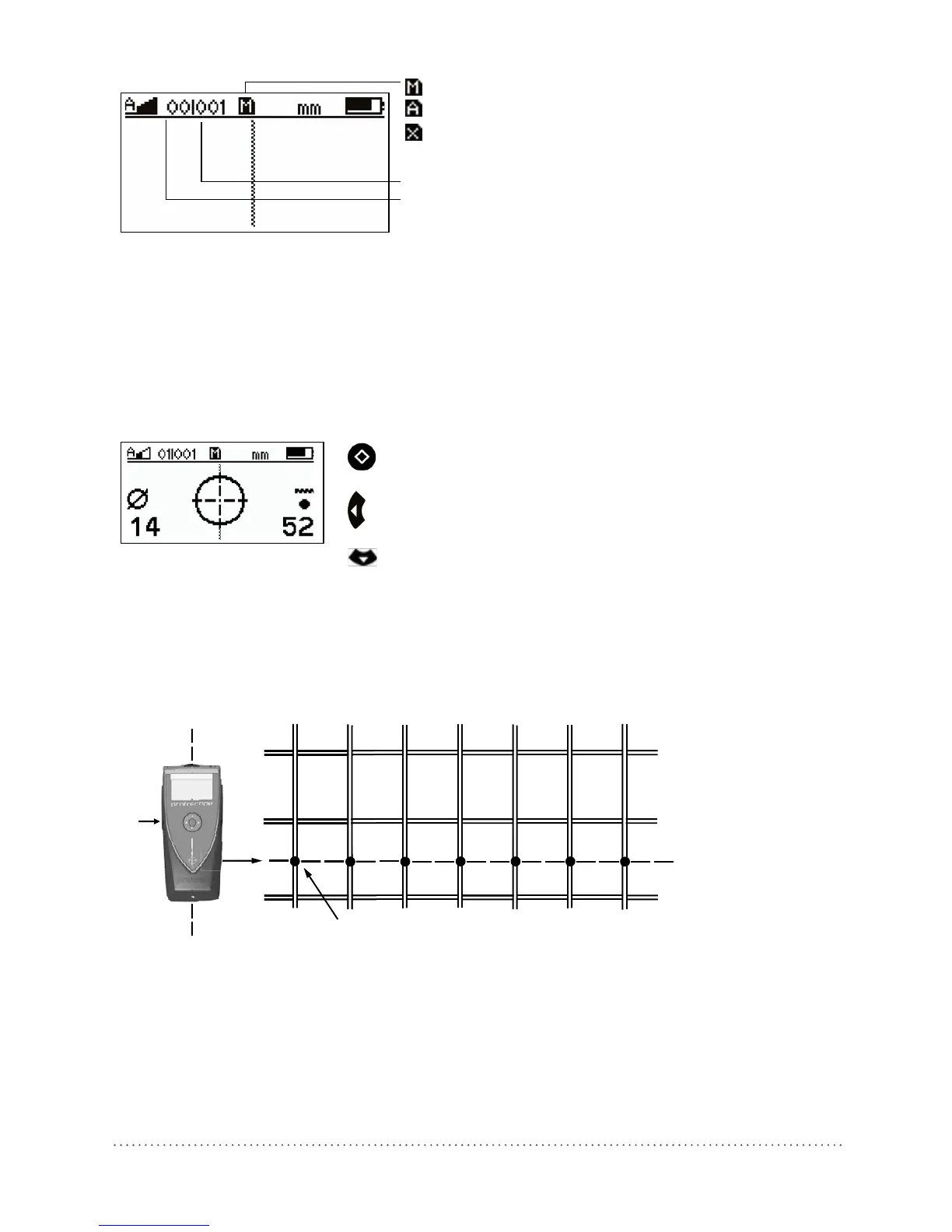
Manual Storage Mode
Automatic Storage Mode
Memory card missing or defect
Object number (max.500)
Measurement number (max.99)
Fig 34: Display of memory functions
It is recommended to set up a separate object for each structural element (e. g. column, wall). Every
measuring position on this object can then be assigned to a measurement number.
6.8.1 Manual Storage Mode:
After locating a rebar (the Rifle Scope is on the Center Line (9) and the LED Indicator (5) is lit), the
cover value and the rebar diameter can be stored by pressing the Function Key (6). This procedure
must be repeated for each rebar.
Estimate diameter and store values
Delete last measurement
Open next object
Fig 35: Display of manual storage
6.8.2 Automatic Storage Mode:
This mode is used for surface scans.
Position the Profoscope with the Center Line (9) parallel to the rebars of which the cover will be
stored. Press the Function Key (6) and start moving sidewise over the rebars.
(6)
MC (4)
Rebars
Covers above the rebars are stored
CL (9)
Fig 36: Automatic storage of covers




 To Next Page