6.2.2. Enabling the CANopen Stack
The CANopen stack prevents the transmission of some CAN messages such as CANopen RX SDOs, TX SDOs, and
emergency messages. These messages are received by the device’s CANopen stack and processed to the radio
Interface without being forwarded on. It is possible to configure the device for connection control via CANopen. In that
case, the device does not transmit messages with certain CAN identifiers. The following table shows messages that
are used by the device but not transmitted when the CANopen stack is enabled.
Table 44. CANopen Stack
Type CAN Identifier Default configuration (Node ID
34)
TX SDO 1 0x580 + Node ID
0x5A2
RX SDO 1 0x600 + Node ID
0x622
Heartbeat/Boot-Up 0x700 + Node ID
0x722
NMT
0x000 0x000
1. To enable the CANopen stack, the Advanced Settings must be activated within the CANlink wireless 4000
Configurator first. Refer to Enable Advanced Settings.
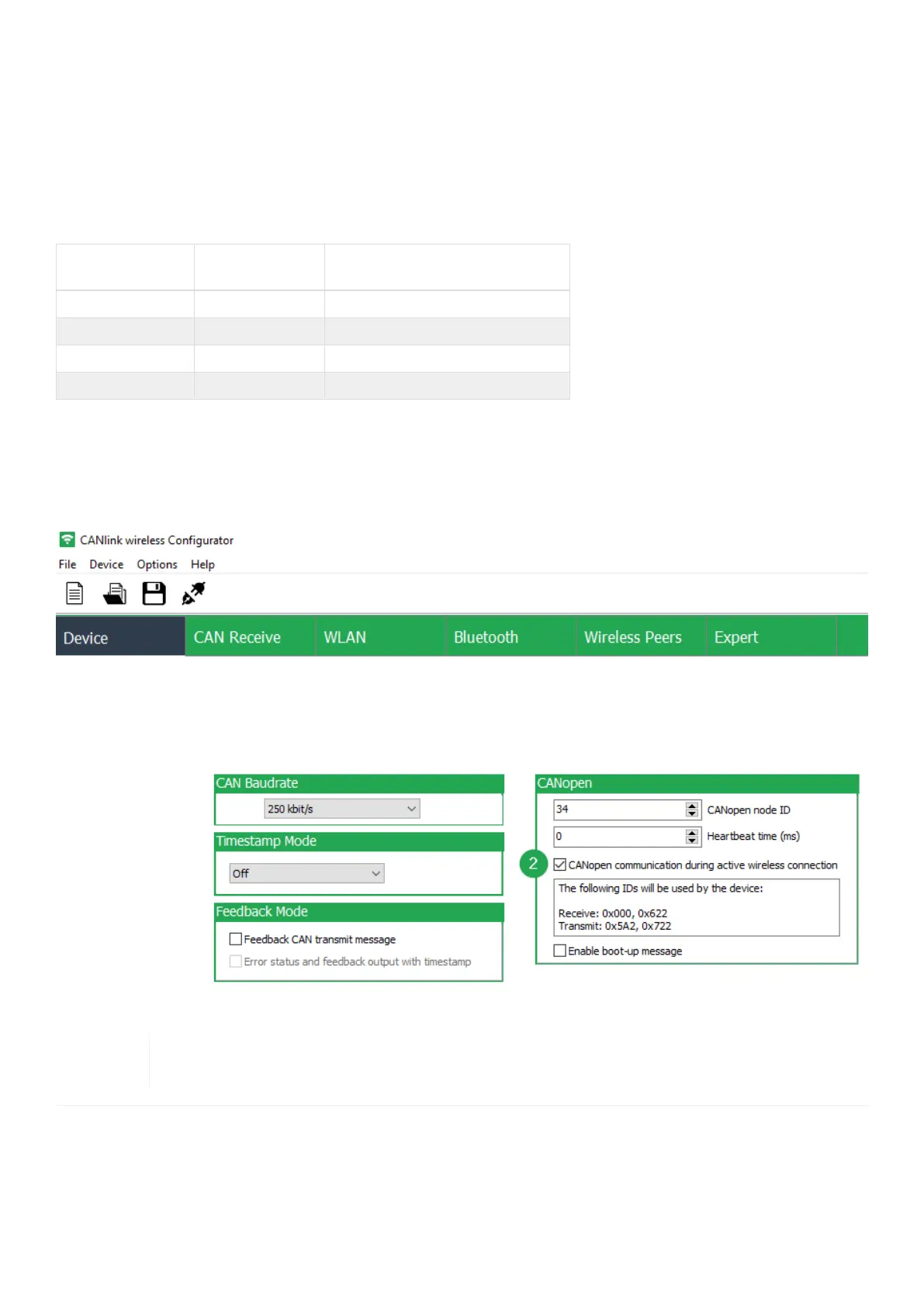
2. In the CANopen field of the Device tab enable the checkbox CANopen communication during active
wireless connection.
Figure 40. Enable CANopen Stack
The corresponding CAN identifiers for the specific CANopen node ID are calculated and displayed
within the CANopen field.
CANlink wireless 4000 Device Manual



 To Next Page