User Manual
PROTEC GmbH & Co. KG, In den Dorfwiesen 14, 71720 Oberstenfeld, Germany
5.2.14 Use of Memory Function
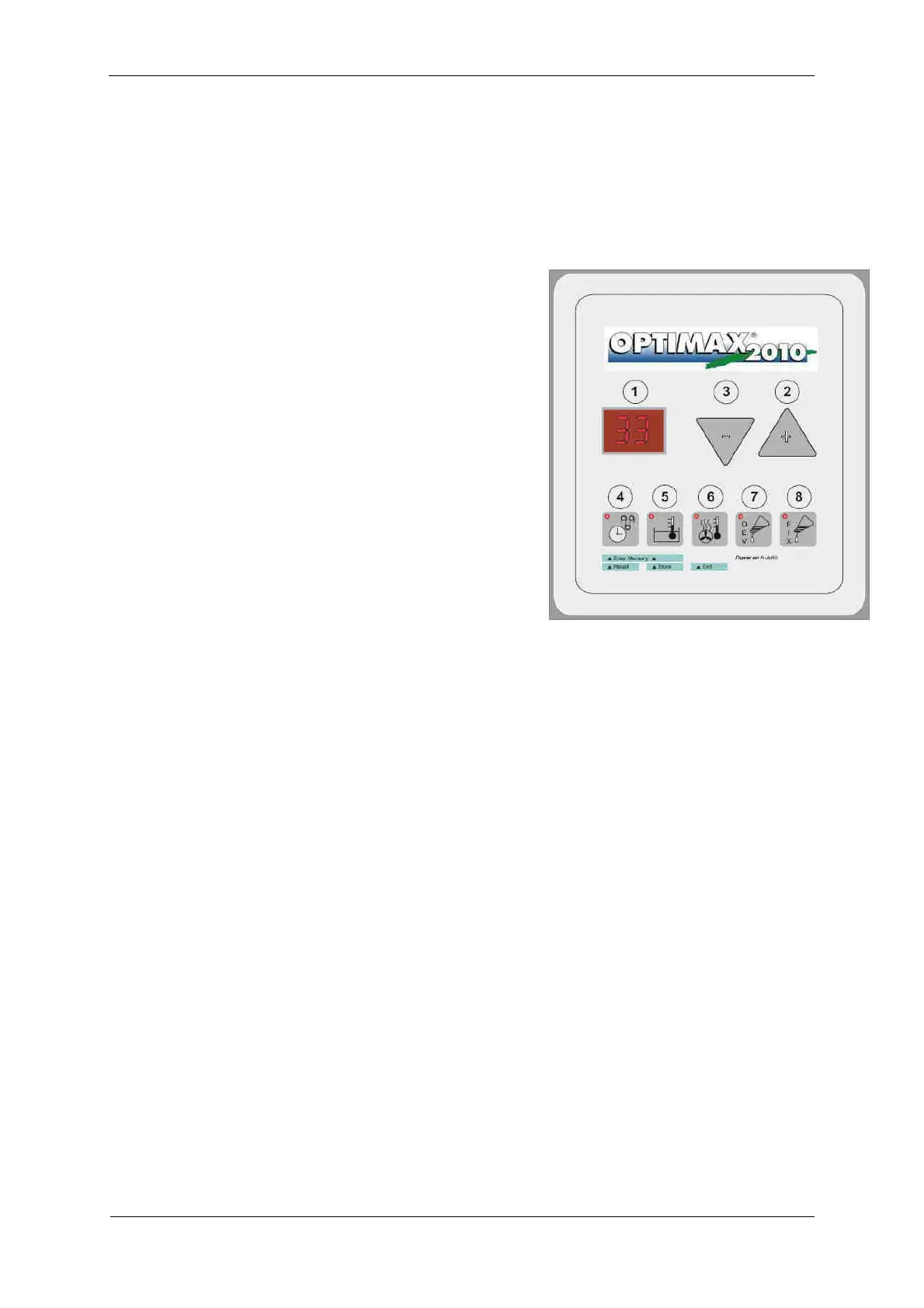
In the memory two sets of parameters can be stored and be recalled to the operating memory.
5.2.14.1 Store processing parameters
1 Set machine to preferable parameters e. g. bath
temperature, processing time etc. (see manual)
2 Press buttons 4 and 5 „Enter Memory“
(simultaneously to enter the memory mode
3 Use the buttons 2 and 3 „Select“ to select the
parameter memory (P1 or P2). These save the
parameters, old values will be overwritten
4
Press the button 5 „Store“ to store parameters and
to leave the memory mode
5.2.14.2 Recall processing parameters
1 Press buttons 4 and 5 „Enter Memory“
simultaneously to enter memory mode
2 Use the buttons 2 and 3 „Select“ to select the
parameter memory (P1 or P2) from which the
parameters are to be recalled
3
Press button 4 „Recall“ to recall parameters (copy
into the operating memory) and to leave the
memory mode
5.2.14.3
To leave memory mode without change
1 Press button 6 „Exit“
Choose the same bath temperature for all stored programmes. Of course different bath temperatures
can be stored too, but when changing the programme you always have to wait until the changed bath
temperature is reached.
5.3 Problems and Solutions
5.3.1 Advice on Film Defects
Your processor has been constructed for long term use. If however irregularities might occur, you will
find help to locate the problem below. Please check the listed points, before calling your service-
technician.
5.3.1.1 Films do not have enough density
• Bath temperature is too low
• Developing time too short
• Exposure time is too short
• Replenishment rate of developer too low
• Developer chemicals are exhausted or too strong diluted: Renew
• Fixer solution has been mixed into developer: Renew. Clean and rinse bath well before refilling
•
Circulation is broken down
5.3.1.2 Too high a density
• Bath temperature too high
• Developing time too long
• Exposure time is too long


 To Next Page