Need help?
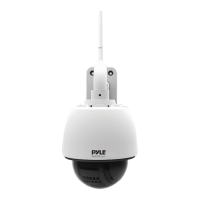
Do you have a question about the Pyle PIPCAMHD46 and is the answer not in the manual?
Details default passwords, login procedures, and the hardware reset process.
Instructions for preparing the device and initiating the mobile setup process.
Steps for selecting wireless connection, scanning QR code, and entering Wi-Fi password.
Using the camera view page for PTZ control, zoom, and accessing advanced settings.
Detailed guide on using PTZ controls and setting/calling preset camera positions.
How to enable and adjust motion detection sensitivity and linkage actions.
Steps to search for, connect to, and configure the wireless network via the web UI.
Defining motion detection areas, setting sensitivity, and linkage actions.
Addressing DDNS failures and detailed steps for port forwarding on common routers.
Comprehensive list of camera sensor, video, communication, power, and system requirements.
 General
| Lens | 3.6mm |
|---|---|
| Night Vision | Yes |
| Video Compression | H.264 |
| Image Sensor | CMOS |
| Resolution | 1080p Full HD |
| IR Distance | 65ft |
| Weatherproof | IP66 |
| Power Supply | DC 12V |
| Storage | Micro SD card (up to 128GB) |
| Operating Temperature | -10°C to 50°C |

 To Next Page