Page 41 of 133
Version 3.0 REV r000
Date 25-08-2010
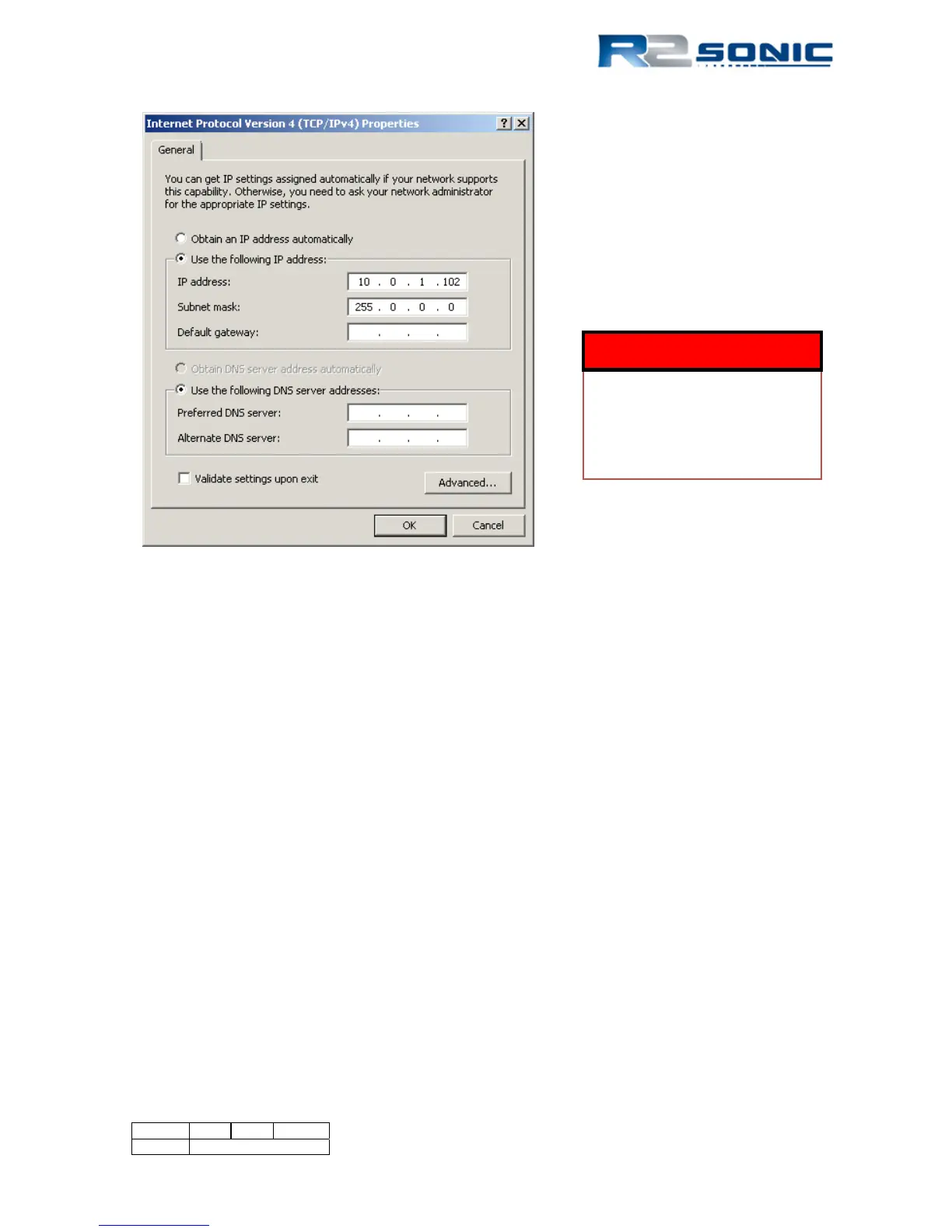
Figure 33: IP and Subnet mask setup
6.2.2 Discover Function
The sonar head and the SIM have initial IP and UDP ports to establish communication (see below).
Communication will not be established until the serial number of sonar head and the SIM are
entered in the settings for Sonar 1, in the Sonic Control 2000 Network settings.
Use the Discover function to request the serial number information from all attached R2Sonic
equipment. The Discover function will automatically transfer the serial numbers to the correct field.
6.2.2.1 Default Network Configuration
Head IP: 10.0.0.86 BasePort: 65500
SIM: 10.0.0.99 BasePort: 65500
GUI: 10.0.1.102 BasePort: 65500
Bathy: 10.0.1.102 BasePort: 4000
Snippets: 10.0.1.102 BasePort: 4000
It is very important that the exact
settings, as shown in Figure 33, are
entered. This will allow initial
communications to be established
with the Sonic system; once
communication is established, the IP
address can be user configured.
WARNING
ALL COMPUTER
FIREWALLS MUST BE
DISABLED TO INSURE
COMMUNICATION.



 To Next Page