Page 64 of 133
Version 3.0 Rev r000
Date 25-08-2010
Part No. 96000001
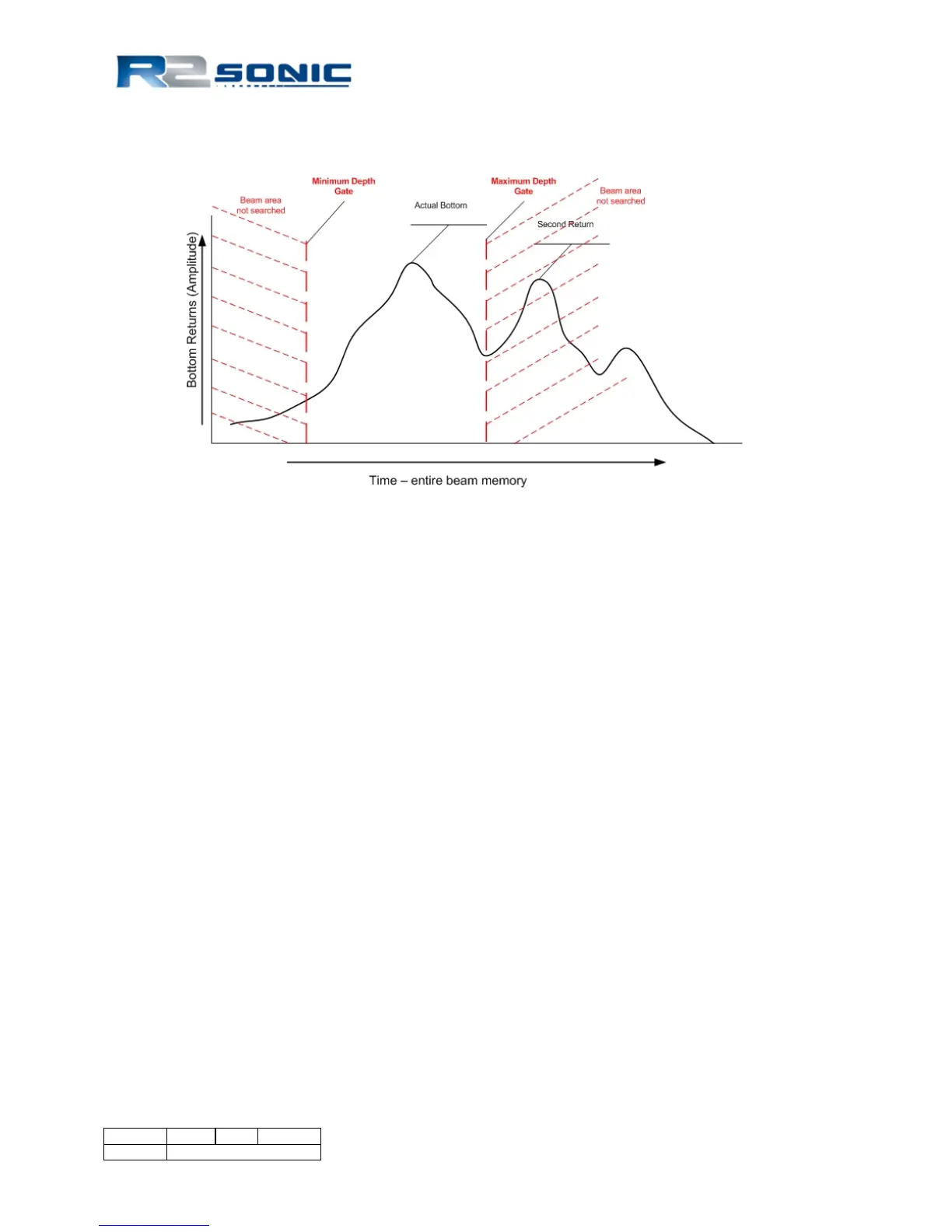
be searched to derive a bottom detection. Although the user enters a depth for the gate setting, to
the Sonic 2024/2022 this is a time to start searching and a time to stop searching.
Figure 64: Graphical representation of depth gate
The above representation illustrates how the depth gate narrows down the bottom detection search
area (in time) to only the area where the true bottom is expected. If the Maximum Depth gate was
not in this location, the second return could be strong enough so as to influence the bottom
detection process.
Again, it must be borne in mind that if the depth gate is set such that true bottom detections are
‘gated out’; those data are lost entirely and cannot be recovered.
6.9 Save Settings
When Sonic Control is launched, it will always load the default settings configuration file located in
the Sonic Control installation directory (CurrentSettings.ini). The default configuration file will save
any local configuration changes during operation of the system.
When a user defined configuration is saved, like dualhead.ini, Sonic Control will still use the default
configuration file to store local changes while operating the sonar. This is equivalent to copying the
default configuration file to a configuration file with another name.
When a user defined configuration is loaded, Sonic Control will use the default configuration file to
store local changes while operating the sonar. This is equivalent to copying the loaded configuration
file to the default configuration file.



 To Next Page