Page 63 of 133
Version 3.0 REV r000
Date 25-08-2010
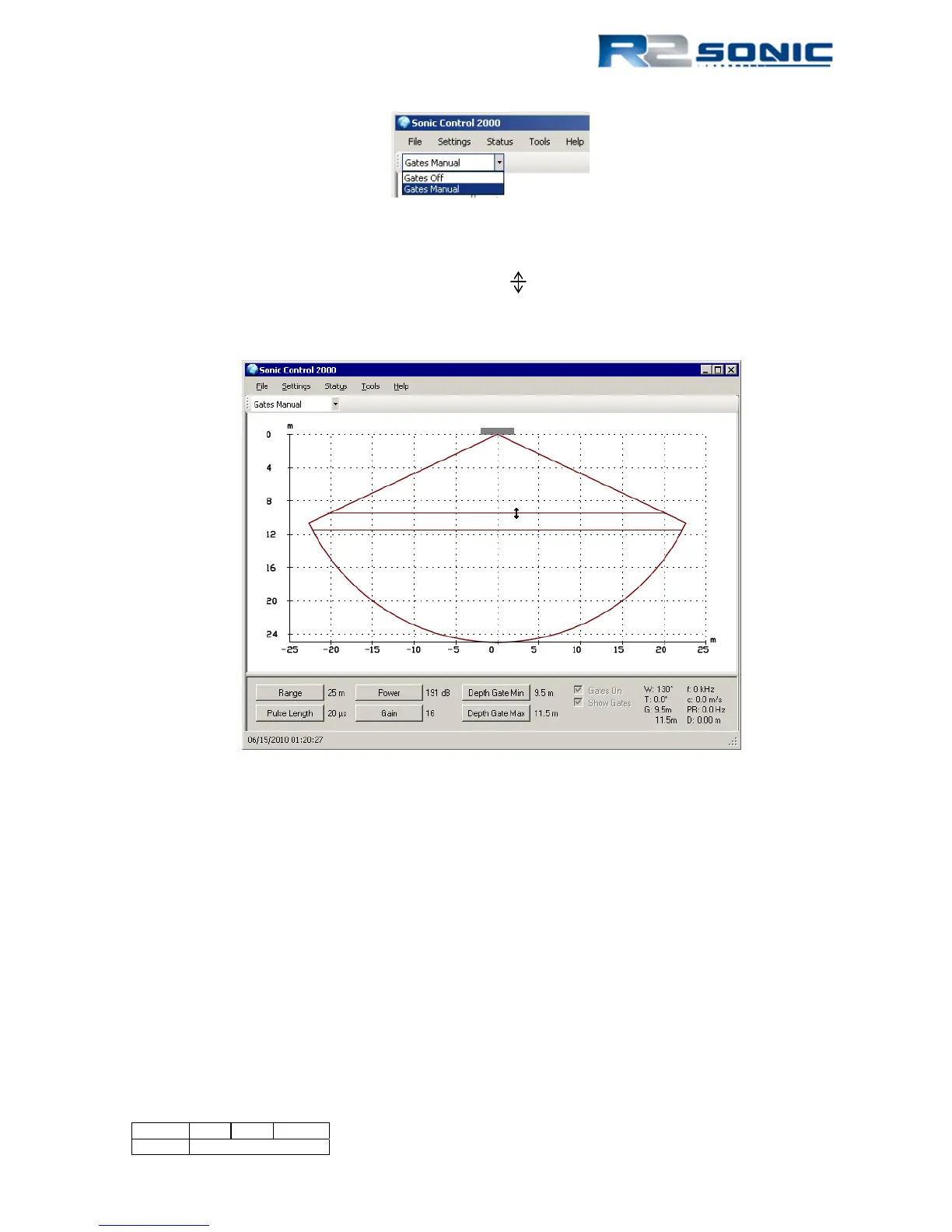
Figure 62: Depth Gates on and off control
The depth gates can also be changed using the mouse in the wedge display. Click and drag on either
depth gate; the cursor will change to a double arrow , drag the gate to the new depth and release
the mouse button. The depth gate position is visible in the lower left hand section of the display.
When the mouse button is released the gate will be updated in the Operation Parameters area.
Figure 63: Dragging depth gates to new location
If the minimum or maximum depth gate eliminates good data, the data are lost as it will not be
included in the Sonic 2024/2022 output. In the data collection software there will also be a form of
depth gates. If the data are eliminated there, it is more than likely that the data is flagged and not
really deleted, so it can be recovered.
The main reason to use the Sonic 2024/2022 depth gates is to eliminate interference of the bottom
detection process. Depending on bottom composition, multiple returns can occur. There will be a
secondary and possibly a tertiary return that arises from the initial bottom returns being reflected
by the water surface and then back up again to the receiver. These second and third returns can be
strong enough to influence the bottom detection process. Using the Sonic 2024/2022 depth gate
will enable the Sonic 2024/2022 to search only a small area of the entire beam for a bottom
detection, therefore, only the area around where the energy from the actual bottom returns are will



 To Next Page