CHAPTER 5
32 VSN® Operation Manual
RESET DEFAULTS
To restore system default settings:
1. From the VSN home page, select the Tools button.
2. Select the Machine Settings tab.
3. Select the Reset Defaults button to clear stored row spacing presets and recalibrate the system. Accepting the
confirmation will restore the VSN back to factory default settings.
NOTE: Review Chapter 3, Calibration Wizard, for additional assistance with calibrating the VSN system and
completing the calibration wizard after resetting the system defaults.
CAMERA MOUNTING
To adjust camera mounting settings and measurements:
1. From the VSN home page, select the Tools button.
2. Select the Machine Settings tab.
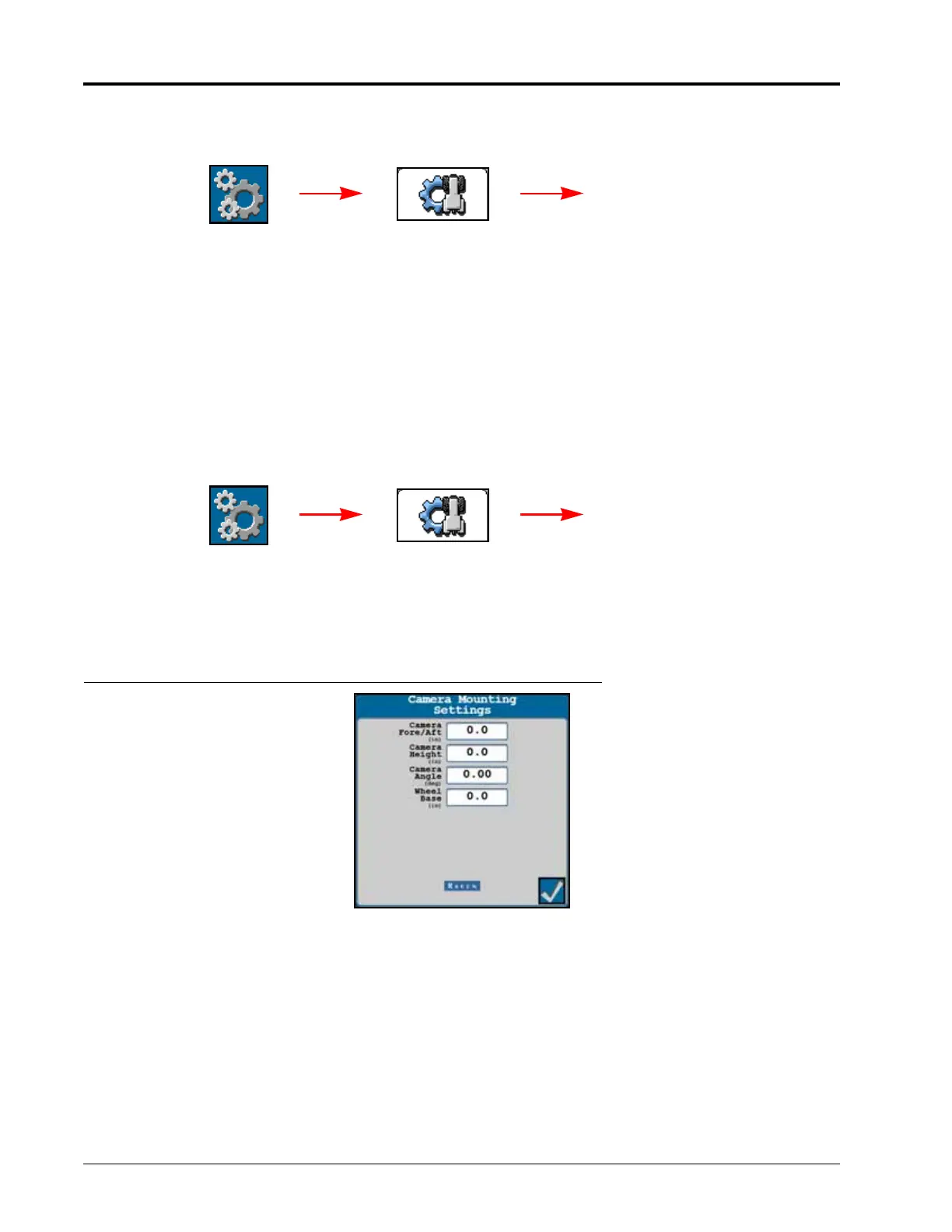
3. Select the Camera Mounting button. The following settings and options will be displayed.
FIGURE 2. Camera Mounting Settings Page
NOTE: A factory reset will be required to change or adjust the values displayed on the Camera Mounting
Settings page.
Camera Fore/Aft. Distance from the VSN camera lens to the rear axle. A positive value indicates the camera is
positioned in front of the rear axle.
Camera Height. Distance from the VSN camera lens to the bottom of the furrow.
Camera Angle. Pitch of the camera from horizontal.
Wheel Base. Measurement between the front and rear axle.
Machine Settings
Reset
Defaults
Tools
Machine Settings
Camera
Mounting
Tools








 To Next Page