XC3000Series Motion Control System of Laser Cutting - User Manual
V1.0 Raytools AG © Copyright 28 |87
www.raytools.ch
(3) Advanced Options
Apply MicroJoint to selected graphic: modify the micro joint size of the selected graphic and change all the selected
graphics into the same size.
Joint at Start: select to add one micro joint at the start point.
Joint by Flycut: select to add one micro joint in fly cutting.
Add Leadline at micro joint: select to add a leadline at micro joint. Deselect, the leadline can only be added after
exploding microjoint.
(4) Corner Parameter
Micro Joint avoid corner: select to use the function.
Safety distance: the determination range of corners.
Maximum angle: the determination angle of corners.
Take the parameters in the figure above as an example: the corner whose angle is less than 180° will not be added the
micro joint, including the distance near it for 5mm, though the corner fits the conditions.
(5) Range
Min MicroJoint curve length: if the perimeter of the graphic is less than the minimum length, there will not add the micro
joint.
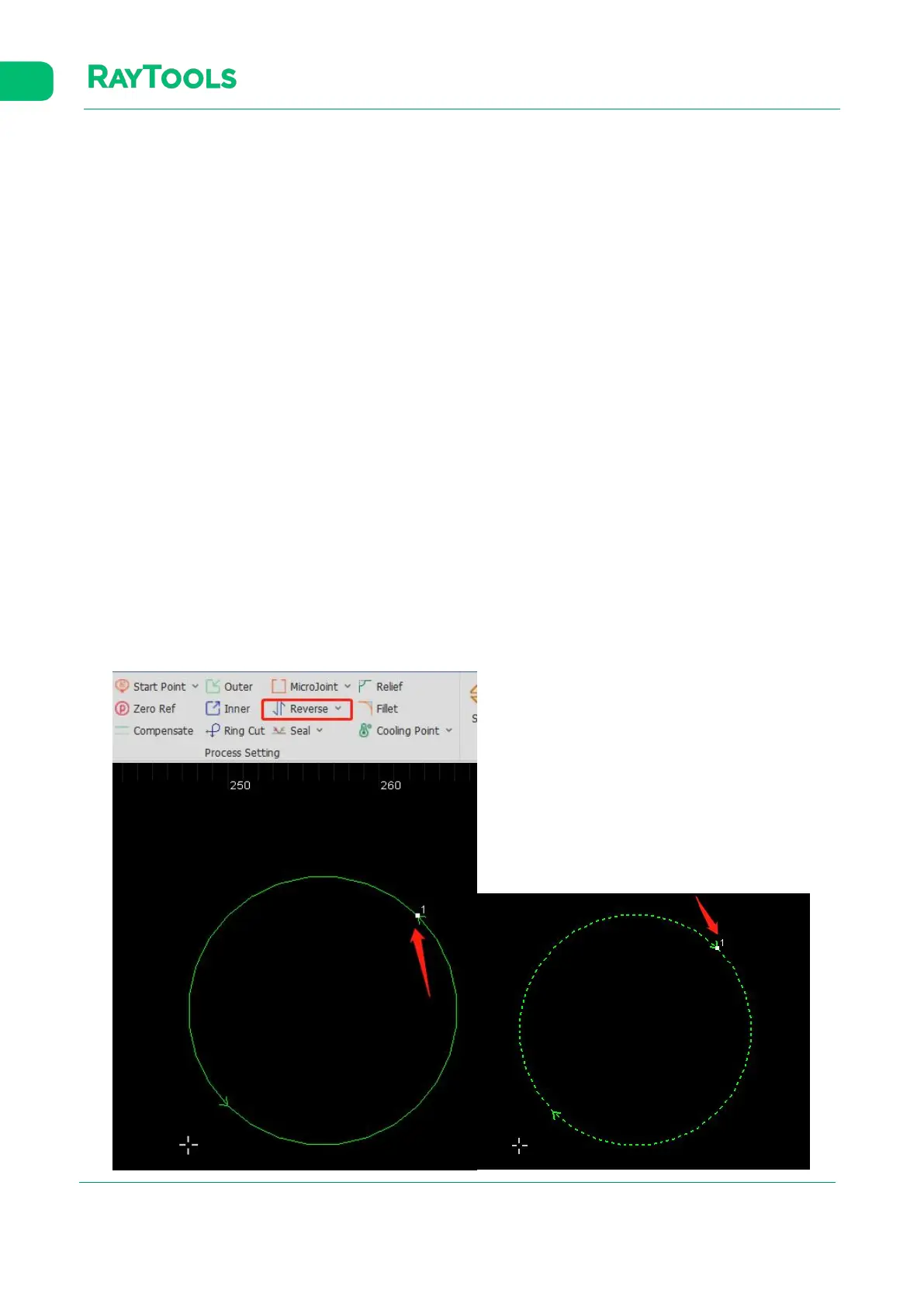
2.1.15 Reverse
Adjust the processing direction.
(1) Reverse: if the processing direction now is clockwise, select the graphic and click on Reverse. Then, the selected
graphic will be processed in an anticlockwise direction, as shown below:



 To Next Page