XC3000Series Motion Control System of Laser Cutting - User Manual
V1.0 Raytools AG © Copyright 80 |87
www.raytools.ch
5.11 Height Sensor
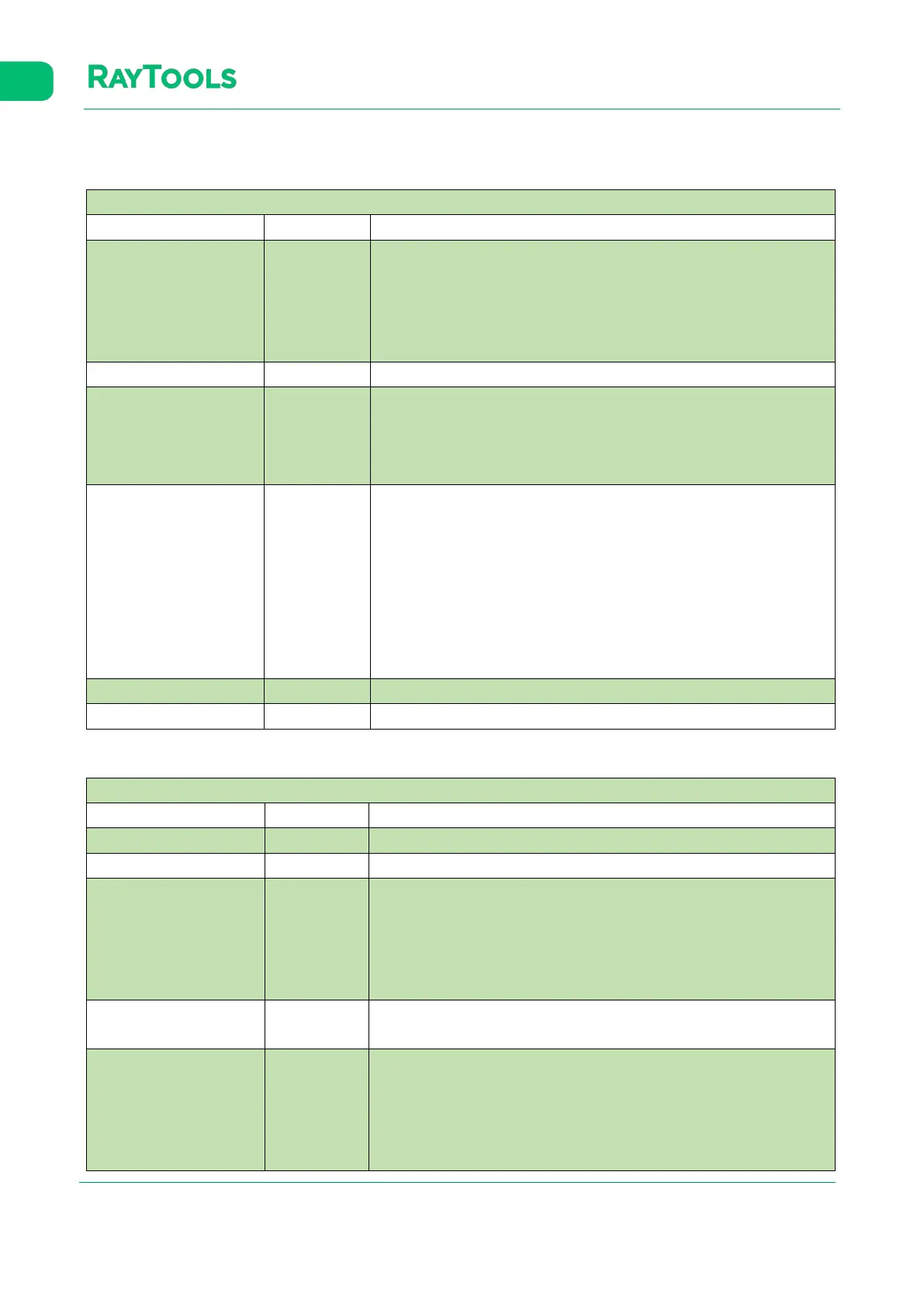
Click on Height Sensor in CNC sub-page, and the setting interface which contains the following parameters will pop up:
Lifting
Parameter Default Remark
Max lifting height
(among contours)
30
After Z-Axis follow-up completes, the max lifting height is the lifting
height of the cutting head bases on its current position. It is
recommended not to set the value too large. The value can be set as
half of the Z-axis travel. A value that is too larger may reduce the
cutting efficiency.
Optimize short travel Enable Enable: use the function. Disable: not use the function.
Short travel 8
Using the function of optimizing short travel, if the linear distance
between the end of the current contour and the start of the next
contour is less than the value, the cutting head will move to the start
of the next contour in the follow-up state.
Open LeapFrog
Enable: the cutting head will move and lift simultaneously while it
completes cutting one contour and travels to the next one. When the
cutting head gets close to the position, it will follow down in advance
to improve efficiency. Disable: while the cutting head completes
cutting one contour and travels to the next one, it will lift at first and
then move to the start position of the next contour, and last it will
follow down to reduce the risk of touching the plate
Enable
.
Leapfrog takeoff height 0 It refers to the takeoff height of the Leapfrog function.
Max frog drop distance 20 It refers to the max distance when the cutting head frog-like drops.
Follow-up Parameter
Parameter Default Remark
Follow level 7 The default is fine, and generally, it does not need modification.
Follow speed 18 It refers to the maximum speed when follow down.
Follow max height 5
If the follow height is larger than the value, the cutting head will follow
up to 1mm from the plate and then lift to the follow height.
Meanwhile, the follow-up is in closed state for the accuracy of height.
If the follow height is smaller than the value, the cutting head will
straightly follow-up to the follow height to improve the efficiency.
Real-time calibration
Optimize the algorithm at the set time to make the calibration data of
capacitance more accurate
Select.
.
Calibration jump value 1000
Select capacitance jump to be the touch-plate signal when calibrate,
and the value will take effect.
Parameter definition: during calibration, when the cutting head is
seeking the plate, if the absolute value of the difference between the
capacitance value of the current cycle and the capacitance value of the



 To Next Page