XC3000Series Motion Control System of Laser Cutting - User Manual
V1.0 Raytools AG © Copyright 68 |87
www.raytools.ch
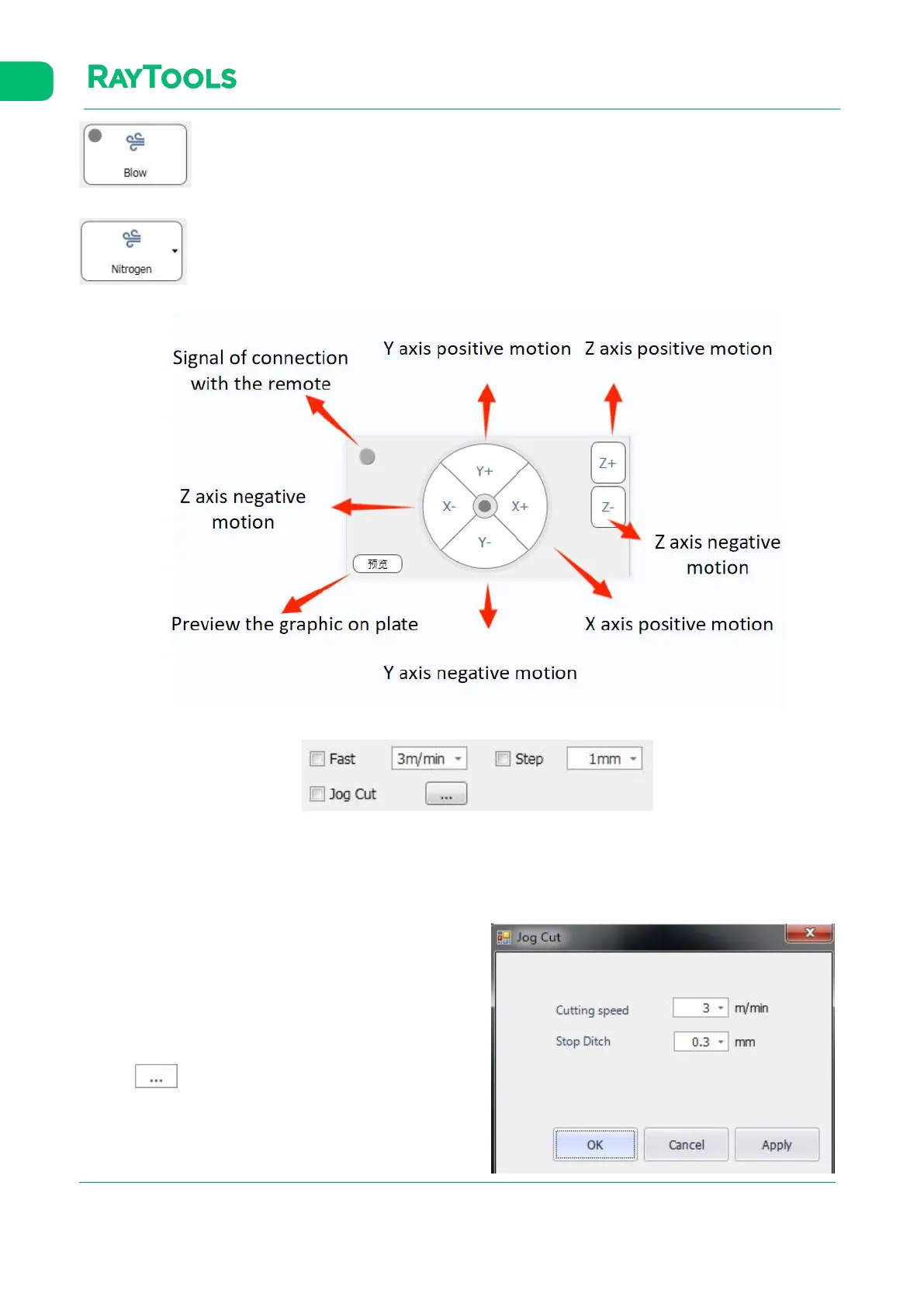
:click on Blow to manually open or close the protective gas.
:Click on Nitrogen. Air, nitrogen, and oxygen are all selectable for blowing.
· Fast: after selecting and setting the speed, the axis motion will switch to the fast speed mode. Motion speed depends
on the setting.
· Step: after selecting and setting the stepping distance, the axis steps when it's clicked to move. The stepping distance
depends on the setting.
· Jog Cut: after selecting, click to move the axis and hold on.
The cutting head will follow to move downwards and start
cutting with beam out. Release the button for moving axis, and
the jog cutting will stop. After each axis motion, the button will
auto-deselect.
Click on
to open the setting of the jog cutting, as



 To Next Page