6
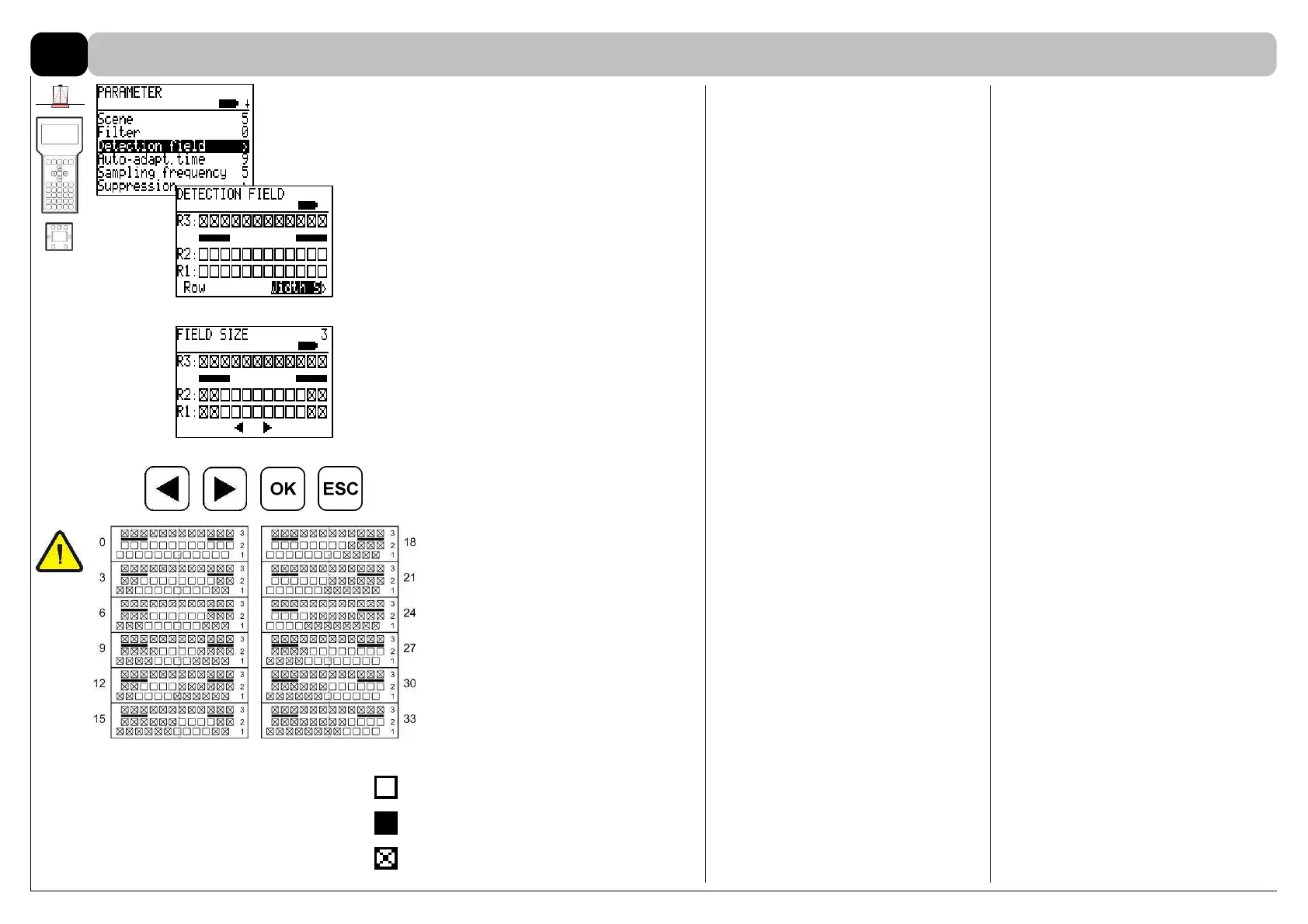
Select in the SERVICE SENSOR menu
for ex. identified sensor SI 1 / Parame-
ter the parameter Detection field (FPC
902) or Field size (BDE-D).
On the FPC 902 the field width is graph-
ically displayed:
2 rows (R1-R2) with 12 spots each are
located on the fitting side of the sensor.
Row R3 is not available.
.
The proper field width/position can be
selected out of 12 predefined patterns
with the left/right arrow key.
The relevant parameter value is dis-
played on the top right end of the
screen.
OK: confirm entry
ESC: quit menu, escape
12 predefined patterns
(parameter value 0 - 33)
ANSI 156.10 (8.1.1)
Width of detection field = min. pas-
sage width/clear door opening
Parameter / Detection field / Width /
Set up with predefined patterns 1-12
Default: 0
Spot active without detection
Spot active with detection
Spot inactive
Width of the presence detection field
6.5



 To Next Page