REAR VIEW
2
158 - Getting to know your vehicle
Switching off the function
Thedisplayswitchesoffafewmo
ments after the ignition is switched off.
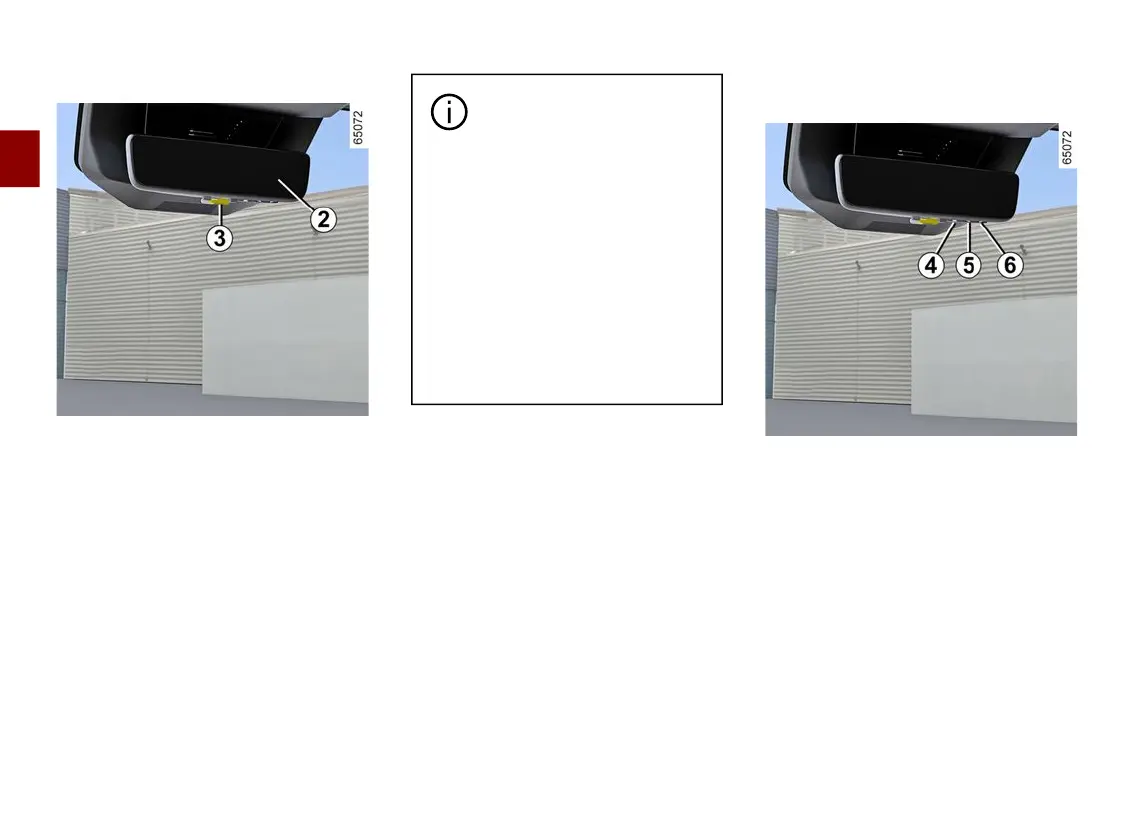
Note:the"mirror"modecanbeacti
vated using the lever
3
.
Depending on your vision,
an adaptation time may be
necessary to focus on the
camera view display.
Objects which appear on the
edge of the door mirror
2
may be
distorted.
In very bright light (snow, vehicle
in sunshine, etc.), the camera
view may be partially disturbed.
In low brightness or poor weather,
the image on the screen may be
distorted.
Adjustingthedisplayandthecam
era
Press button
4
for "Menu" to access
the settings menu.
Repeatedly press the button
4
to scroll
through the settings options.
Use buttons
5
and
6
"toadjusttheset
ting as desired.
Selecting the settings:
a) adjusting the brightness;
b) adjusting the vertical viewing angle.
Exitfromthesettingsmenuoccursau
tomatically after approximately five
seconds if no button is pressed.











 To Next Page