en
5.1.1 Resetting the counter / checking the lter capacity
Ifaltercartridgeofthesamesizewasusedwhenreplacingtheltercartridge,onlythecounterneedsto
be reset�
Toresettheltercapacityafterreplacement,seeChap.5.2.3.
Ifadierentsizeisused,theltercapacitymustbedeterminedandenteredagain(seeChap.4.5.1).
5.2 Programming and display unit
Thedisplayofthedisplayunitisswitchedo30secondsafterthelastkeyispressed.
Pressinganykeyswitchesthedisplayonagainandthelterstatusisshown.
5.2.1 Selecting a menu item
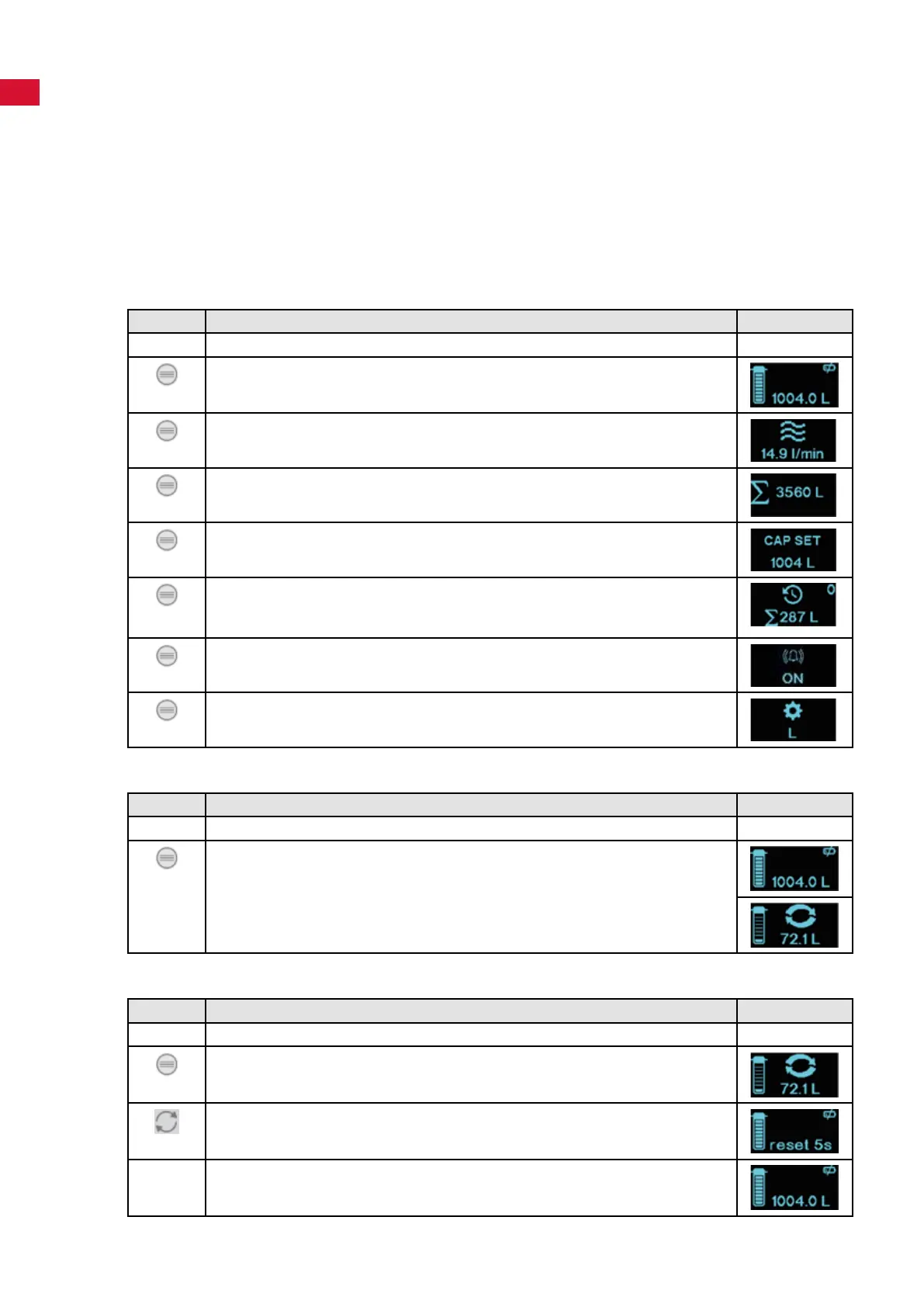
By pressing the menu key, the following menu items are displayed one after another�
Key Display
Thedisplayisswitchedo. ---
Press the "MENU" key:
- Display: Filter status�
Press the "MENU" key:
- Display: Flow�
Press the "MENU" key:
- Display: Total counter�
Press the "MENU" key:
-Display:Setltercapacity.
Press the "MENU" key:
- Display: Counter reading, 0 = Current cartridge was inserted at a counter
reading of 287 l�
Press the "MENU" key:
- Display: Alarm�
Press the "MENU" key:
- Display: Settings�
5.2.2 Filter status display
Key Display
Thedisplayisswitchedo. ---
Press the "MENU" key:
- Display: Filter status�
OR
-Display:Filterstatus,ltercapacityspeciedhasbeenreachedorthe
maximumperiodofuseof12monthsexceeded.Replacelter!
5.2.3 Reset the lter capacity (when replacing the lter)
Key Display
Thedisplayisswitchedo. ---
Press the "MENU" key:
- Display: Filter status�
Press and hold the "RESET" key for approx� 5 seconds�
- The display shows "reset 5s", the countdown runs down�
Theltercapacityisnowresetandthelastvalueenteredisshown.
Afterthereset,atimerisstartedthatindicatesreplacementofthelterafter360days.
- 10 -


 To Next Page
 Loading...