en
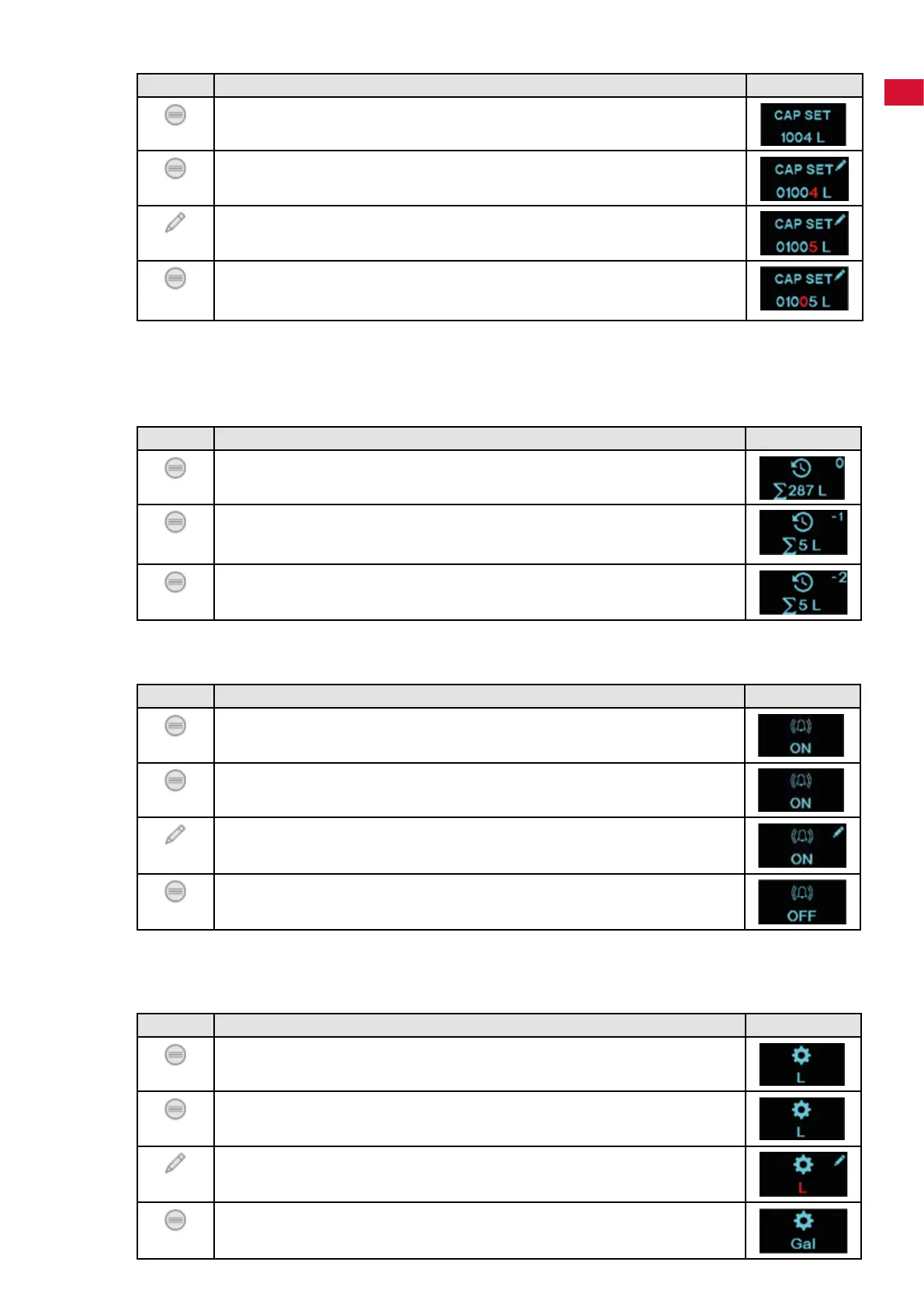
5.2.4 Entering the lter capacity
Key Display
Press the "MENU" key until CAP SET is shown�
-Display:Setltercapacity.
Press and hold the "MENU" key for approx� 5 seconds�
-Theactivedigitashes.
Press the "MODIFY" key:
- Set the active digit�
Press the "MENU" key:
-Conrmtheactivedigitandmovetothenextdigit.
-Theactivedigitashes(repeattheprocedureuntilthelastdigit).
Based on the local carbonate hardness of the tap water, use the table in Chapter 4�3 to determine the
resultingcapacityoftheltercartridge.
5.2.5 Counter reading (when inserting the cartridge)
Itispossibletocallupthetotalcounterreadingwhenreplacingthelast5ltercartridges.
Key Display
Press the "MENU" key until the counter reading is shown�
- Display of the counter reading at which the current cartridge was inserted�
Press and hold the "MENU" key for approx� 5 seconds�
- The digit "-1" is shown = Total counter reading at the last but one
replacement of the cartridge�
Press the "MENU" key:
- The digit "-2" is shown, it is possible to continue to press until "-4"�
Outputofthecounterreading(totalnumberofliters)ofthelast5cartridgereplacements.
5.2.6 Alarm
Key Display
Press the "MENU" key until the alarm is shown�
- Display: Alarm�
Press and hold the "MENU" key for approx� 5 seconds�
- "ON" or "OFF" is shown�
Press the "MODIFY" key:
- Switch between "ON" and "OFF"�
Press the "MENU" key:
- The current setting is applied�
Whenswitchedon(beepon),anacousticsignalsoundswhentheremainingcapacityis10%oraftera
maximumperiodofuseof12monthswhenwaterisdrawno.
5.2.7 Setting the unit (liters or gallons)
Key Display
Press the "MENU" key until the settings are shown�
- Display: Settings�
Press and hold the "MENU" key for approx� 5 seconds�
-"L"or"Gal"ashes.
Press the "MODIFY" key:
- Switch between "L" and "GAL"�
Press the "MENU" key:
- The current setting is applied�
- 11 -


 To Next Page
 Loading...