Troubleshooting
118
Doc No: UMAN\FL\0110
Rev. No.: 1.02B
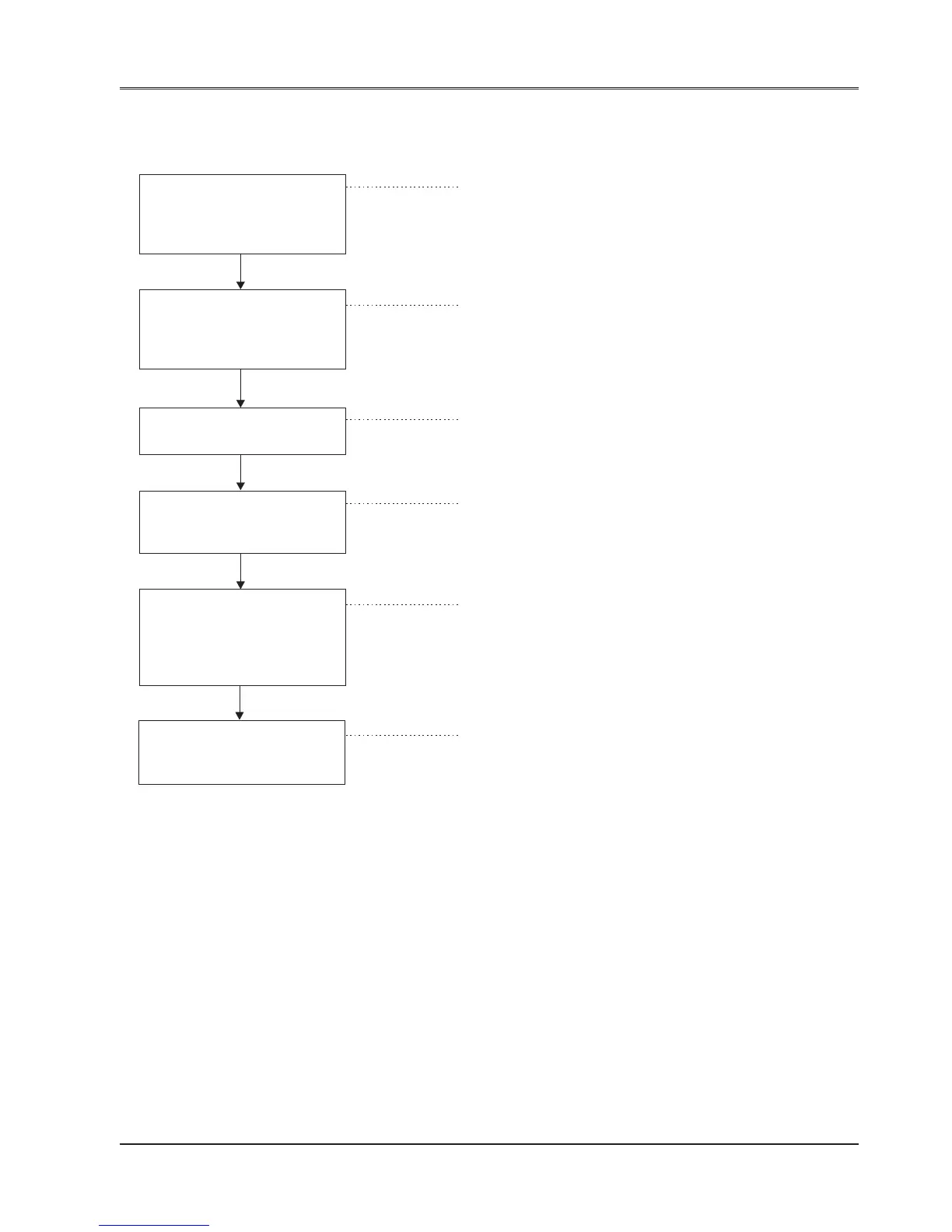
8.1.4 Input Check
If the program is running but the external input signal is not read normally, check the following points:
Is the input status LED If not, check the input voltage at the
changed ON/OFF according FlexiLogics’s input terminals.
to the corresponding input If the voltage is not normal, check the input
device operation ? device and the cable.
If the voltage is normal, the FlexiLogics’s input
Yes circuit may be faulty.
Connect the programming If the monitored X device state is identical
tool, and monitor the to the state of the input status LED, the
corresponding X device state cause may lie in the user program or in the
in RUN mode environment.
Not normal
Check whether the X device If it is forced, release the force designation
is forced or not then execute the EEPROM write
operation.
Not forced
Check whether the I/O In force run mode physical inputs and
allocation table is identical to outputs are not updated.
the actual I/O configuration
Not identical
Execute the automatic I/O Download the application now
allocation, and check whether and execute ladder.
the I/O allocation table is now
identical to the actual I/O
configuration
No
Check the expansion unit Replace the faulty unit or else the
Hardware one by one FlexiLogics basic unit may be faulty.
the expansion rack ?


 To Next Page