Chapter 5
5-4 BiPAP Focus Ventilator Service Manual © Respironics, Inc. REF 1029568 Rev B
Diagnostic Mode and Troubleshooting
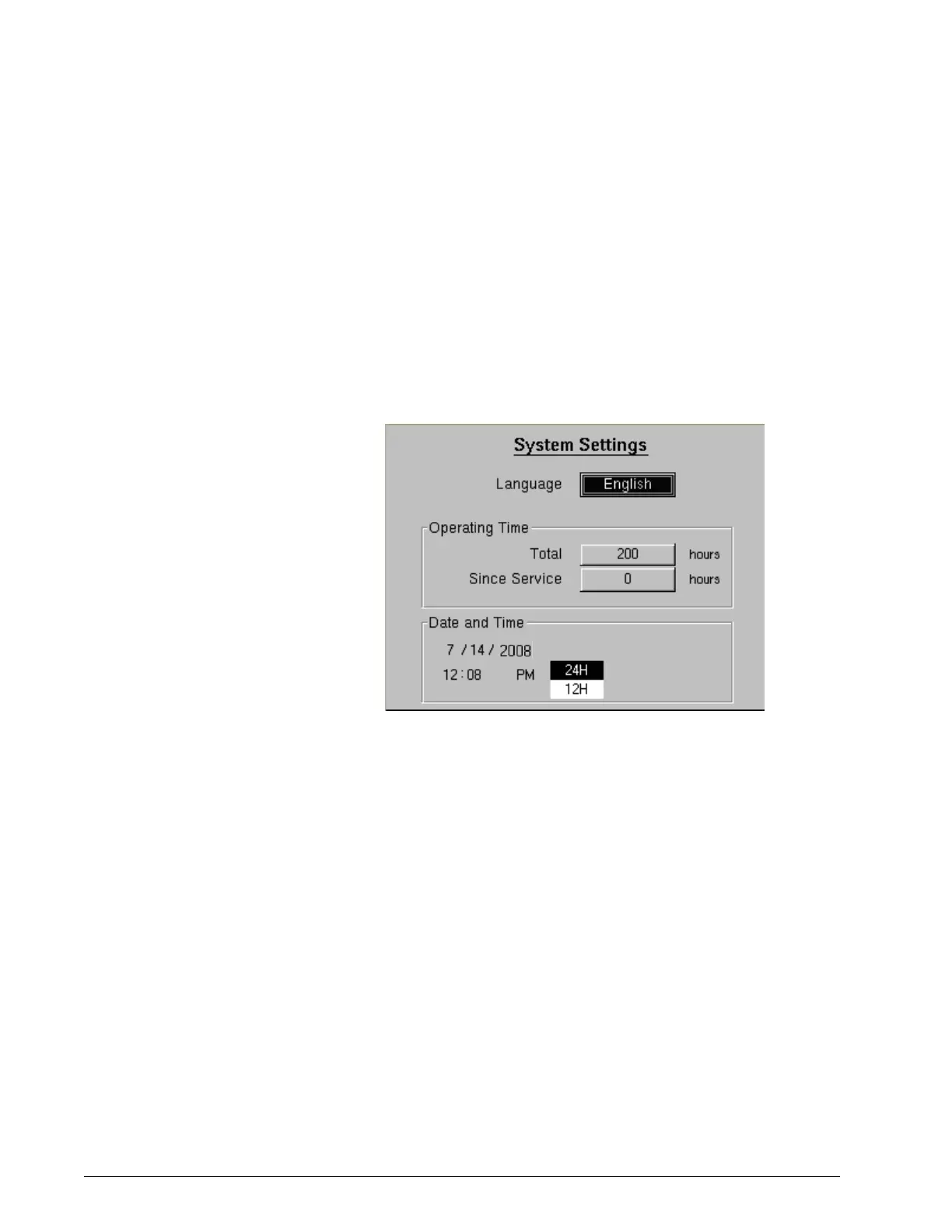
5.3 System Settings Use the System Settings screen (Figure 5-4) to select language, operating time
(total and service), and date and time. Follow these steps:
1. Use the arrow keys to highlight the parameter to change, then press
Enter.
2. Use the arrow keys to adjust a value or select a setting from a drop-
down menu, then press Enter (or press Cancel to exit without making a
change).
3. Press the Menu key to return to the main menu.
Figure 5-4: Diagnostic Mode: System Settings Screen
NOTE: Operating times increment based on power-on hours.
• Do not adjust Total time unless replacing the user interface PCB. If
so, reset Total time to the original number of hours.
• Once the Since Service time is reset, it starts counting from 0 hours
and cannot be set to a new elapsed time.
• Once a new language is selected, a window appears notifies you that
the language is being updated, and that the ventilator will shut down
in 5 seconds. The new language is displayed when the ventilator
restarts.


 To Next Page