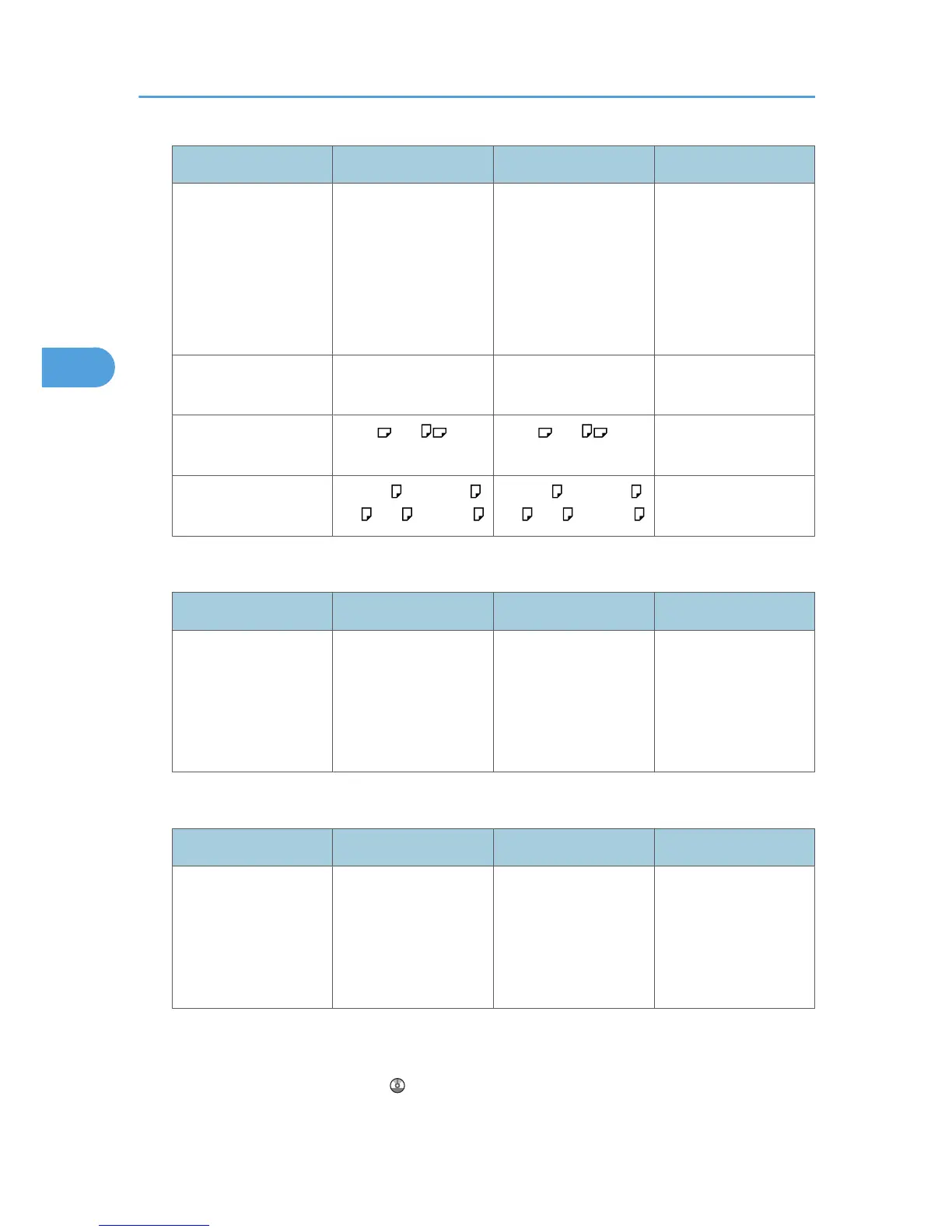
Paper type and weight Metric version Inch version Paper capacity
Thick Paper
*6
106 - 256 g/m
2
, 28 -
68 lb.
*5
Custom size
Vertical: 90.0 - 305.0
mm
Horizontal: 148.0 -
600.0 mm
*5
Custom size
Vertical: 3.55 - 12.00
inches
Horizontal: 5.83 -
23.62 inches
OHP transparencies
*8
A4 8
1
/
2
× 11
*7
*9
Label paper (adhesive
labels)
B4JIS , A4 B4JIS , A4 1 sheet
Envelope Com10 , Monarch ,
C5 , C6 , DL Env.
Com10 , Monarch ,
C5 , C6 , DL Env.
Tray 3 (LCT) (optional)
Paper type and weight Metric version Inch version Paper capacity
60 - 105 g/m
2
, 16 -
28 lb.
Thick Paper
106 - 256 g/m
2
, 28 -
68 lb.
*10
A4
*10
8
1
/
2
× 11
1,000 + 1,000 sheets
*7
Large capacity tray (LCT) (optional)
Paper type and weight Metric version Inch version Paper capacity
60 - 105 g/m
2
, 16 -
28 lb.
Thick Paper
106 - 169 g/m
2
, 28 -
45 lb.
*10
A4
*10
8
1
/
2
× 11
1200 sheets
*7
*1
The paper size is detected automatically.
*2
Select the paper size in System Settings. For details about Tray Paper Size: Tray 2-4, see “System Settings”,
Network and System Settings Guide .
3. Adding Paper
90



 To Next Page