33
Basic Blade Requirements
10" Diameter
Blades marked for 5,500 RPM or higher
5/8" Diameter Arbor Hole
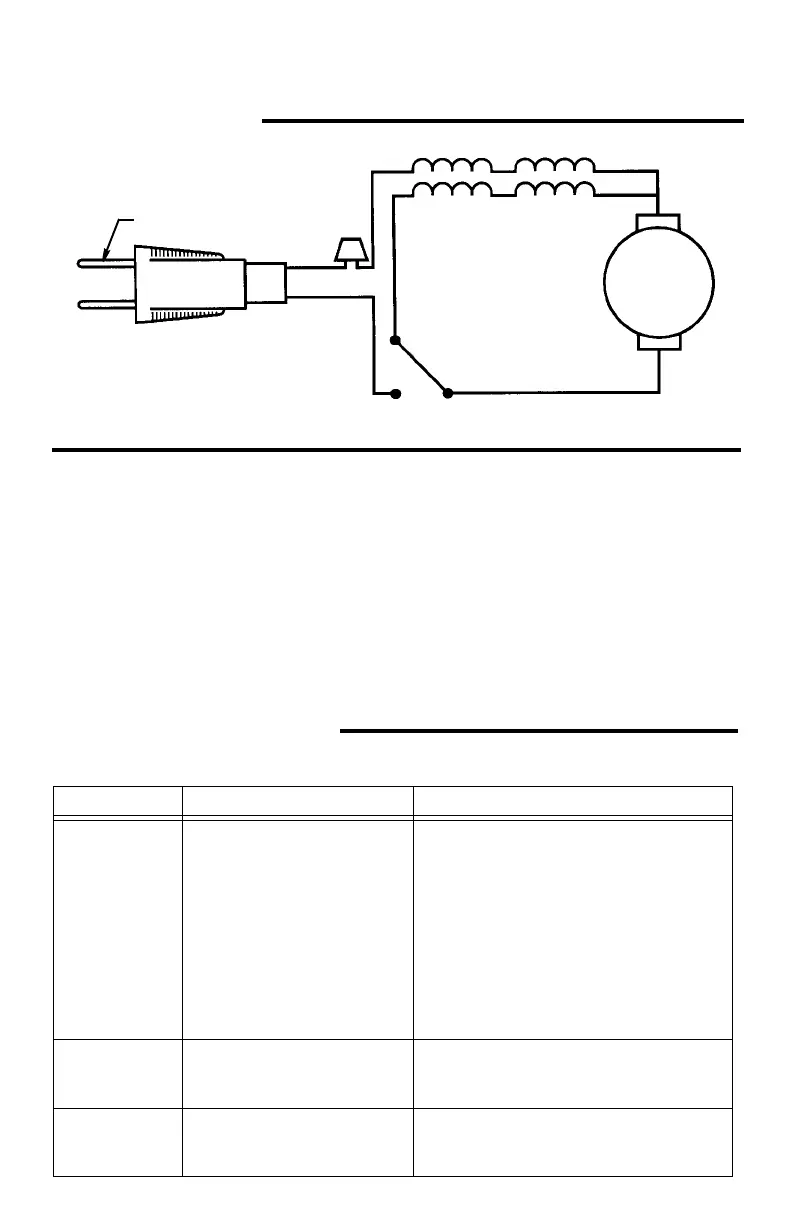
Wiring Diagram
Troubleshooting Of Brake By
Qualified Service Person Only
1. Check commutation at no load. If there
is a heavy sparking which follows the
curvature of the commutator replace
the armature.
2. To continue trouble shooting, now
unplug the power cord.
3. Install new brushes, especially if
delayed come-in of brake has been
noticed before failure.
4. Check brake circuit for continuity:
Remove motor cap and brushes. Use
ohmmeter to check continuity from
brush terminal to brush terminal. If
open, locate exact place using ohmme-
ter. As indicated by test, tighten con-
nection, replace field assembly, or
replace switch.
5. After repair, check direction of blade
rotation vs. guard arrow.
Troubleshooting Guide
Motor
Power Cord
White
Wire
Black
White
Gray
2 N.C.
1 COM
3 N.O.
Field Winding
Brake Winding
Black
Brush #1
Armature
Brush #
Blue
SPDT Switch
Nut
Wide Blade
Black
PROBLEM PROBABLE CAUSE SUGGESTED CORRECTIVE ACTION
Brake does not
stop blade
within 6 sec-
onds.
1. Brushes not seated or
lightly sticking.
2. Motor brake winding
overheated from use of
not-recommended blade
or rapid on/off cycling.
3. Arbor screw loose.
4. Other.
-Inspect/clean/replace brushes
(see maintenance section).
-Use a recommended blade.
-Let cool down
-Retighten
-Get Authorized service. Check motor
brake winding, switch, condition of
commutator.
Motor does not
start.
1. Fuse.
2. Brushes worn.
3. Other.
-15-Amp time delay fuse, or circuit breaker.
-See “Maintenance” section.
-Get Authorized service.
Brush sparking
when switch
released.
1. Normal-automatic brake
working properly.
-None


 To Next Page