3.1. Password Protection
Password protection can be enabled to prevent unauthorized access to
set-up screens, by default password protection is not enabled.
Password protection is enabled by selecting a four digit number other than
0000, setting a password of 0000 disables the password protection.
3. Programming
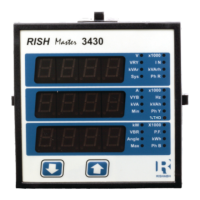
The following sections comprise step by step procedures for configuring the
3430 for individual user requirements.
To access the set-up screens press and hold the “
Key simultaneously for 5 seconds. This will take the User into the Password
Protection Entry Stage (Section 3.1).
Down” and “ Up”
VYB
VRY
KVAr
Sys
V
A
KVA
Min
KW
VBR
Angle
Max
x1000
KVArh
x1000
x1000
IN
Ph R
Hz
KVAh
Ph Y
P.F.
KWh
Ph B
KAh
%THD
9


 To Next Page