29
When Paper Runs Out
Loading Paper in the Standard Tray
Do Not Use These Paper Types
Using these paper types may cause problems such as paper jams.
• Paper that does not comply with the conditions in the
basic specications*
• Paper with a processed surface, such as thermal paper
or carbon paper
• Curled paper (3 mm (1/8") or more)
• Paper with wrinkles
• Bent paper
• Torn paper
• Paper with ripples
• Coated paper such as art paper
• Paper with jagged edges
• Glued paper
• Paper with holes
• Gloss paper for photographs
• Transparencies
• Synthesized paper (Yupo)
* For more information on basic specications, see the "User's Guide".
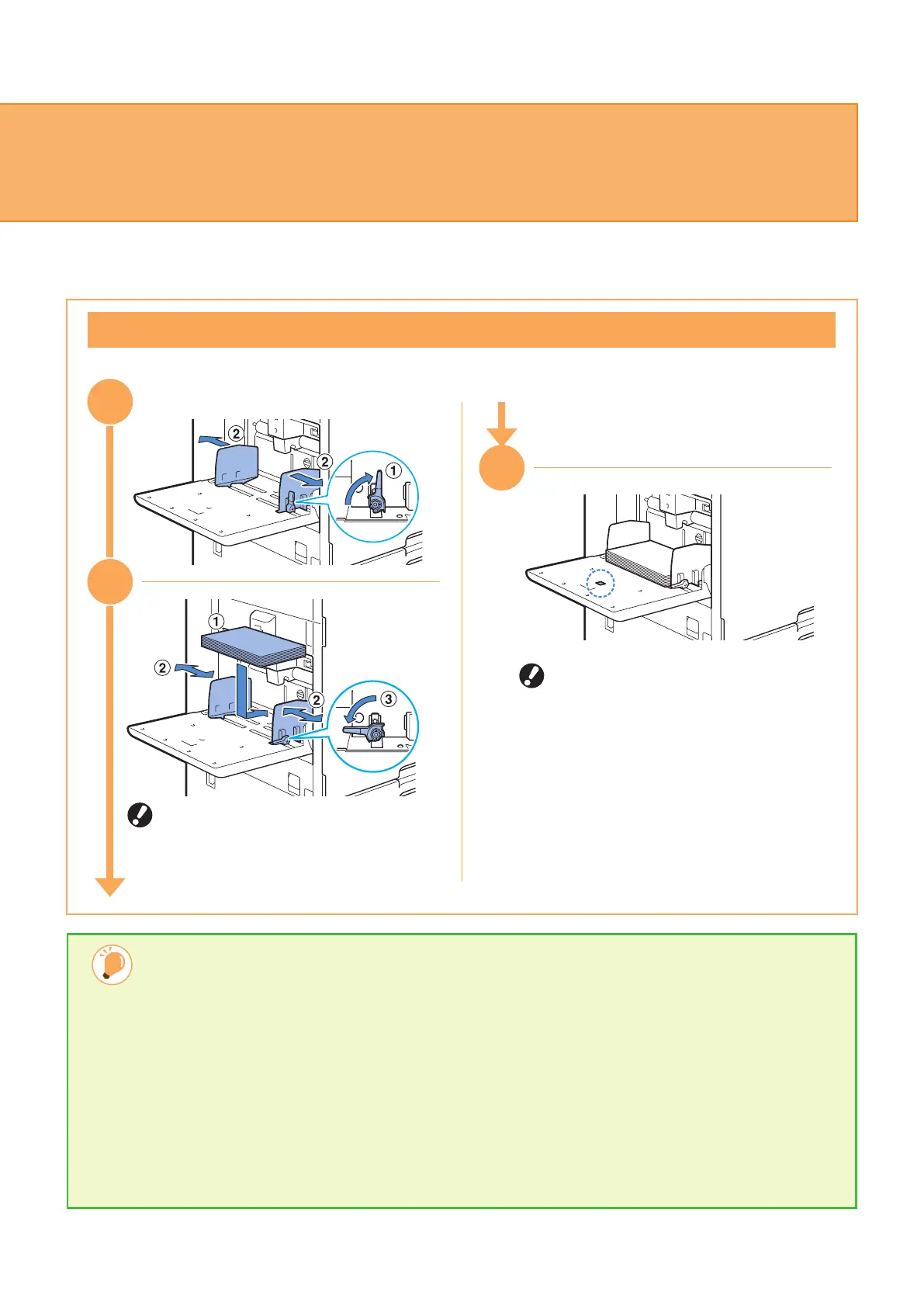
The machine detects the paper size
based on the guide position. Make sure
to position the guides against the edges
of the paper.
•
Do not place spare paper on the paper
size detection sensor when loading A4
or A5 size paper. If the sensor is
blocked, the machine cannot detect the
paper size correctly.
•
When you have switched to a dierent
type or size of paper, update the
standard tray settings from [Home]
screen - [System Info] -
[Paper Tray Setting].
Load the standard tray with special paper such as thick paper, postcards, or envelopes.
3
1
33
32
ComColor FT Series Quick Guide



 To Next Page