32
Periodically clean the scanner to ensure optimal image quality for copies and scans.
Scanner Care
Routine Care
Foreign matter such as dust, dirt, ink, glue or
correction uid on the platen glass or white sheet of
the ADF may reduce the quality of copies or scans.
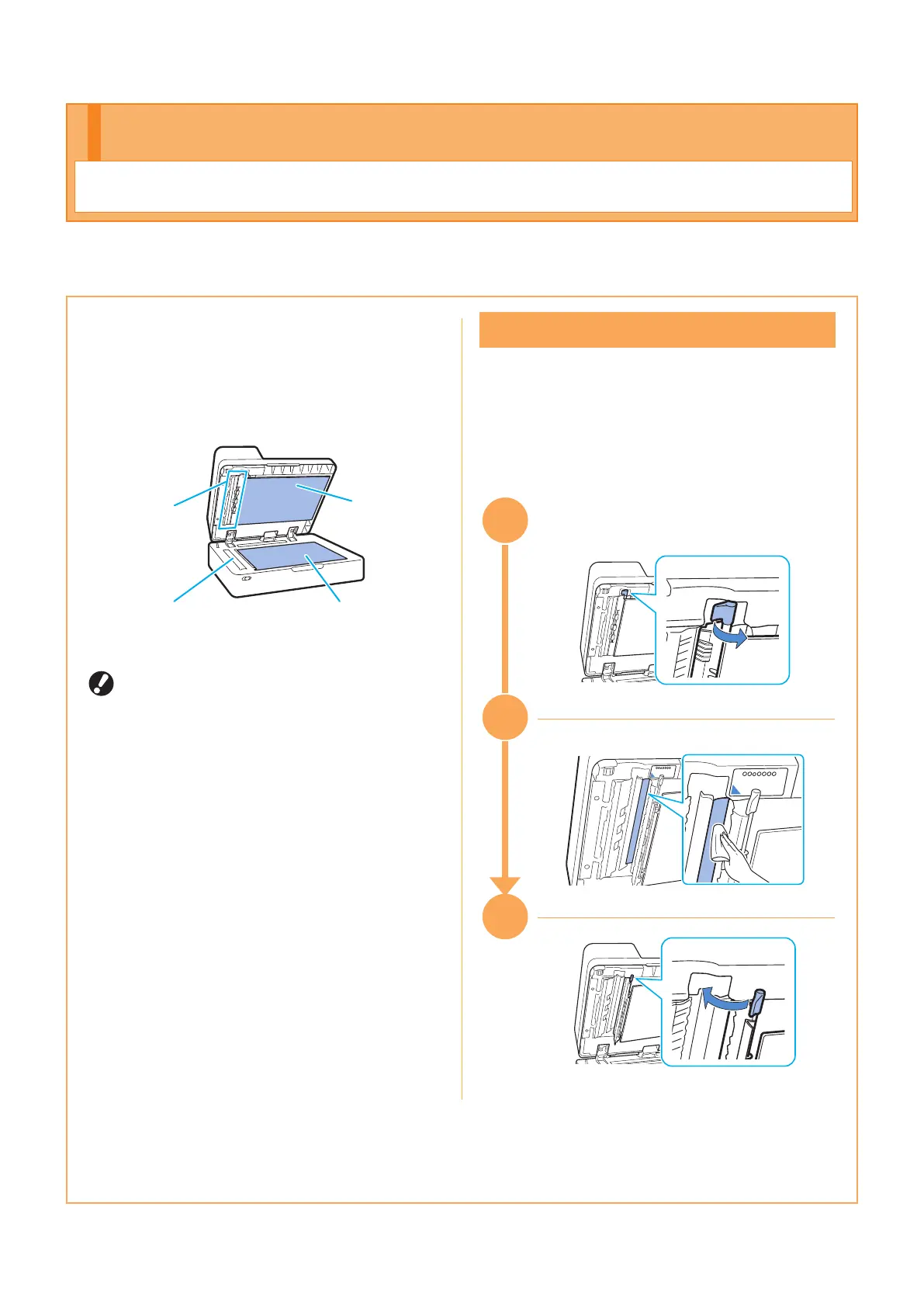
Gently wipe the areas indicated below several times
with a soft cloth.
Scanner glass (Lower)
• White sheet
• Scanner
glass (Upper)
Platen glass
Original pad
• Do not perform operations other than those
described in this guide. To adjust or repair
this machine, make sure to contact your
dealer or authorized service representative.
• The platen glass is fragile. Never touch it
with hard objects or expose it to impact.
Scanner Glass
If the scanner glass is dirty, black streaks may
appear on copies and scans.
Wipe the scanner glass with a soft cloth.
Follow the procedure below when wiping the
scanner glass on the top part of the scanner.
3
1
33
32
ComColor FT Series Quick Guide



 To Next Page