15
Note: if you change a camera zoom, you have to move and adjust the position circle on the beam image again.
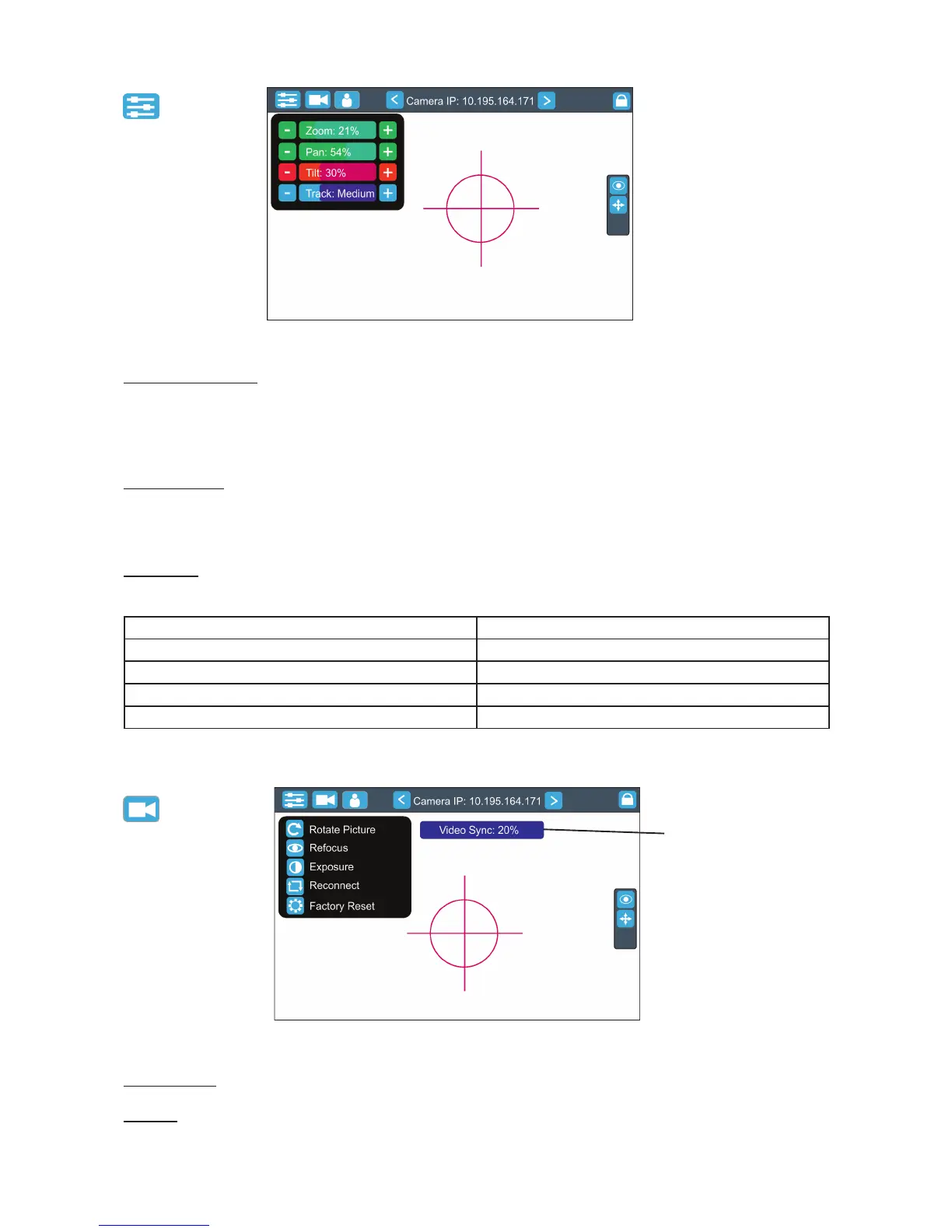
Sliders menu
Camera Zoom slider- use it to change a zoom of currently selected camera. A sensitivity of a camera zoom
can be set in three levels: low (green slider), medium (yellow slider) and high (red slider).
To change the sensitivity level of the camera zoom, the camera zoom has to be assigned to some jog-wheel
of the FollowSpot Controller, please see the chapter "Functions mapping" how to change sensitivity level of a
slider. After changing of zoom size, picture is automatically focused.
Pan/Tilt sliders - use them to move a moving head to the desired position. A Sensitivity of pan/tilt movement
can be set in three levels : low (green slider), medium (yellow slider) and high (red slider).
In order to switch the sensitivity of pan or tilt movement to desired level, press and hold the PAN (5) or TILT (6)
button until the colour of fader is changed.
Track slider- use it to set desired level of speed of pan/tilt movement. Each level of the track slider responds to
the DMX value of the Pan/Tilt speed channel in DMX chart of BMFL xture:
Track level DMX value on the Pan/Tilt speed channel
Smooth 0
Fast 1
Medium 10
Slow 20
Camera menu
Rotate Picture- use this item to rotate a picture on the touch screen 180 degrees from current orientation.
Refocus- use this item to focus an image on the screen (Focus of the camera is set to the "One shot focus "
mode which means that picture is focused automatically after zoom change and the item Refocus allows to
focus the image when the zoom is without change.
video synchronization
eld


 To Next Page