23
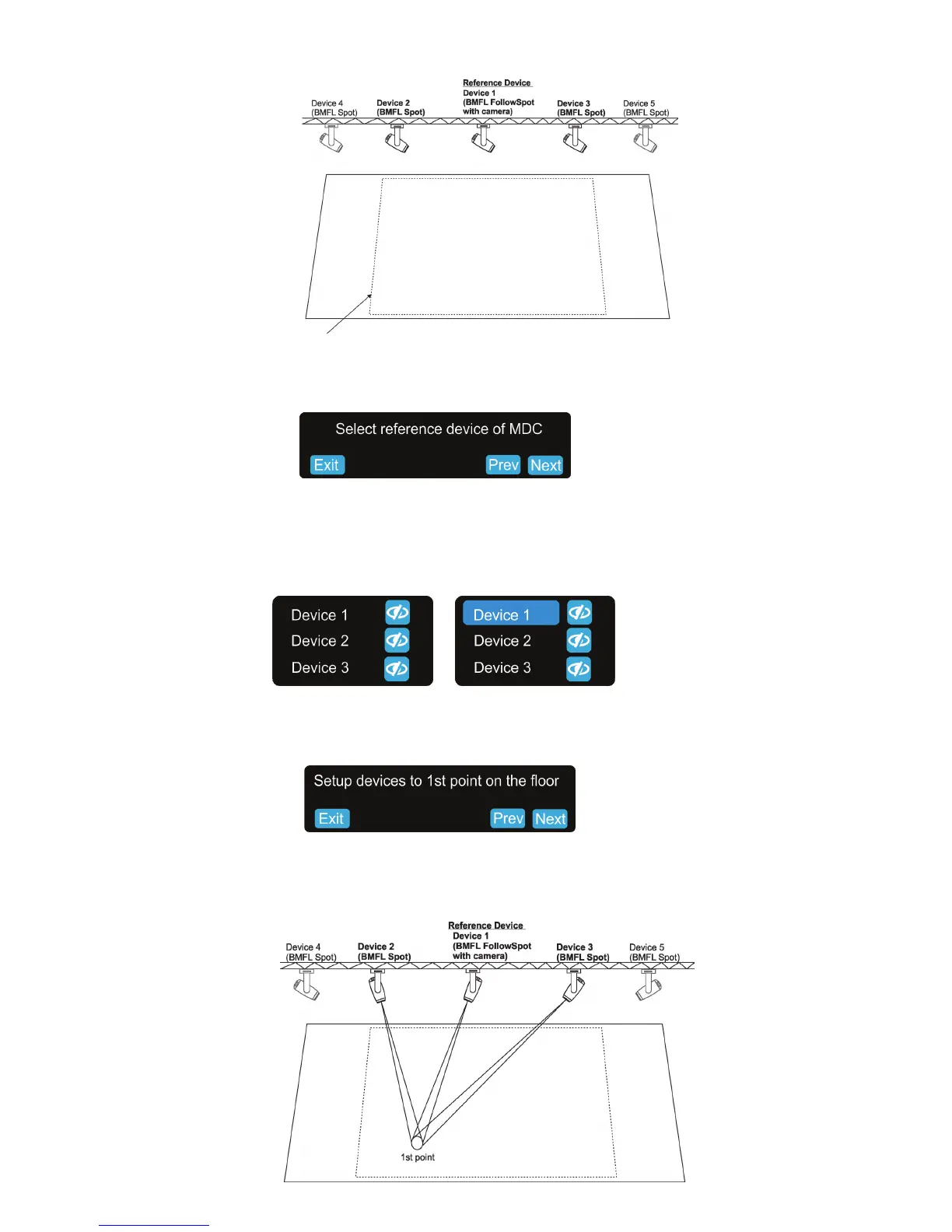
Three xtures are selected for the follow spot operation
3. The following massage will appear on the screen:
Select desired reference device from devices intended for the follow spot operation (the reference device should
be a device with a camera /BMFL FollowSpot with camera or RoboSpot Motion camera)/ and should not be
placed on the edge of xtures row, optimal position is in the middle of xtures /if it is possible/, in this case it
is the Device 1) and touch the Next button.
The pan/tilt position of the reference device is directly controlled by means of the RoboSpot handles.
The pan/tilt positions of remaining devices in the follow spot operation are calculated in relation to the reference
device.
Touch the Next button.
4.The Following massage will appear on the screen:
Zoom and iris is automatically set to the narrow beam at all devices used in the follow spot operation.
Activate the device 1 (by touching desired device button ), focus it (by means of the FollowSpot Controller) and
aim it to one point on the oor (by means of the RoboSpot handles) as exactly as possible.
Repeat this action for the device 2 and device 3.
Exit -cancels MDC setup
Next - goes to next step
Prev - goes to previous step
Working area for the follow spot operation


 To Next Page