Robotiq inc. © 2016 26
3.7 Installation for Universal Robots
The table below shows which Robotiq software to use with your Universal Robots’ controller. If you are using a CB3 or CB3.1 controller, it is recommended
to use the 2-Finger Gripper URCaps Package.
Robotiq sotware Universal Robots' controller version
CB1 CB2 CB3 CB3.1
Driver Package
(includes Gripper toolbar)
Incompatible Compatible Compatible Compatible
2-Finger Gripper URCaps Package
(includes Gripper toolbar and Gripper node)
Incompatible Incompatible Compatible Compatible
Refer to the appropriate section depending on your controller version:
Section 3.8 covers the installation of the 2-Finger Gripper URCaps Package.
Section 3.9 covers the software installation when not using URCaps.
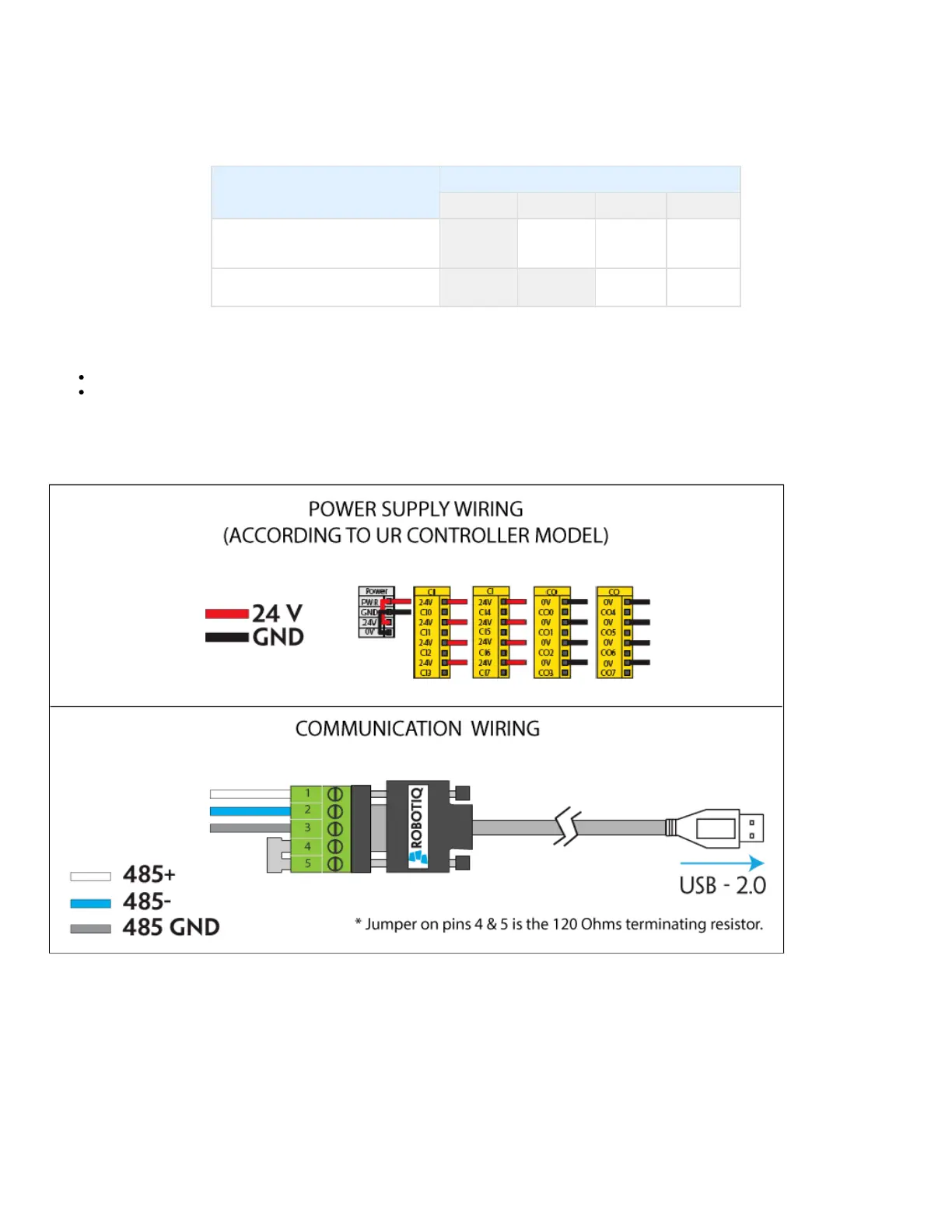
Prior to any software installation on Universal Robots, connect the white, blue and bare wires to the Robotiq RS-485 signal converter
(ACC-ADT-RS485-USB) as shown in Figure 3.7.1. Also connect the red (24V) and black (0V) wires in the controller according to Figure 3.7.1.
Figure 3.7.1 : 2-Finger Adaptive Robot Gripper wiring to Universal Robots’ controller.



 To Next Page