Robotiq inc. © 2016 37
1.
2.
Control using registers:
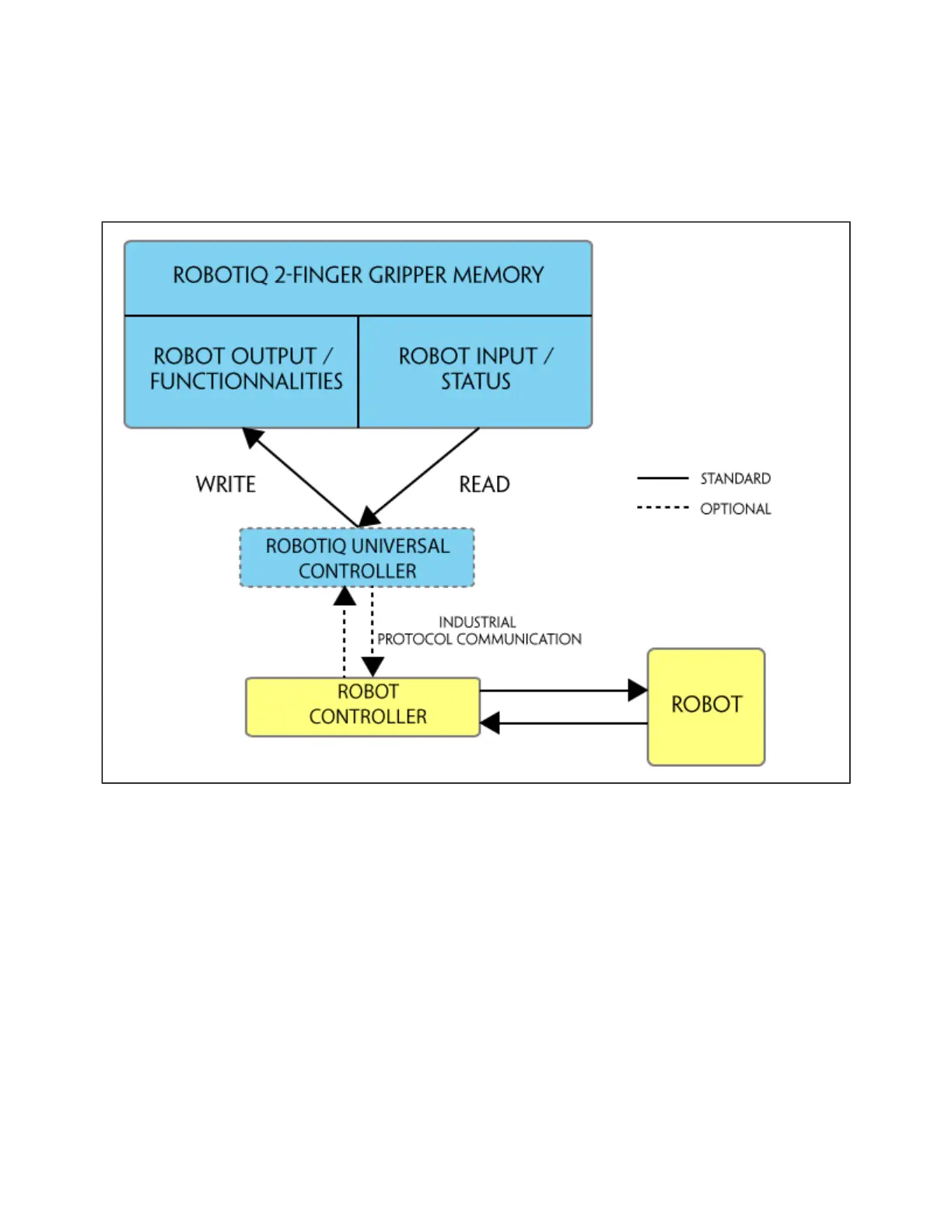
The Gripper has an internal memory that is shared with the robot controller. One part of the memory is for the robot output; gripper functionalities. The
other part of the memory is for the robot input; gripper status. Two types of actions can then be done by the robot controller :
Write in the registers to activate ;robot output functionalities
Read in the registers to get the of the Gripper.robot input status
Section 4.2 will map the different registers used to control the Gripper or to read its status while will detail the output (write) register functionsSection 4.3
and will detail the input (read) register status. Figure 4.1.1 is a representation of the memory and the control logic of the Gripper.Section 4.4
Figure 4.1.1 : 2-Finger control logic overview
Control using packages :Universal Robots
Robotiq provide packages to be used with either (require controller CB3 or higher) or using subprograms (for controller CB2).Universal Robots URcaps
See for instructions on how to use the , this method will provide you with a to test and a tosection 4.8 URcaps Gripper Gripper Toolbar Gripper node
program via the URcaps tabs.
See on how to use without , this method will provide you with a similar but robot program will be done using section 4.9 URcaps Gripper Toolbar subprogram
and .s scripts



 To Next Page