www.cel-robox.com
5.0 AutoMaker Soware
5.4 Layout Screen
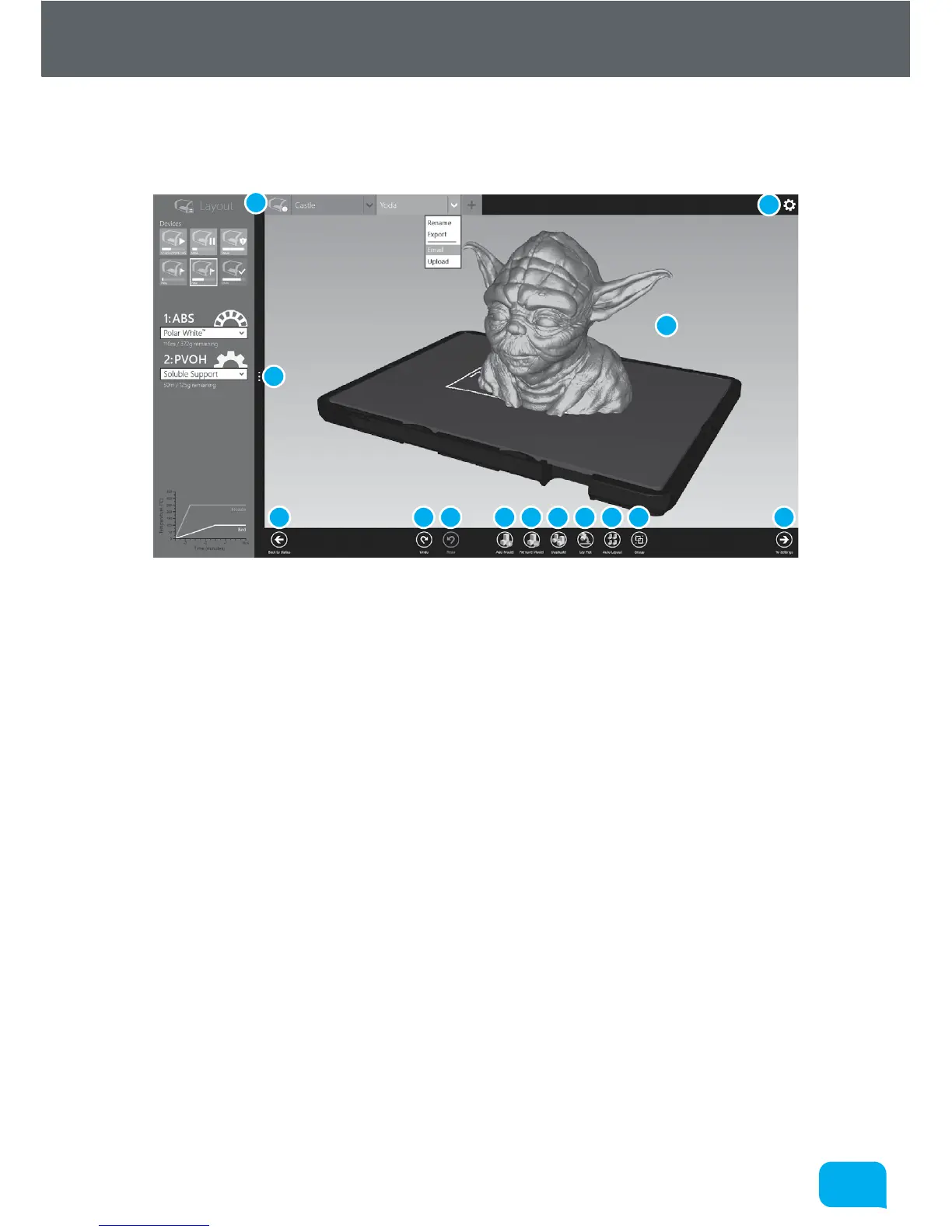
This section explains how to lay out objects on the bed and prepare for printing.
1 Return to Status Screen 8 Auto Layout All Objects
2 Undo Previous Change 9 Group/Ungroup Objects
3 Redo Change 10 Preferences
4 Add New Model 11 Go To Settings Screen
5 Remove Selected Model 12 Model Display
6 Duplicate Selected Model 13 Advanced Settings
7 Lay Model Flat
• Preferences
This displays the AutoMaker™ preferences page - see section 5.6.
• Model Display
This displays a preview of the selected print job, showing the print bed and
any objects you have added, arranged as they will be printed. You can rotate
the view by clicking the right mouse button and dragging , pan around by
holding the <Alt> key and dragging with the right mouse, and zoom by rolling
the mouse wheel.
1
1
2 3 4 5 6 7 8 9
10
11
12
13



 To Next Page