EasyManua.ls Logo

Robustel R3000 Lite - PIN Assignment

Robustel R3000 Lite
111 pages
Print Icon
To Next Page IconTo Next Page
To Previous Page IconTo Previous Page
Loading...
Robustel R3000 Lite User Guide
RT_UG_R3000 Lite_v.3.0.1 19 May, 2017 15/109
Confidential
Note: You can choose the display type of USR LED. For more details, please refer to 3.26 Service > Advanced.
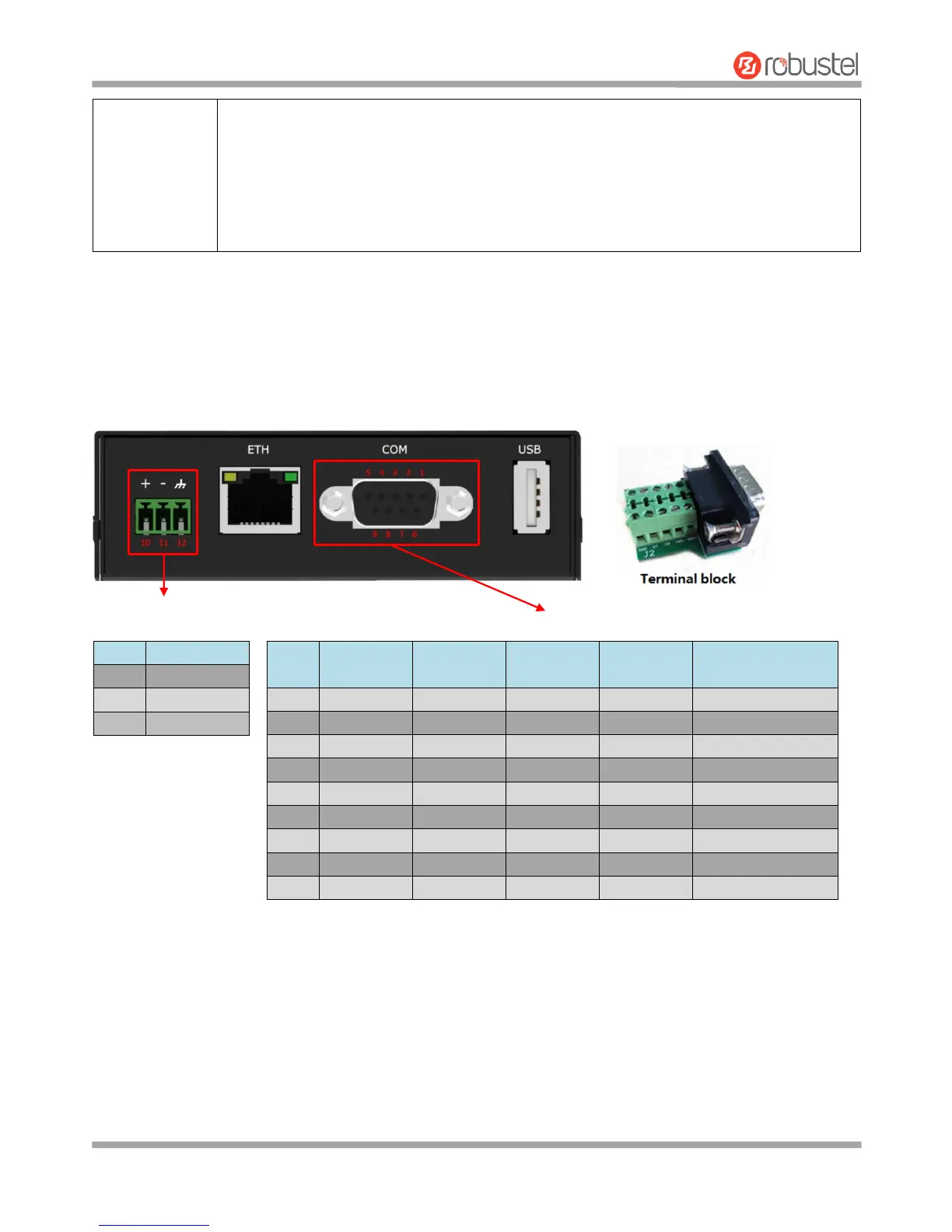
2.2 PIN Assignment
The R3000 Lite has been designed to be placed on a desktop. Below is the bottom view of the R3000 Lite.
DB9 female connector
001 AT command failed
010 no SIM card detected
011 need to enter the PIN code
100 need to enter the PUK code
101 registration failed
110 module error
111 not support the module
PIN
Polarity
10
Positive
11
Negative
12
GND
PIN
Debug
RS-232
RS-485
(2-wire)
Terminal
block
Direction
1
CR
--
Data+ (A)
485+
--
2
CT
RXD
--
RXD
Router Device
3
--
TXD
--
TXD
Router Device
4
DRXD
--
--
DT
Router Device
5
GND
GND
--
GND x 2
--
6
--
--
Data- (B)
485-
--
7
--
RTS
--
RTS
Router Device
8
--
CTS
--
CTS
Router Device
9
DTXD
--
--
DR
Router Device

Related product manuals