Robustel R3000 Lite User Guide
RT_UG_R3000 Lite_v.3.0.1 19 May, 2017 19/109
Confidential
2.8 Mount the Router
The router can be placed on a desktop or mounted to a wall or a 35 mm DIN rail.
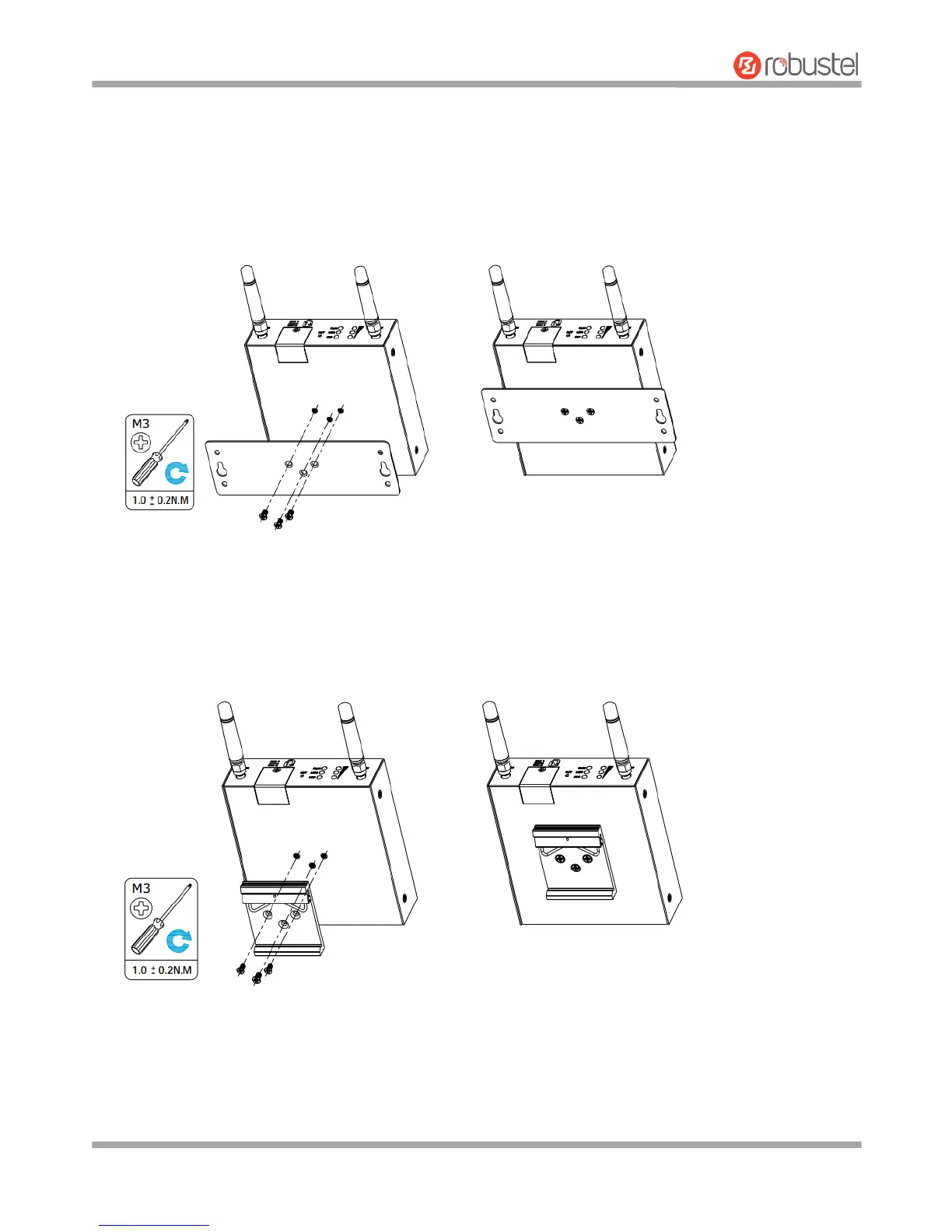
Two methods for mounting the router
1. Wall mounting
Use 3 pcs of M3*4 flat head Phillips screws to fix the wall mounting kit to the router, and then use 2 pcs of M3
drywall screws to mount the router associated with the wall mounting kit on the wall.
Note: Recommended torque for mounting is 1.0 N.m, and the maximum allowed is 1.2 N.m.
2. DIN rail mounting
Use 3 pcs of M3*6 flat head Phillips screws to fix the DIN rail to the router, and then hang the DIN rail on the
mounting bracket. It is necessary to choose a standard bracket.
Note: Recommended torque for mounting is 1.0 N.m, and the maximum allowed is 1.2 N.m.














 To Next Page