Controller Parameter Value Explanation
[CTRL1]
knob
ATTACK 0‒
127
Setsthefade-intime.Whenyousetthisto127,thefade-intimeisthree
seconds.
[CTRL2]
knob
HOLD 1‒
100
(%)
Thetimefromfade-intofade-outisdeterminedbyitsratiototheoverall
sampletime.
Forinstance,whenthisissetto100,fade-inandfade-outareappliedtothe
entiresample.Whenthisissetto50,fade-inandfade-outareappliedfrom
thebeginningofthesampletothemiddle.
[CTRL3]
knob
RELEASE 0‒
127
Setsthefade-outtime.Whenyousetthisto127,thefade-outtimeisthree
seconds.
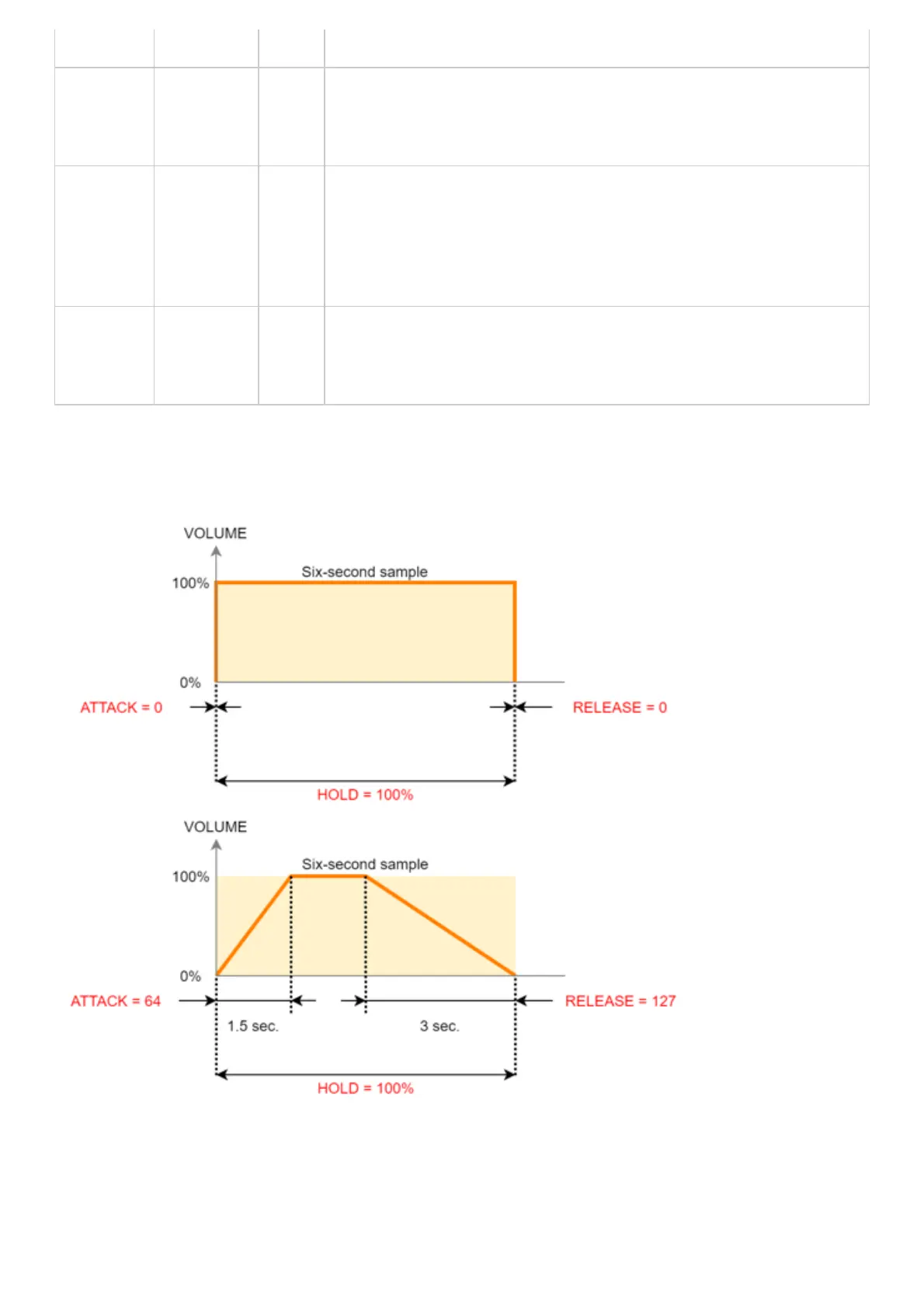
ExamplesettingsforATTACK,HOLDandRELEASE
Herearesomeexamplesofhowthevolumeofasix-secondsamplechangeswhenyousetdifferentATTACK,HOLDand
RELEASEvalues.



 To Next Page