EN
32
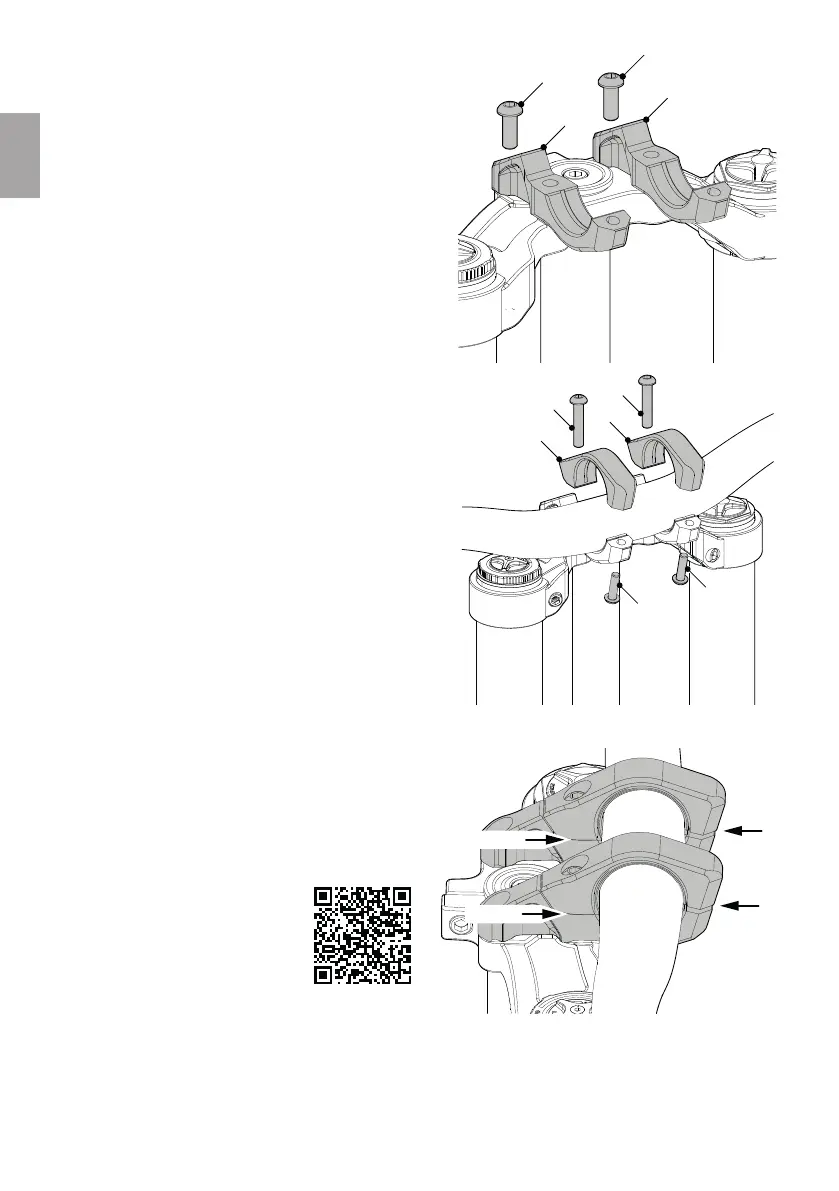
3.2.2 Reverse Black One Direct Mount D-2
1. Clean and degrease the lower leg arch and handlebar.
2. Place the lower clamping shells (1) of the stem on the
lower leg arch, screw the bolts (2/M6x15 mm) all the
way in and then turn them back a full turn.
3. Place the handlebar in the lower clamping shells (1).
4. Attach the upper clamping shells (3).
5. Turn the bolts (4/M6x30 mm) all the way in and then
back a full turn.
6. Screw in the bolts (5/M5x18 mm) two turns.
7. Centrally align the handlebar and adjust the angle
according to your preferences.
8. Tighten the four bolts (2/4) to a torque of 14 Nm.
9. Tighten the two bolts (5) to a torque of 8 Nm.
→ After mounting the bolts, a gap must be visible at
the front of the stem.
→ On the opposite side, however, there must be no
gap.
10. Adjust the headset play. Make sure to preload the
adjusting bolt by half a turn after adjusting the play.
Adjusting the headset play of a
Rock Shox Boxxer suspension fork
requires a few important steps.
Scan this QR code to access the user
manual of your Boxxer suspension
fork.
1
1
2
2
3
3
4
4
5
5
GAP
GAP
NO GAP
NO GAP



 To Next Page