© Rototilt Group AB 2018-03-16
C
A
B
10
D
9
11
4
8
3
7
2
6
1
5
English
EN
Configuration of ICS
i
INFO - Prole 0 is reserved for the installer and cannot
be modied by another user.
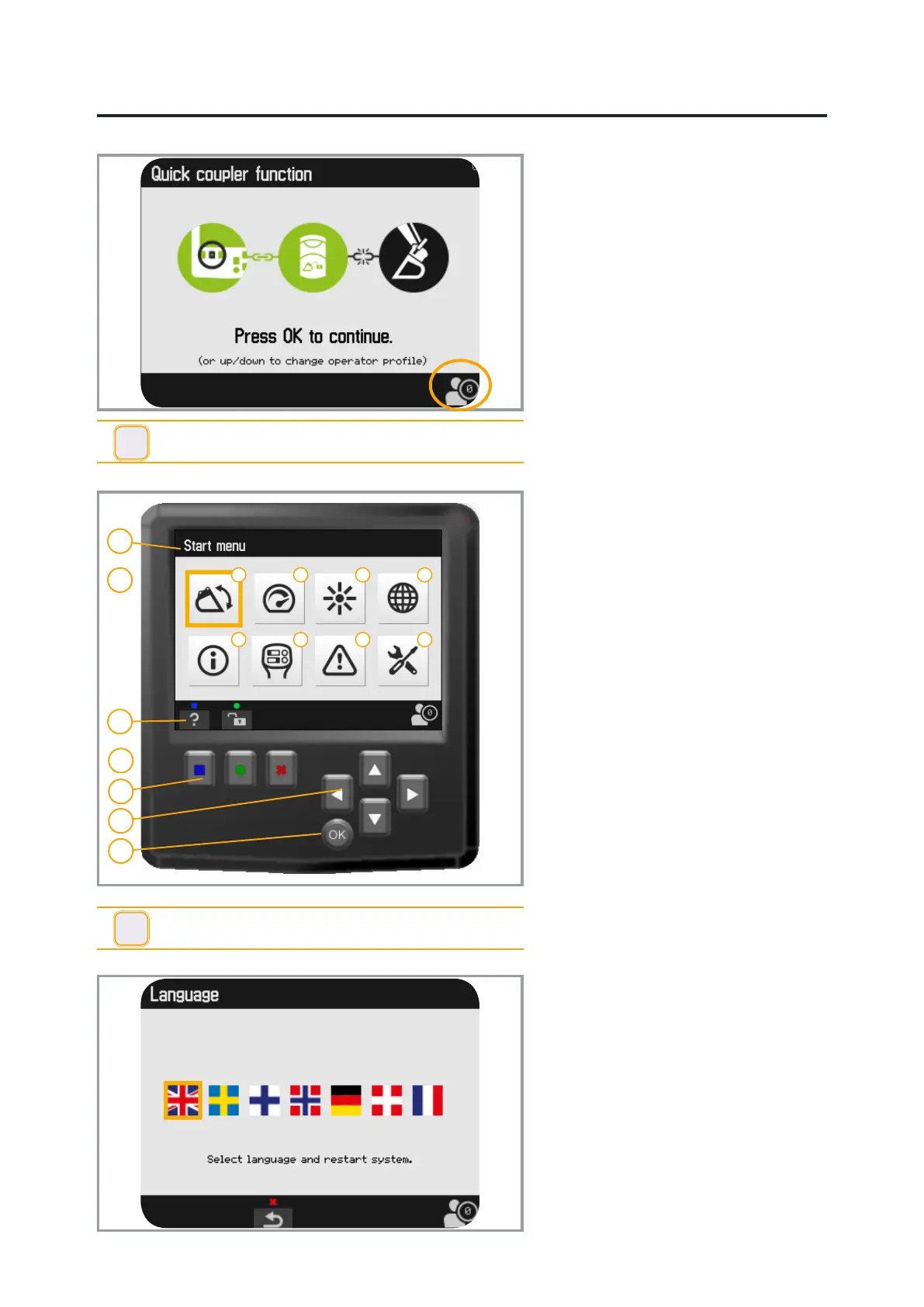
Display
ICS and ICS Direct are congured during
installation with the help of the display.
Operators can adjust settings on the
display and save them in individual
proles. The last selected prole remains
active after start-up; change if necessary.
The installer uses prole 0.
A. The top bar indicates the current menu
or numbered warnings. Also see alarm
list in the Schematics. section
B. 8 sub-menus are shown on the Start
menu:
1. Angles
2. Speed
3. Brightness
4. Language
5. Information
6. Handle
7. Troubleshooting
8. Settings
C. Icons are shown on the bottom bar. At
the left edge, the icons indicate which
function or function key activates in
the current view.
The current prole is shown in the
right corner.
D. The display has a total of 8 keys:
9. Three function keys
blue, green & red
10. Four arrow keys
Change values & navigate the menu
11. One key to conrm (OK).
Unless otherwise stated, make the
changes as follows:
Move the cursor using the arrow keys.
Conrm with OK.
Adjust the values with the arrow keys.
Conrm with OK.
Return to the previous menu using the
right function key (red).
Language
The language setting is changed via
the menu. The 7 options are; English,
Swedish, Finnish, Norwegian, German,
Danish and French.
Select the ag for the preferred language.
Conrm with OK. This change is enabled
only if the system is restarted.
i
INFO - A system restart is required to activate a change
in language.


 To Next Page