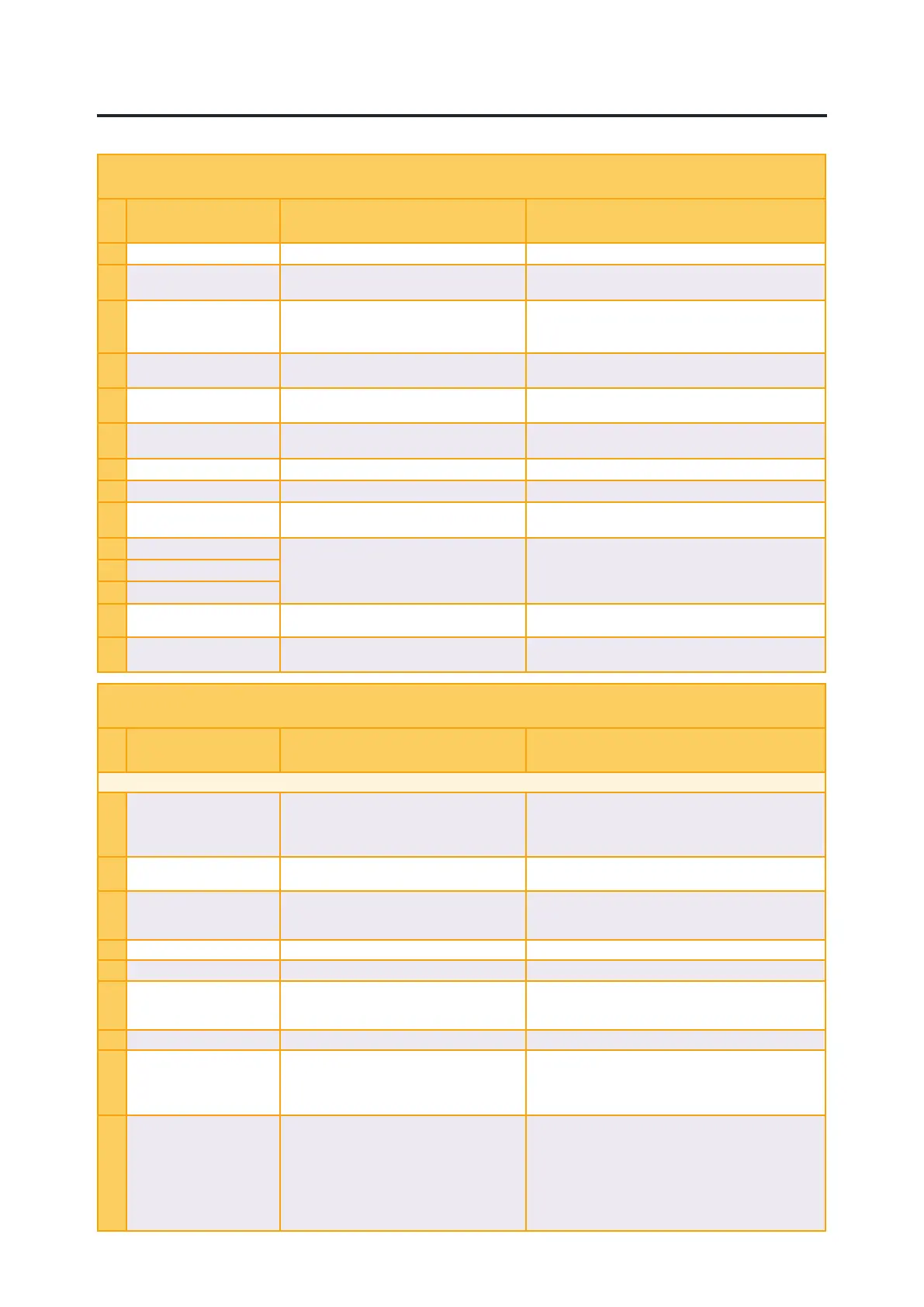
System error
Error message: Possible causes Remedial action
100
Software not started SW. Missing, possible Can failure Check CAN bus circuit.
101
No contact with Cabin unit CAN bus failure Check CAN bus circuit if orange led gives pulsating light.
If no leds are on , check PWR harness.
102
Wrong software in display Mismatch between software in display/ CCU
or unable to verify that software in display/
CCU are matching.
Check Info for differences in software version
Check CAN bus circuit.
110
Internal error Software error, firmware mismatch.
Will only show up in error log.
Contact the service workshop.
111
Output error Error detected on output, most likely shortcut
on digital output.
Check harness on indicated output
112
V-SYS error Input voltage too low/high, check system
voltage on machine.
Check harness for power supply if low, check alternator
if high.
113
V-OUT error N/A
114
Temp error. Internal temperature too low/high.
115
VREF-OUT error Error detected on 5V-output to rollers and
sensor’s.
Check 5V reference supply wires in harness to affected
function
116
VCC error Error detected on internal voltage. Contact the service workshop.
117
VSS error
118
VDD error
119
HW error Internal hardware error, most likely
inclinometer.
Contact the service workshop.
121
Slave unit disconnected Lost connection to slave unit, for example
expansion unit.
Check CAN bus circuit.
Overview - Alarm List
Application error
Error message: Possible causes Remedial action
For more detailed information regarding the alarms below, consult the alarmlist in the display.
1
Sensor circuit error, coupler! Input signal fault from the coupler sensor. Check the harness in terms of crush damage or open
circuit.
Check the sensor/ electrical swivel
Contact the service workshop.
2
Service 8h, 40h, 160h, 500h Service Refer to Instructions of Use Perform service according to Instruction of Use and
confirm.
3
Error coupler circ.1
Error coupler circ. 2
Error in output signal coupler 2=CCU 1=TCU Check the harness in terms of crush damage or open
circuit.
Contact the service workshop.
4
Wedge not in position! Quick coupler not closed Check the wedge, Refer to Instructions of Use
5
Wedge past position! No tool attached If correct: press OK, Refer to Instructions of Use
6
Coupler switch circuit defect! Input signal to TCU and CCU not synchronized Check the coupler switch harness in terms of crush
damage or open circuit.
Contact the service workshop.
7
Quick coupler open! If quick coupler not opened check wedge
8
Roller outside range! Voltage from roller outside range (0,5-4,5V).
Cable breakage, connector play or roller fault.
Check the harness to the joystick in terms of crush
damage or open circuit.
Restart the system.
Contact the service workshop.
9
Power output, feeder! Error in output signal from CCU to feeder
valve.
Cable breakage or electric coil fault.
Also valid for 0-5 Volt machine control
aplications.
Check the harness in terms of crush damage or open
circuit.
Check the condition of the valve.
Return the roller to the zero position.
Machine controll applications: Check PWM to analog
module, connectors and harness
Contact the service workshop.
© Rototilt Group AB
2018-03-06
Alarm:1
English
EN
EN -


 To Next Page