© Rototilt Group AB 2018-03-16
*
*
Not visible for operator when RPS is installed.
English
EN
Automatic Grade Control
Option only available with activated RPS
and established communication with
excavator system.
If the automatic tilt and rotation function
is included in the installed excavation
system, it can be controlled via ICS.
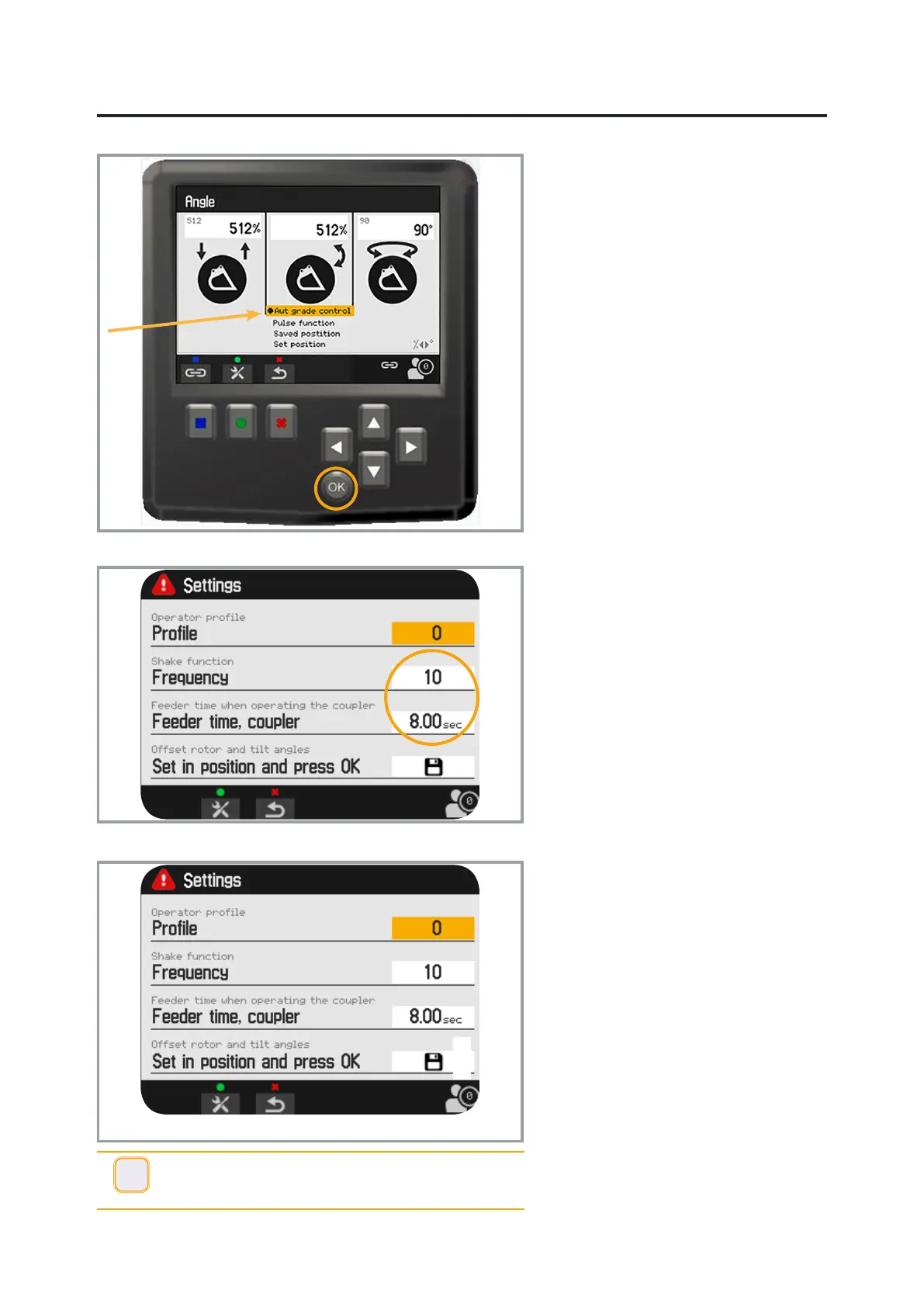
Select the icon for the Angles menu and
then conrm your selection with OK.
Select Auto grade control (AGC) in the
view on the display using the arrow keys.
Conrm your choice with OK.
Activate the function by pressing and
holding the button on the handle. This
is generally located on the right handle;
check against the handle sticker.
The function is only active in this view.
Shake function/Frequency
Select Frequency and adjust the
frequency of the shake function.
Pressurising
Select Feeder time Coupler and set the
required value (3-12 sec). The saved
value regulates the time that the quick
coupler locking function is pressurised.
Calibrate angles
In order for the angle display to work
correctly, it must be calibrated with the
right bucket.
Rotate the bucket to the zero position.
Position the bucket bottom at against
the surface.
Now highlight the icon to save (diskette),
using the arrow keys.
Conrm with the OK function key.
i
INFO -
If RPS is installed, angles are calibrated by an authorised
installation engineer.


 To Next Page