© Rototilt Group AB 2018-03-16 English
EN
Handle
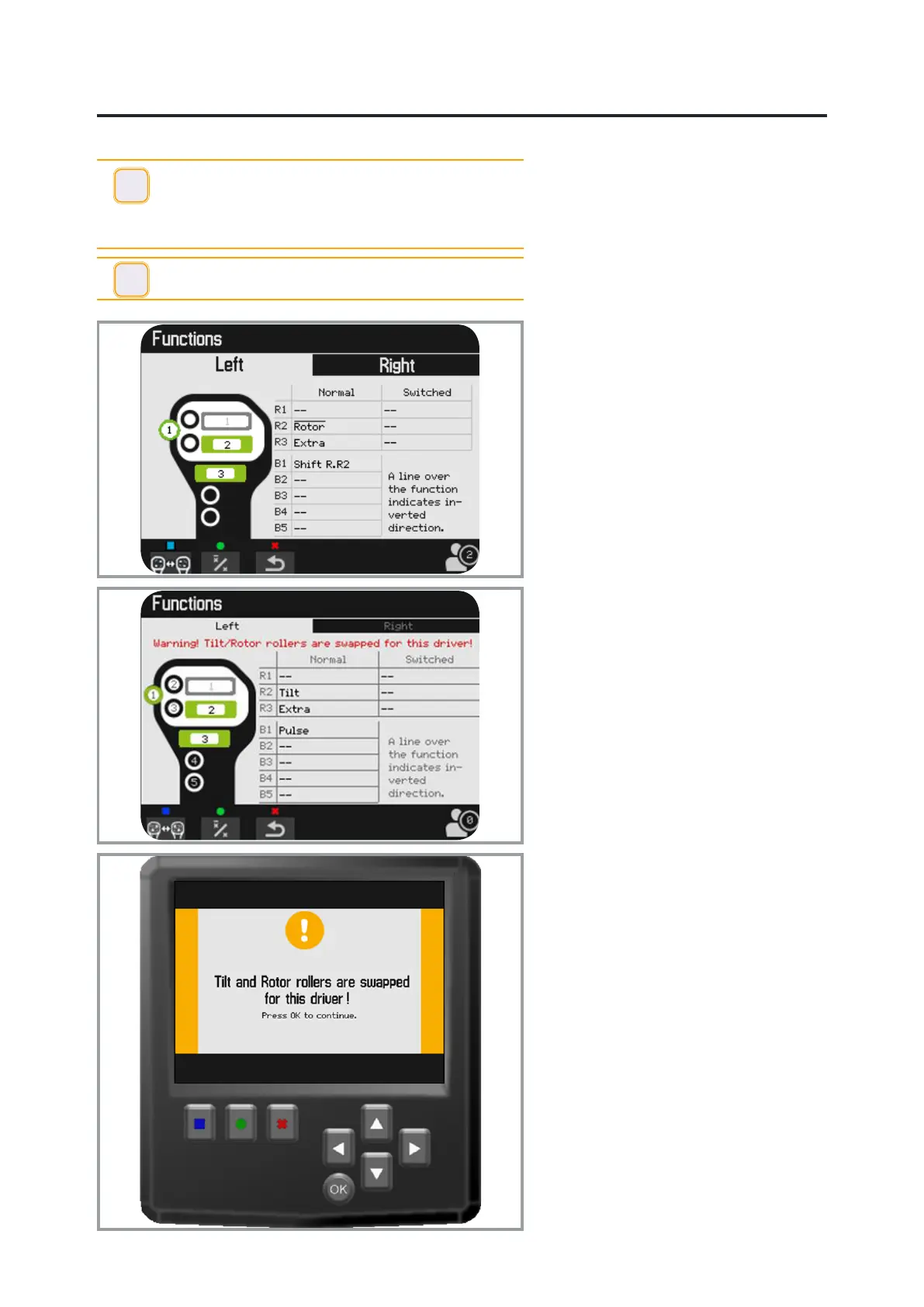
The functions of the rollers and switches
are described on the menu.
Information about handle conguration is
specied in three places: On the sticker,
on the display and in the Instructions for
Use for the base machine/excavator.
The roller direction can be changed:
select the function and conrm with OK.
Shift direction with x/x, middle function
button (green).
A dash above the function shows that it is
inverted. Conrm with OK.
The user can toggle the position of tilt
and rotation.
Switch the position using the left function
button (blue). A warning text will now be
displayed in the menu view.
A larger warning text is also displayed
upon each start-up of the system, and
upon each activation of the shut-off lever.
The warning must be conrmed with OK
to activate the tiltrotator’s functions.
The ability to switch positions for the
rotation and tilt functions should be used
as seldom as possible.
!
IMPORTANT - The base machine/excavator’s factory-
installed handles have been replaced with handles
adapted to the control system.
Carefully check the changed functions, for both the base
machine/excavator and alternative control.
i
INFO - Prole 0 is reserved for the installer and cannot
be modied by another user.


 To Next Page