Chapter 1 Operation Procedures
A
Operation Edition - 24
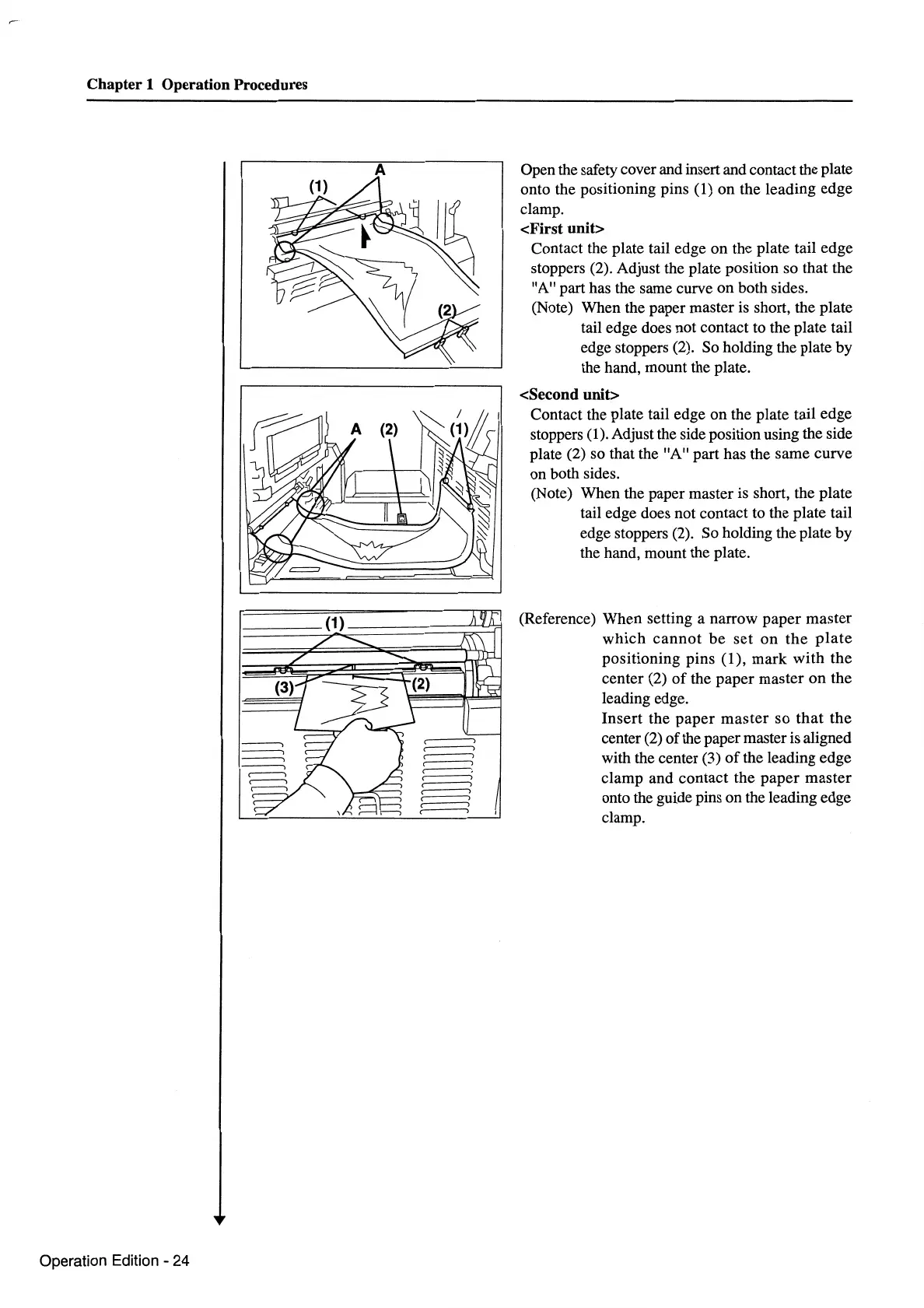
Open the safety cover and insert and contact the plate
onto the positioning pins
(1) on the leading edge
clamp.
<First unit>
Contact the plate tail edge on the plate tail edge
stoppers (2). Adjust the plate position so that the
"A" part has the same curve on both sides.
(Note) When the paper master
is
short, the plate
tail edge does not contact to the plate tail
edge stoppers (2). So holding the plate by
the hand, mount the plate.
<Second unit>
Contact the plate tail edge on the plate tail edge
stoppers
(1). Adjust the side position using the side
plate (2) so that the "A" part has the same curve
on both sides.
(Note) When the paper master is short, the plate
tail edge does not contact to the plate tail
edge stoppers (2). So holding the plate by
the hand, mount the plate.
(Reference) When setting a narrow paper master
which
cannot
be
set
on
the
plate
positioning pins (1), mark with the
center (2)
of
the paper master
on
the
leading edge.
Insert the
paper
master
so
that
the
center
(2)
of the paper master is aligned
with the center (3)
of
the leading edge
clamp and contact the paper
master
onto the guide pins on the leading edge
clamp.



 To Next Page