Chapter 2
!Press
,with
Semiautomatic
Plate
Cljangerl
Plate Mounting and
Removing,
and
Diagonal
Image Adjustment Process
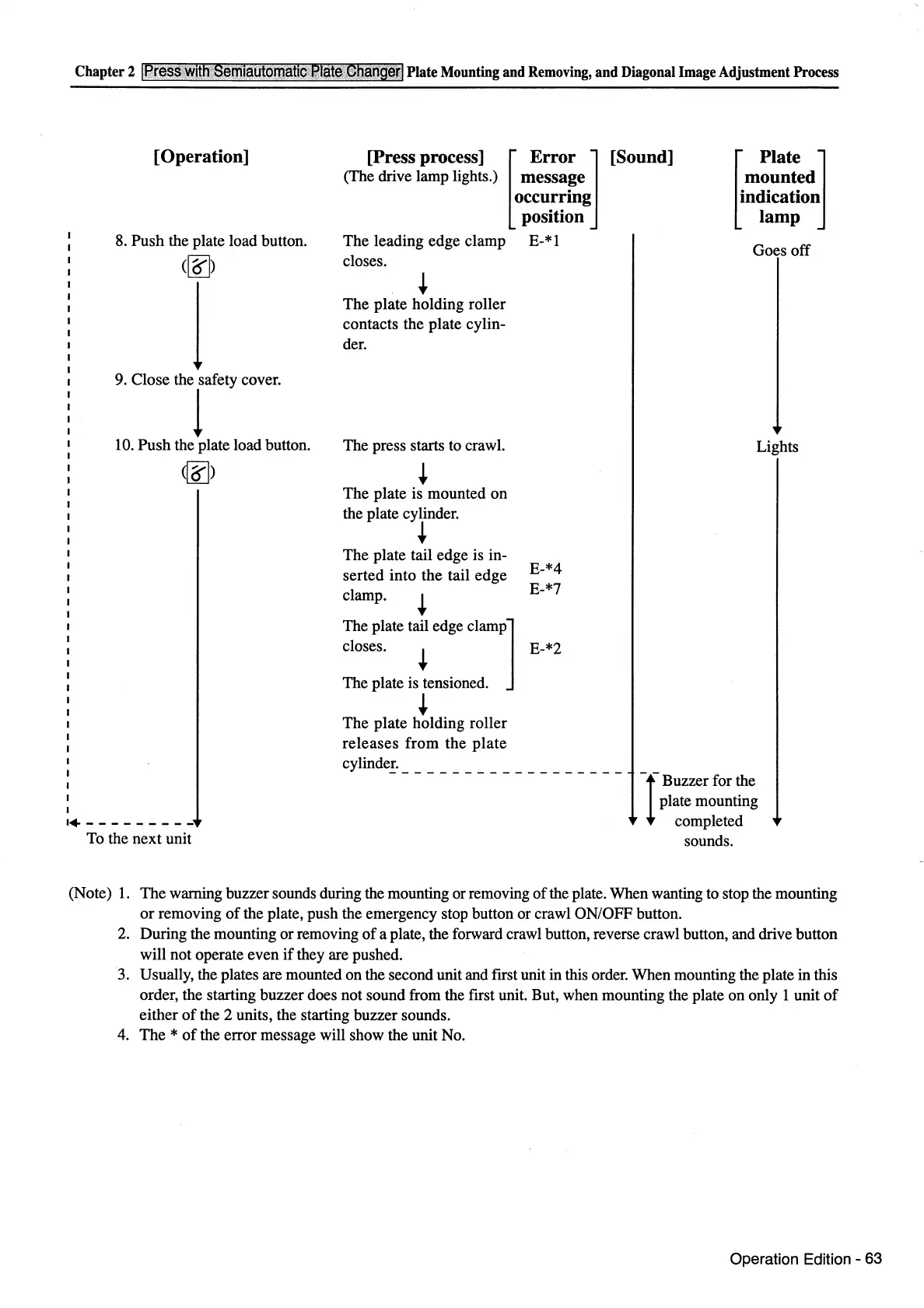
[Operation]
8.
Push the plate load button.
(~)
l
9.
Close the
rfety
cover.
10. Push the plate load button.
(~)
[Press process] [
Error
]
(The drive lamp lights.) message
occu.r~ing
position
The
leading edge clamp E-* 1
closes.
+
The
plate holding roller
contacts the plate cylin-
der.
The press starts to crawl.
The
plate is mounted on
the plate cylinder.
+
The plate tail edge is in-
serted into the tail edge
clamp.
E-*4
E-*7
The plate tail edge clamp]
closes.
+ E-*2
The plate is tensioned.
+
The
plate holding roller
releases
from
the
plate
[Sound]
~
Plate J
mounted
indication
lamp
Goes off
Lights
cylinde!.
_________________
_
-1-
Buzzer for the
plate mounting
completed
sounds.
·---------
To the next unit
(Note)
1.
The
warning buzzer sounds during the mounting or removing
of
the plate. When wanting to stop the mounting
or
removing
of
the plate, push the emergency stop button or crawl ON/OFF button.
2. During the mounting or removing
of
a plate, the forward crawl button, reverse crawl button, and drive button
will not operate even
if
they are pushed.
3. Usually, the plates are mounted on the second unit and ftrst unit in this order. When mounting the plate in this
order, the starting buzzer does not sound from the ftrst unit. But, when mounting the plate on only 1 unit
of
either
of
the 2 units, the starting buzzer sounds.
4.
The *
of
the error message will show the unit No.
Operation Edition - 63



 To Next Page