2-10 3rd Ed. Sep 30, 06
S–TEC
ACTION RESPONSE
20. Select local VOR frequency on
Navigation Receiver.
------
Note: Proceed to either step 21 (HSI) or step 26 (DG).
21. Turn Course Pointer until CDI
needle is centered.
------
22. Press NAV mode selector switch
to engage navigation mode.
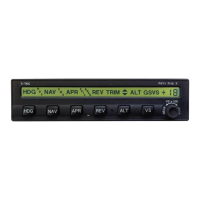
NAV, VS, and +0 annunciations only
appear on AP display, as shown in
Fig. 2-11.
23. Turn Course Pointer left until CDI
needle deflection is 2 dots right of
center.
A/C Control Wheel turns to the right.
24. Turn Course Pointer right until
CDI needle deflection is 2 dots left of
center.
A/C Control Wheel turns to the left.
25. Turn Course Pointer left until CDI
needle is centered.
A/C Control Wheel stops.
Note: Proceed to step 30.
26. Press NAV mode selector switch
to engage navigation mode.
NAV, VS, and +0 annunciations only
appear on AP display, as shown in
Fig. 2-11.
27. Turn OBS until CDI needle
deflection is 2 dots right of center.
A/C Control Wheel turns to the right.
28. Turn OBS until CDI needle
deflection is 2 dots left of center.
A/C Control Wheel turns to the left.
Table 2-2. Pre-Flight Test (continued from page 2-8)


 To Next Page