3-14 3rd Ed. Sep 30, 06
S–TEC
Fig. 3-20. Straight-In ILS Approach
3.2.1.2 Software Revision 4 and Below
Execute a straight-in intercept and track of the FRONT INBOUND LOC course
(reference section 3.3.3), while holding the approach altitude. The NAV, APR,
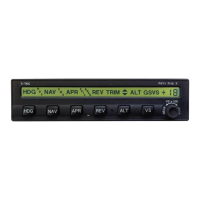
and ALT annunciations will appear as shown in Fig. 3-17.
Once the following conditions have existed simultaneously for a period of ten
seconds, the GS annunciation will appear to acknowledge that the glideslope
mode has automatically armed, as shown in Fig. 3-18:
1. NAV APR mode engaged
2. ALT mode engaged
3. NAV Flag out of view
4. GS Flag out of view
5. LOC frequency selected
6. A/C within 50% CDI needle deflection of LOC centerline
7. A/C more than 60% Glideslope Deviation Indication (GDI) needle deflection
below GS centerline
If the last condition cannot be met because the aircraft is too near the GS
centerline, then manual arming of the glideslope mode can be instantly
achieved by pressing the ALT mode selector switch.
The armed glideslope mode can be subsequently disabled by pressing the
APR mode selector switch. The GS annunciation will flash to acknowledge this.
To then re-arm the glideslope mode, press the APR mode selector switch again.
The GS annunciation will immediately extinguish, but re-appear after ten
seconds.
With the glideslope mode armed, once the aircraft arrives at 5% GDI needle
deflection below the GS centerline, the ALT annunciation will extinguish to
indicate engagement of the glideslope mode, as shown in Fig. 3-19.


 To Next Page