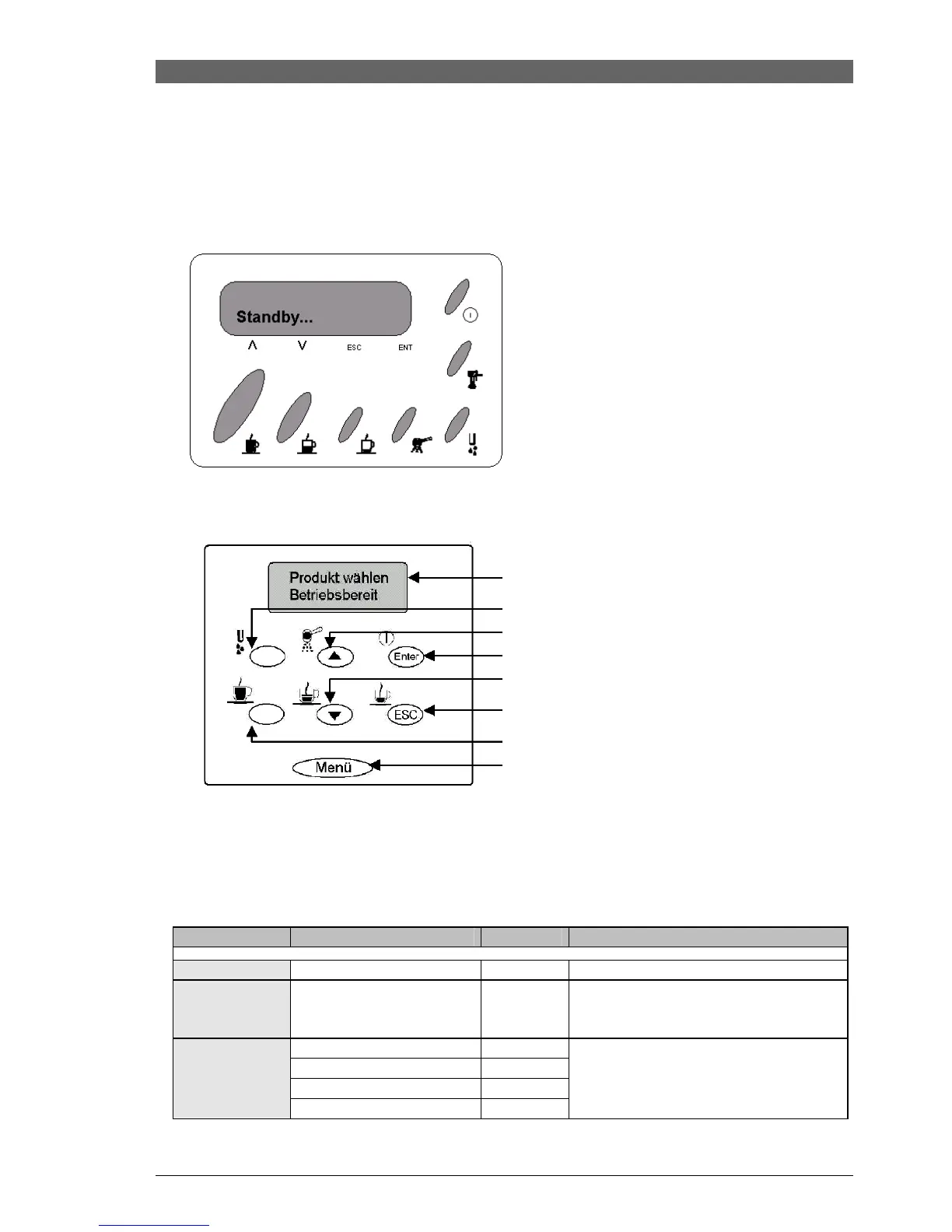
ROYAL 3. OPERATION
Saeco International Group REV.4 SEPT.2003 Page 15/25
4.2. User programme (Royal
Professional Rapid Steam / Coffeebar / Digital Plus)
The table below indicates the various values, settings and programmes which can be read and selected
through the user programme options.
Various cleaning programmes can also be activated.
Access: Access is via the ENTER button.
Access (Digital+): Selection entry via menu button.
Menu procedure:
1. Select desired programme using the cursor buttons (arrow buttons).
2. Access appropriate item using the ENTER button.
3. Use the arrow buttons to handle each item.
4. Confirm with the ENTER button.
Item
Setting/Indicator
Standard
Function
Language
German
Select display language.
Rinse
ON/OFF
OFF
Rinses residual water through pipes
each time machine turned on
(only when machine is cold).
1 – 500 l
3
2 – 300 l
3 – 150 l
Water hardness
4 – 80 l
Change in coffee quantity until
descaling required (1-4).
- Digital display/indicator
- Hot water
- Pre-selection powder compartment
or scroll in menu and change value
- Standby or save value
- Coffee or scroll in menu and change value







 To Next Page