5. SERVICE PROGRAMME ROYAL
Page 6/24 REV.4 SEPT.2003 Saeco International Group
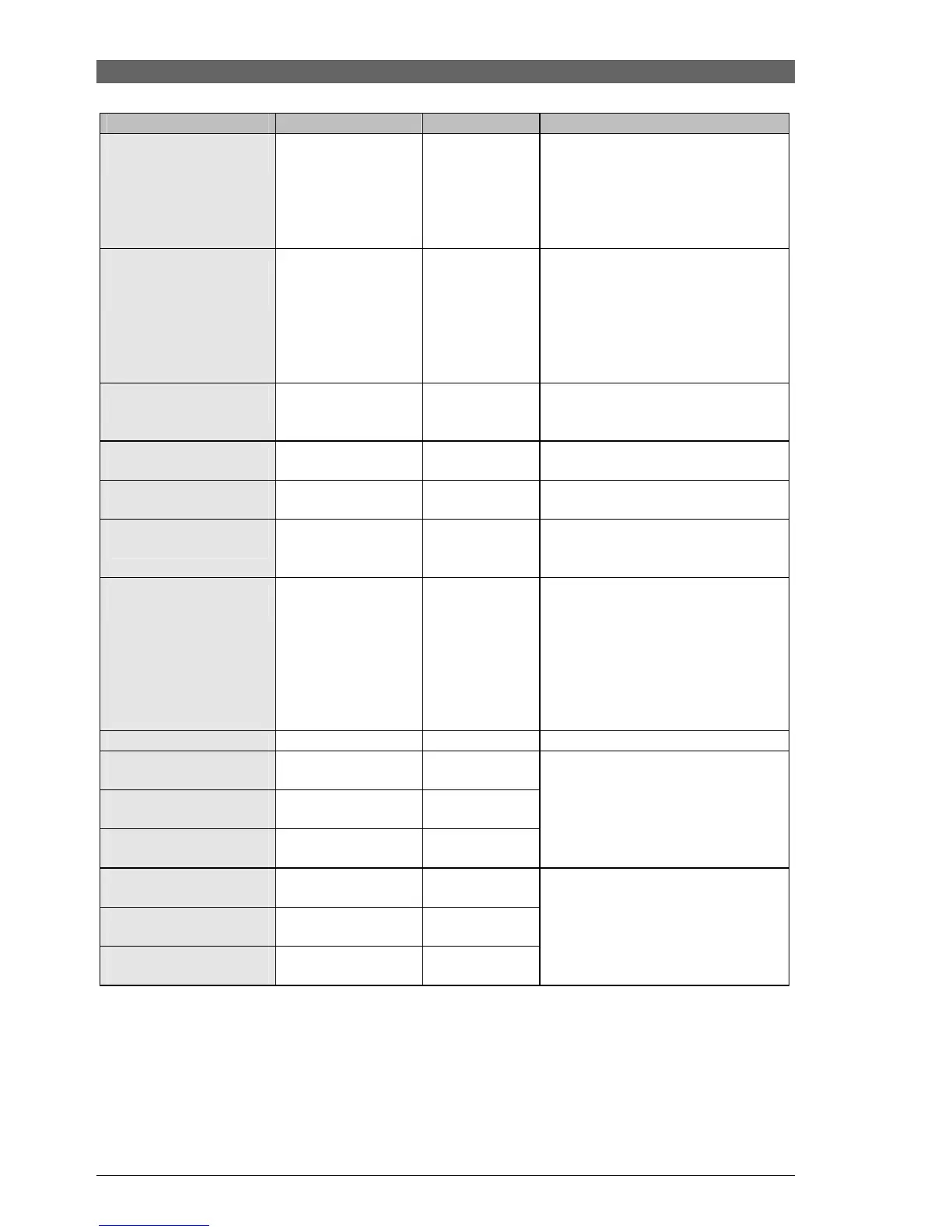
Function
Setting range
Increment
Comments
TEMP. INCREASE
°C 10
0-50°C +/-1 The boiler temperature is increased
by a set value shortly before
brewing in order to pre-heat the
boiler. and compensate for the
temperature drop during the first
water flow.
GRINDS COUNTER
Number
0-50 +/-1 Counts number of coffee cycles.
When this value reaches the
Grinds Stop value, "GRINDS
CONTAINER EMPTY" will be
displayed. (Reset by removing
dregs drawer for emptying - min. 6
sec.)
GRINDS STOP
30
5-50 +/-1 Number of cycles until "EMPTY
GRINDS CONTAINER" is
displayed.
--TOTAL WATER--
(ml) Number
--------------------- ------------------
-----
Total water flow volume (in ml) /
not resettable
WATER DESCALING
(ml)
--------------------- ------------------
-----
Total water flow (in ml) since last
descaling / resettable
HOT WATER
FLOW (l/h) 20
6 - 34 1/h
+/- 2 1/h The pump delivery rate for hot
water can be expressed in litres per
hour.
--HOT WATER---
PUMP ADJUST. 63000
58,000 - 65,500 +/- 1 The pump delivery rate is adjusted
in relation to the HOT WATER
FLOW setting by means of a phase
controlled modulator. Pump
tolerances can thus also be
adjusted. An equivalent value is
saved under HOT WATER PUMP
ADJUSTMENT.
MACHINE STATUS
0 - 255
36
--DATE OF MANUF---
DAY
--------------------- ------------------
-----
--DATE OF MANUF---
MONTH
--------------------- ------------------
-----
--DATE OF MANUF---
YEAR
--------------------- ------------------
-----
This date indicates when the
machine was manufactured. This
date cannot be changed.
--SERVICE DATE--
DAY
0 - 31 +/- 1
--SERVICE DATE--
MONTH
0 - 12 +/- 1
--SERVICE DATE--
YEAR
1996 - 2050 +/- 1
The service date indicates the date
of the machine's last service. This
date can be changed and must be
updated at each service.
Exit: Switch the machine off at the main switch or by pressing ESC twice.







 To Next Page