DOCUMENT SSE-0000077399-01 - VERSION 1.0 - MAY 2010 31
S
AGEM SÉCURITÉ DOCUMENT - REPRODUCTION AND DISCLOSURE PROHIBITED
MORPHOACCESS® J SERIES – User Guide Access control presentation
STAND ALONE MODES
(
NETWORKED OR NOT)
STAND ALONE MODES
(
NETWORKED OR NOT)
S
TAND ALONE MODES
(
NETWORKED OR NOT)
S
TAND ALONE MODES
(
NETWORKED OR NOT)
S
TAND ALONE MODES
(
NETWORKED OR NOT)
S
TAND ALONE MODES
(
NETWORKED OR NOT)
3. Access control presentation
Typical access control system
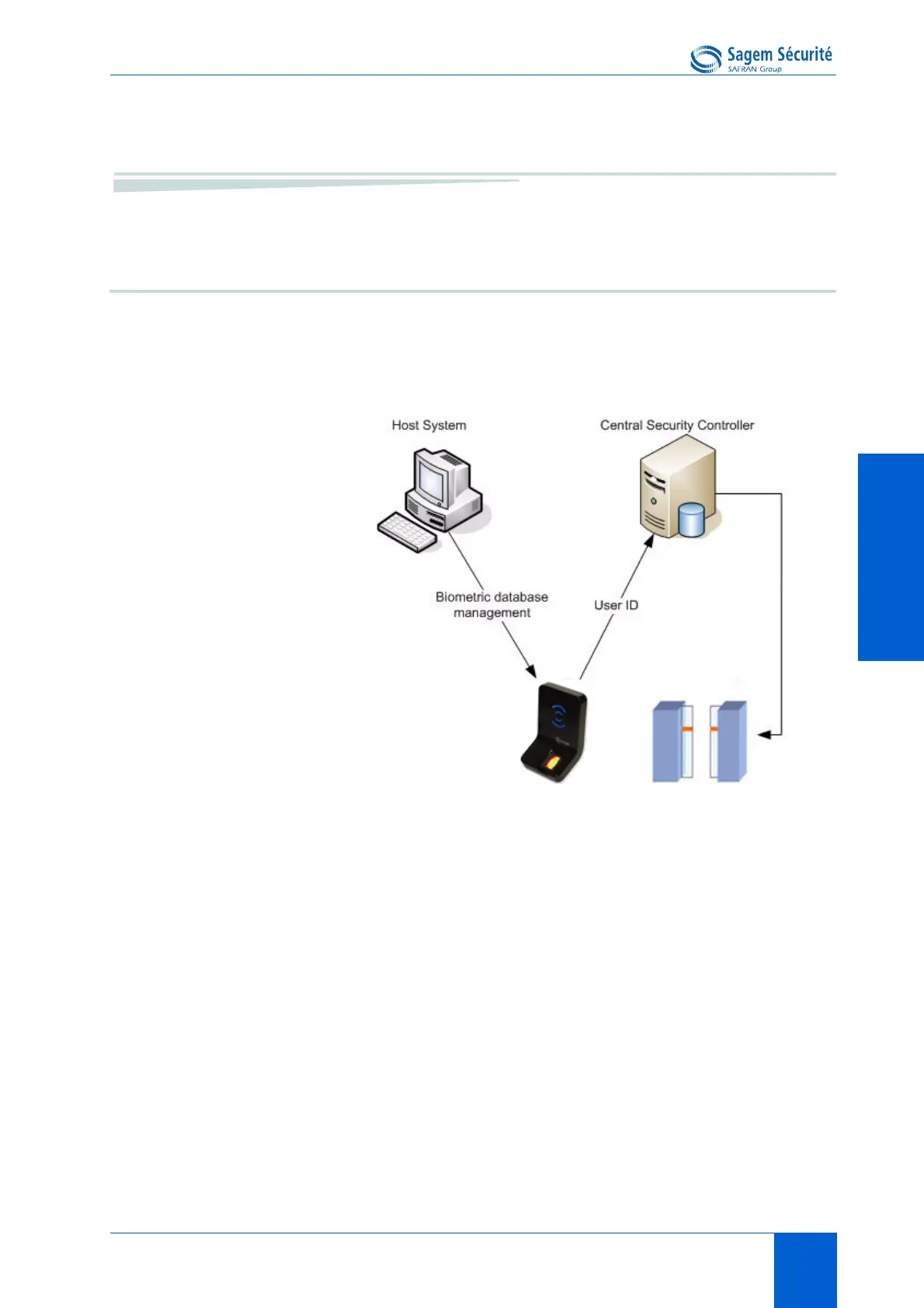
Typical architecture includes, at least one MorphoAccess
®
, a Host System (for
enrolment) and a Central Security Controller (for area access final check, and
physical access command).
Figure 4 • 3:Typical access control system architecture
MorphoAccess
®
J Series biometric database management
The management of the MorphoAccess
®
internal biometric database can be
done remotely by a Host System (typically a PC with MEMS
TM
application).
MorphoAccess
®
operating mode
The MorphoAccess
®
works according two exclusive operating modes.
• In Stand Alone Mode, the biometric database can be managed by a Host
System and downloaded to the MorphoAccess
®
.
• In Proxy Mode, the terminal is remotely operated by a host system
application that sends individual commands to the MorphoAccess
®
.
MorphoAccess
®
access control result sending
When the biometric identification is positive, the person ID can be sent to a
Central Security Controller, for further action such as opening doors.


 To Next Page