44
2.2.2 Setting the Date and Time
Set the built-in clock of the instrument to the current date/time.
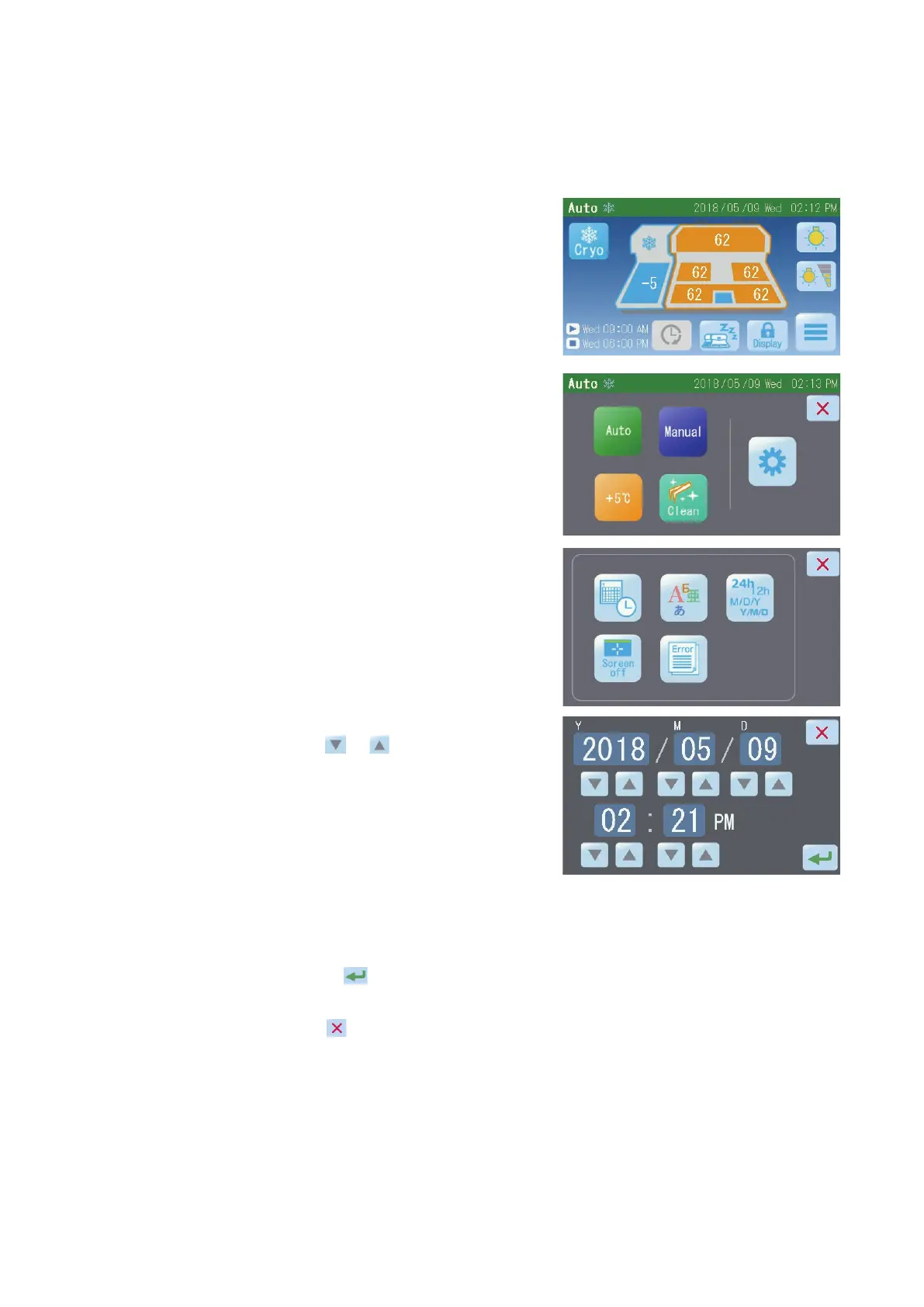
1. Touch the "Main Menu" button [1] on
the Operation screen.
2. Touch the "Maintenance" button [2]
on the Main Menu screen.
3. Touch the "Date & Time Settings"
button [3] on the Maintenance Menu
screen.
4. On the Date & Time Settings screen,
touch the "
"/" " buttons to set
the current date/time.
At the top, the Y eld indicates “year,”
M eld indicates “month, and D eld
indicates “day.”
At the bottom, “hours” and “minutes”
are displayed.
If the 12-hour display mode is set,
AM or PM is displayed.
Touching the "
" button saves the setting, after which the display returns
to the Maintenance Menu screen.
Touch the "
" button, and the display will return to the Maintenance
Menu screen without the setting being saved.
NOTE:
Refer to 3.2.1 Various Settings for information on how to change
the display order of YMD or the 12/24-hour display format.
[1]
[2]
[3]


 To Next Page