Getting
Started
Remote Control
Tour of the Remote Control
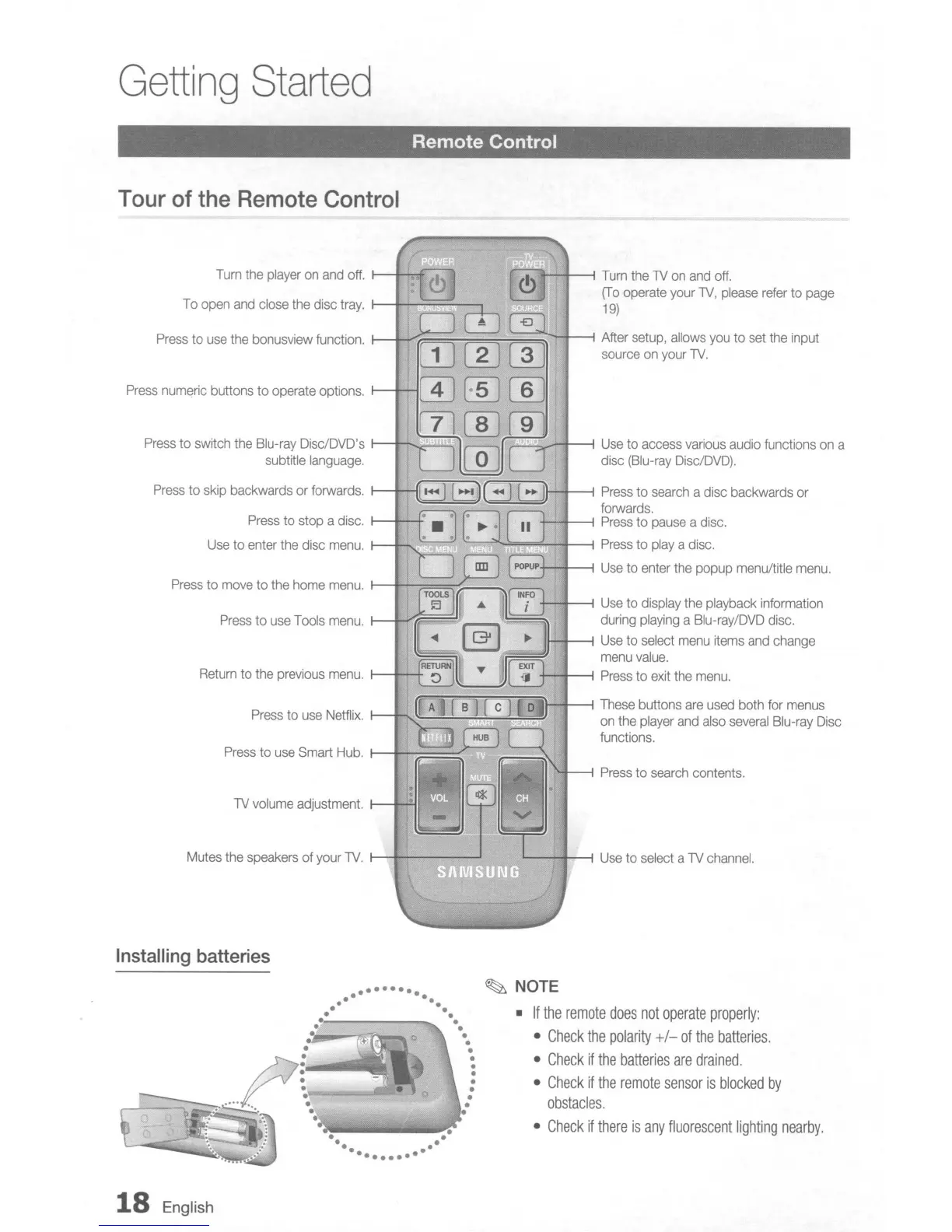
Press
to
search
contents.
I--f----i
Turn
the N
on
and
off.
(To
operate your
N,
please
refer
to
page
19)
,---",.--r--"""1
Use
to access
various
audio functions
on
a
disc
(Blu-ray
Disc/DVD).
Press
to
use
Tools
menu.
1-+~==:fH
Press
to
stop a disc.
1-+-+
Use
to enter
the
disc
menu
.
.----.-
......
+--1--;
Use
to display the playback information
during
playing
a Blu-ray/DVD disc.
11-1--1
Use
to select
menu
items
and
change
==~
menu
value.
Return
to the previous
menu.
t---t--+
+-+--1
Press
to
exit
the
menu.
'---==----,
'"--~'
'----'
N
volume
adjustment.
1--~'11
Turn
the
player
on
and
off.
I--t-'><:f
To
open
and
close
the disc
tray.
I--+-"""':::::'::;:=-:---.
(f";~G~~=nfn'1i)..-+--1
These
buttons
are
used
both for
menus
Press
to
use
Netflix.
r---r,
...
--'
......
---~-~='
on
the
player
and
also
several
Blu-ray
Disc
functions.
Press
to
use
Smart
Hub.
1---r1F=~
Mutes the speakers of your
N.
I-r-:-E~immrB
L..----il---l
Use
to select a N
channel.
Press
to
move
to
the
home
menu.
I--rt===::=;-;:::--,r=,
Press
to
use
the bonusview function.
1--+-....;;;;;;;;;;;;;;....;;;;;;;;;;;....,,;;;;;;;;;~-t----1
After
setup,
allows
you
to
set
the input
source
on
your
N.
Press
to skip backwards or forwards.
1--+-fI;;TT:;;~(~if;:;)I--J---i
Press
to
search
a disc backwards
or
forwards.
+-
.........
-1
Press
to
pause
a disc.
~-"':==~-f---1
Press
to playa disc.
+--1--;
Use
to enter
the
popup menu/title
menu.
Press
to switch the Blu-ray Disc/DVD's
r---r-
........
-~
subtitle
language.
Press
numeric buttons to operate options.
1--+--1
Installing
batteries
..........
..
-
-.
• ••
• •
•
•
• •
• •
r
i
:
• •
• •
•
•
• •
....
"..
.
. .
"'--_:....
·,~
•••••
I .
-.
.-
-.
.-
••••••••
~
NOTE
•
If
the
remote
does
not
operate
properly:
•
Check
the
polarity
+/-
of
the
batteries.
•
Check
if
the
batteries
are
drained.
•
Check
if
the
remote
sensor
is
blocked
by
obstacles
.
•
Check
if
there
is
any
fluorescent
lighting
nearby.
18
English











 To Next Page