EasyManua.ls Logo

Samsung BD-D5500 - Wireless Network

Samsung BD-D5500
91 pages
Print Icon
To Next Page IconTo Next Page
To Previous Page IconTo Previous Page
Loading...
Wireless
Network
You
can
connect to network
with
a
Wireless
IP
sharer
(a
router
or
a
modem).
1. A
wireless
AP/IP
router
and
the
Samsung
Wireless
LAN
Adapter
is
required
to
make
a
wireless
network connection. Connect
the
Wireless
LAN
adapter
(not
included)
to
the
Wireless
LAN
Adapter
jack
on
the
rear
panel
of
the
player.
See
the
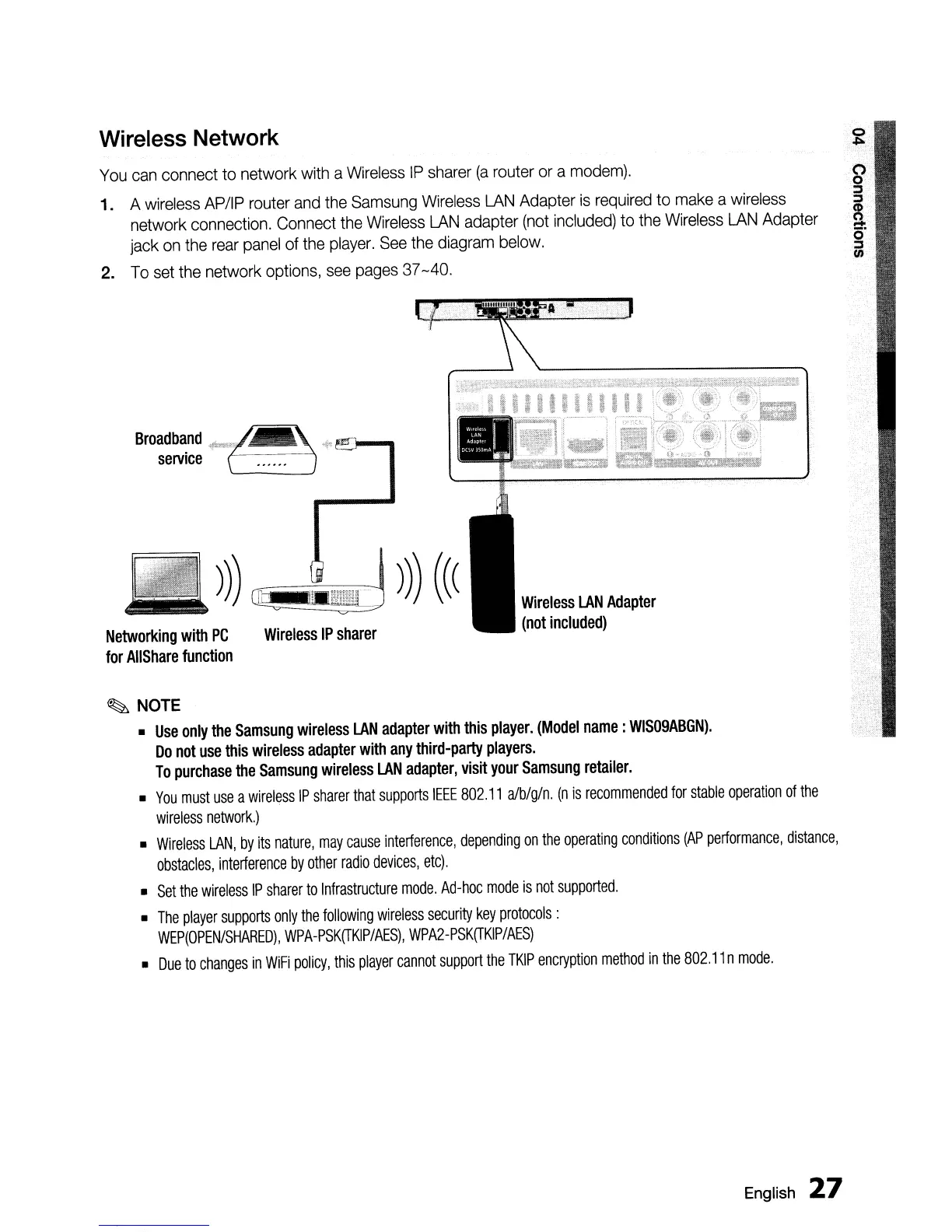
diagram
below.
2.
To
set
the
network
options,
see
pages
37
-40.
Wireless
LAN
Adapter
(not
included)
Wireless
IP
sharer
~
NOTE
•
Use
only
the
Samsung
wireless
LAN
adapter
with
this
player.
(Model
name:
WIS09ABGN).
Do
not
use
this
wireless
adapter
with
any
third-party
players.
To
purchase
the
Samsung
wireless
LAN
adapter,
visit
your
Samsung
retailer.
•
You
must
use
a
wireless
IP
sharer
that
supports
IEEE
802.11
alb/g/n.
(n
is
recommended
for
stable
operation
of
the
wireless
network.)
•
Wireless
LAN,
by
its
nature,
may
cause
interference,
depending
on
the
operating
conditions
(AP
performance,
distance,
obstacles,
interference
by
other
radio
devices,
etc).
•
Set
the
wireless
IP
sharer
to
Infrastructure
mode.
Ad-hoc
mode
is
not
supported.
•
The
player
supports
only
the
follOWing
wireless
security
key
protocols:
WEP(OPEN/SHARED),
WPA-PSK(TKIP/AES),
WPA2-PSK(TKIP/AES)
•
Due
to
changes
in
WiFi
policy,
this
player
cannot
support
the
TKIP
encryption
method
in
the
802.11
n
mode.
Networking
with
PC
for
AIIShare
function
English
27

Table of Contents