EasyManua.ls Logo

Samsung BD-D5500 - Basic Functions; Playing Video and Using Menus

Samsung BD-D5500
91 pages
Print Icon
To Next Page IconTo Next Page
To Previous Page IconTo Previous Page
Loading...
Basic
Functions
)
Using the Disc MenulTitle Menu!
Popup Menu
--folder
(group)
1-1-
folder
(group)
2
...
file
1 +
file
2
....
file
1 +
file
2
·1
...
file
3
MP3,
WMA,
DivX,
MKV
and
MP4
...
track
1 +
track
2 +
track
3 +
track
4
·1
...
track
5
-
title
1 -1-
title
2 -
...
chapter
1+
chapter
2
...
chapter
1+
chapter
2
·I
...
chapter
3
Audio
CD
(CD-DA)
----_._---------_._----~
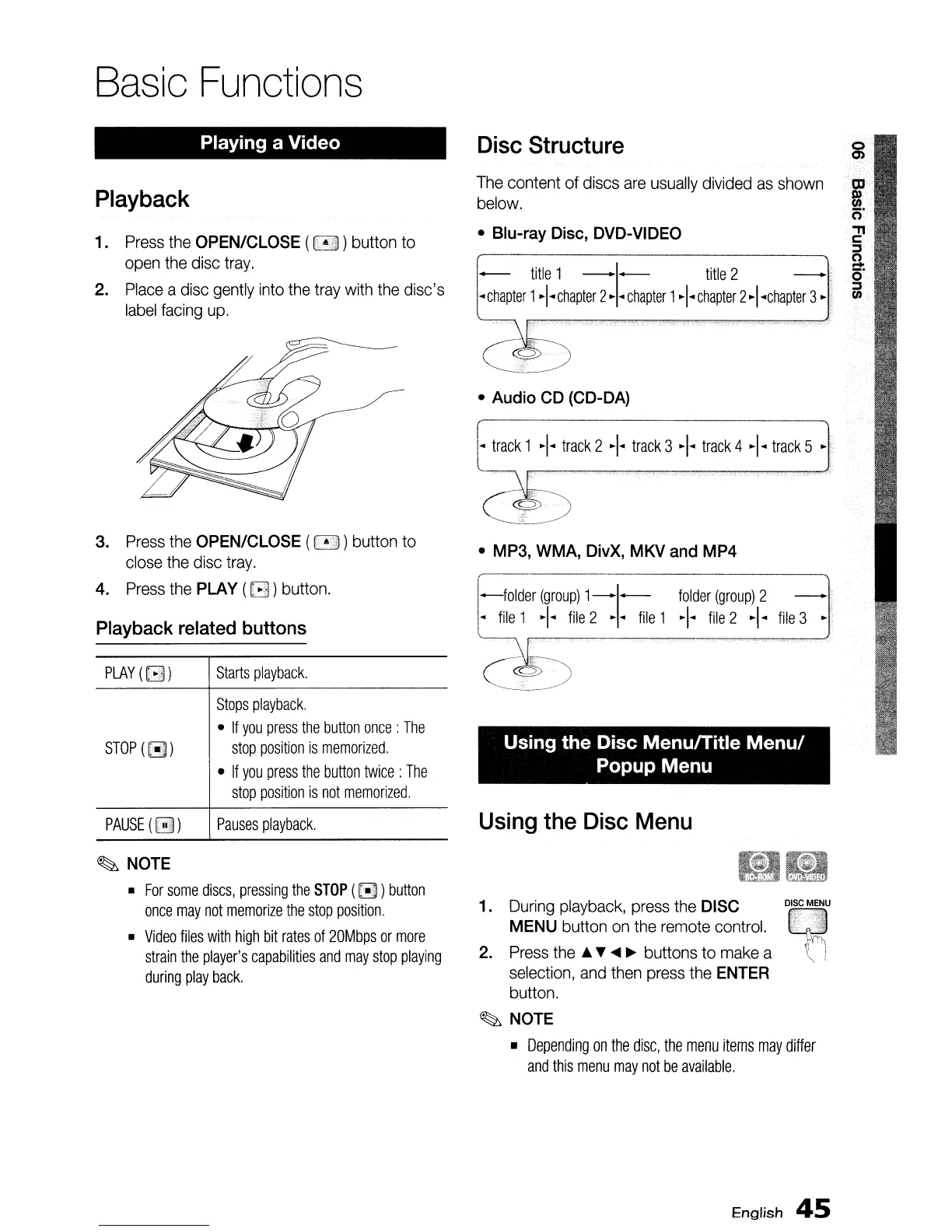
Disc
Structure
The
content of discs
are
usually
divided
as
shown
below.
Blu-ray
Disc,
DVD-VIDEO
~-------_._---------~
Starts
playback.
Stops
playback.
If
you
press
the
button
once:
The
stop
position
is
memorized.
If
you
press
the
button
twice:
The
stop
position
is
not
memorized.
STOP
(~)
PLAY
([3)
Playing a Video
3.
Press
the
OPEN/CLOSE ( ) button to
close
the
disc
tray.
4.
Press
the
PLAY
([3)
button.
Playback
related
buttons
Playback
1.
Press
the
OPEN/CLOSE (
~
) button to
open
the
disc
tray.
2.
Place
a
disc
gently
into
the
tray
with
the
disc's
label
facing
up.
PAUSE
([ill))
Pauses
playback.
Using
the
Disc
Menu
~
NOTE
For
some
discs,
pressing
the
STOP
(~
)
button
once
may
not
memorize
the
stop
position.
Video
files
with
high
bit
rates
of
20Mbps
or
more
strain
the
player'S
capabilities
and
may
stop
playing
during
play
back.
1.
During
playback,
press
the
DISC
MENU
button
on
the
remote
control.
2.
Press
the
..
~
....
~
buttons to
make
a
selection,
and
then
press
the
ENTER
button.
~
NOTE
Depending
on
the
disc,
the
menu
items
may
differ
and
this
menu
may
not
be
available.
English
45

Table of Contents

Other manuals for Samsung BD-D5500

Related product manuals