EasyManua.ls Logo

Samsung BD-D5500 - Network Status; SO-LIVE Internet Connection

Samsung BD-D5500
91 pages
Print Icon
To Next Page IconTo Next Page
To Previous Page IconTo Previous Page
Loading...
Setup
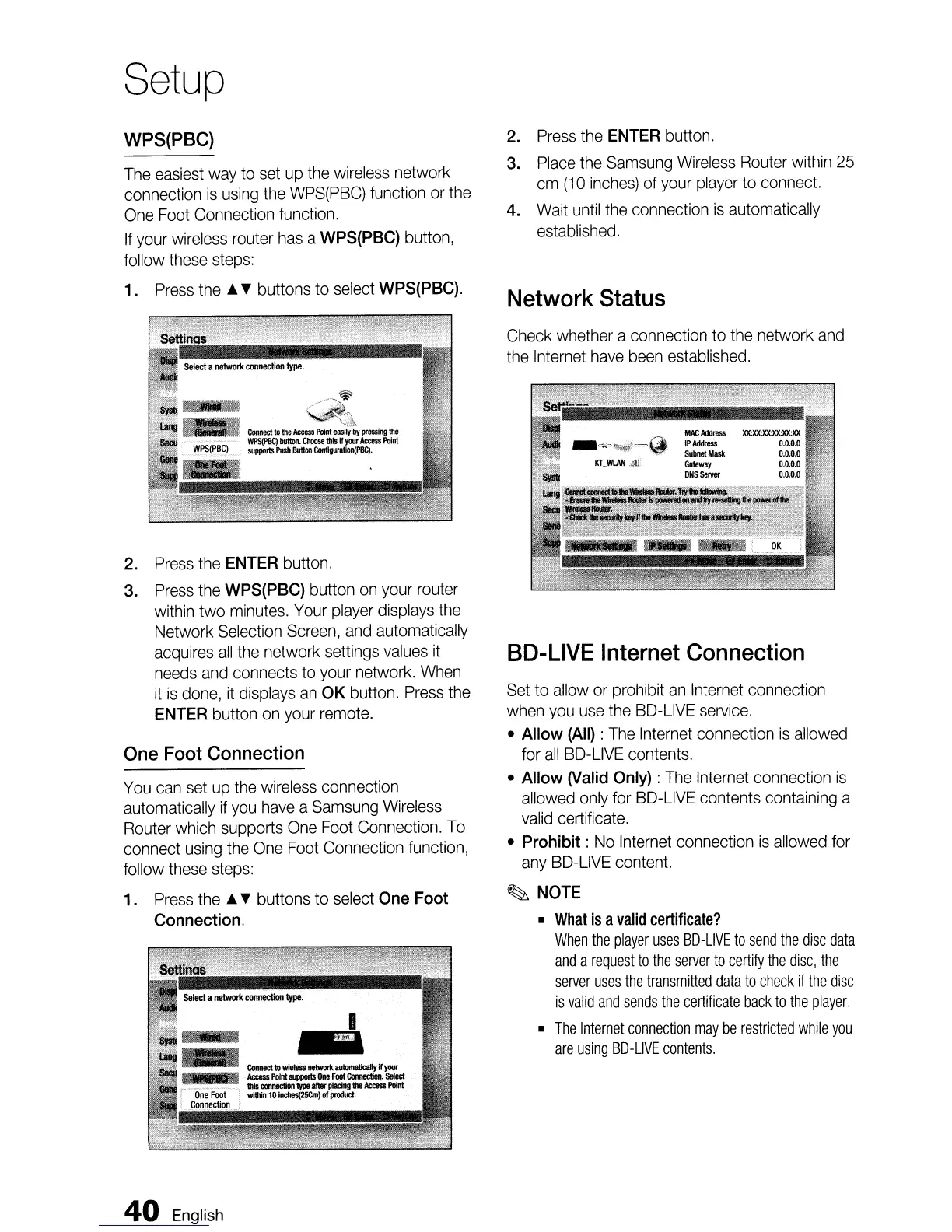
WPS(PBC)
The
easiest
way
to
set
up
the
wireless
network
connection
is
using
the
WPS(PBC)
function
or
the
One
Foot
Connection function.
If
your
wireless
router
has
a
WPS(PBC)
button,
follow
these
steps:
1.
Press
the
~
buttons
to
select
WPS(PBC).
2.
Press
the
ENTER
button.
3.
Press
the
WPS(PBC)
button
on
your
router
within
two
minutes.
Your
player
displays
the
Network
Selection
Screen,
and
automatically
acquires
all
the
network settings
values
it
needs
and
connects
to
your
network.
When
it
is
done,
it
displays
an
OK
button.
Press
the
ENTER
button
on
your
remote.
One
Foot
Connection
You
can
set
up
the
wireless
connection
automatically
if
you
have
a
Samsung
Wireless
Router
which
supports
One
Foot
Connection.
To
connect
using
the
One
Foot
Connection function,
follow
these
steps:
1.
Press
the
~
buttons to select
One
Foot
Connection.
40
English
2.
Press
the
ENTER
button.
3.
Place
the
Samsung
Wireless
Router
within
25
cm
(10
inches)
of
your
player
to
connect.
4.
Wait
until
the
connection
is
automatically
established.
Network
Status
Check whether a connection to
the
network
and
the
Internet
have
been
established.
SO-LIVE
Internet
Connection
Set
to
allow
or
prohibit
an
Internet
connection
when
you
use
the
SO-LIVE
service.
Allow
(All)
:
The
Internet
connection
is
allowed
for
all
SO-LIVE
contents.
Allow
(Valid
Only)
:
The
Internet
connection
is
allowed
only
for
SO-LIVE
contents containing a
valid
certificate.
Prohibit:
No
Internet
connection
is
allowed
for
any
BO-L1VE
content.
~
NOTE
What
is
a
valid
certificate?
When
the
player
uses
SO-LIVE
to
send
the
disc
data
and
a
request
to
the
server
to
certify
the
disc,
the
server
uses
the
transmitted
data
to
check
if
the
disc
is
valid
and
sends
the
certificate
back
to
the
player.
The
Internet
connection
may
be
restricted
while
you
are
using
SO-LIVE
contents.

Table of Contents

Other manuals for Samsung BD-D5500

Related product manuals