o
1.
Connecting to a TV with DVI Cable
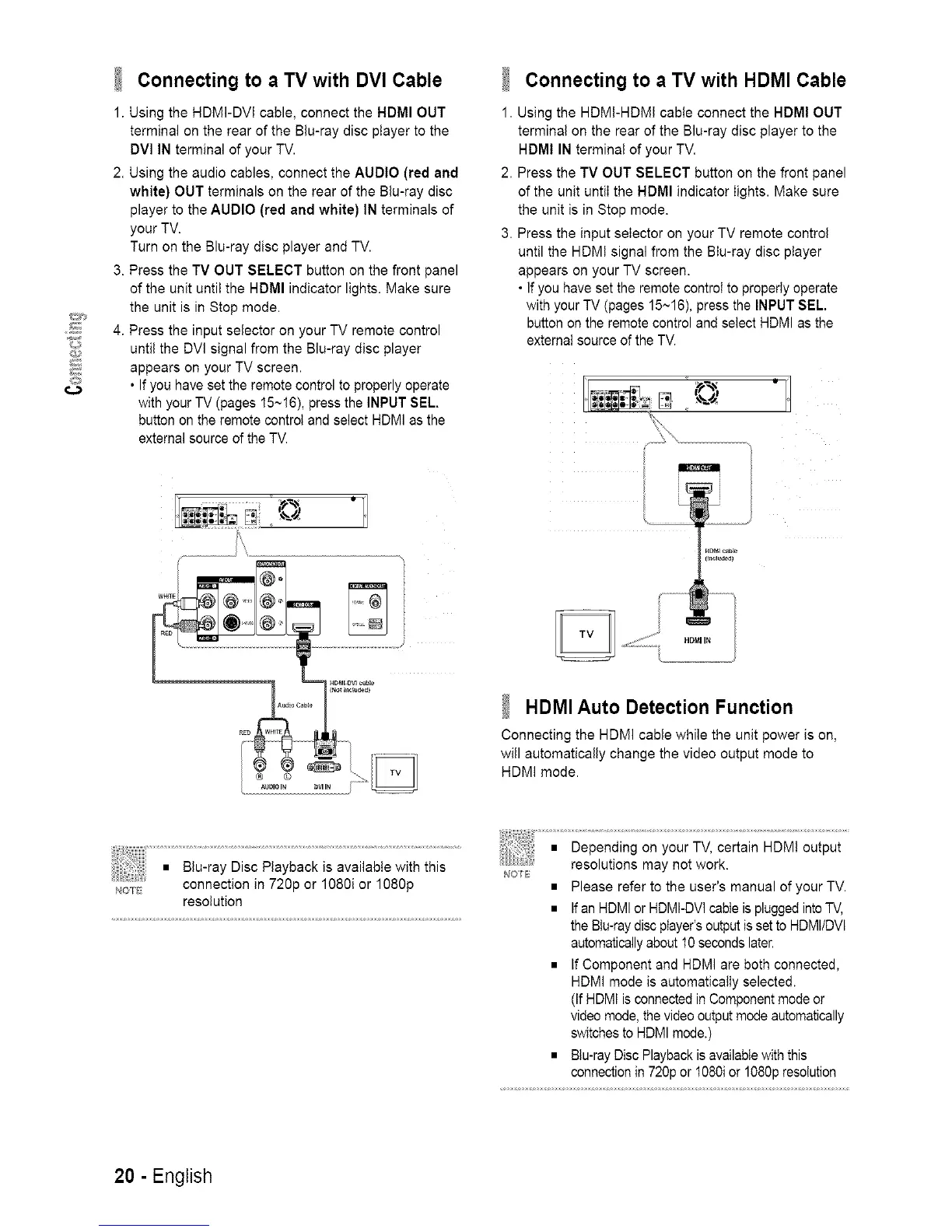
Using the HDMI-DVI cable, connect the HDMI OUT
terminal on the rear of the Blu-ray disc player to the
DVl IN terminal of your TV.
2. Using the audio cables, connect the AUDIO (red and
white) OUT terminals on the rear of the Blu-ray disc
player to the AUDIO (red and white) IN terminals of
your TV.
Turn on the Blu-ray disc player and TV.
3. Press the TV OUT SELECT button on the front panel
of the unit until the HDMI indicator lights. Make sure
the unit is in Stop mode.
4. Press the input selector on your TV remote control
until the DVI signal from the Blu-ray disc player
appears on your TV screen.
• If you have set the remote control to properly operate
with your TV (pages 15~16), press the INPUT SEL.
button on the remote control and select HDMI as the
external source of the TV.
i
Connecting to a TV with HDMI Cable
1. Using the HDMI-HDMI cabte connect the HDMI OUT
terminal on the rear of the Blu-ray disc player to the
HDMI IN terminal of your TV.
2. Press the TV OUT SELECT button on the front panel
of the unit untiI the HDMI indicator lights. Make sure
the unit is in Stop mode.
3. Press the input selector on your TV remote control
until the HDM! signal from the BIu-ray disc player
appears on your TV screen.
• If you have set the remote control to properly operate
with your TV (pages 15~16), press the INPUT SEL.
button on the remote control and select HDMI as the
extemaI source of the TV.
HOM_c_h_e
J..............
HDMI Auto Detection Function
Connecting the HDMI cable while the unit power is on,
will automatically change the video output mode to
HDM] mode.
NOTE
connection in 720p or 1080i or 1080p
resolution
• Please refer to the user's manual of your TV.
• If an HDMI or HDMI-DVI cable is plugged into TV,
the Btu-ray disc player's output is set to HDMIIDVl
automatically about 10 seconds later.
• If Component and HDMI are both connected,
HDMI mode is automatically selected.
(If HDMI is connected in Component mode or
video mode, the video output mode automatically
switches to HDMI mode.)
• BIu-ray Disc Playback is available with this
connection in 720p or I080i or 1080p resolution
20 - English














 To Next Page